infinitered / infinitered/reactotron
OpenInEditor not working
- Dominant language
- TypeScript
- Stars
- 15.6k
- Forks
- 972
- PR merge metrics
- No merged PRs in 30d
Description
Hi, I looked [here](https://github.com/infinitered/reactotron/issues/1104) but I don't understand what am I missing? When I click the stack trace an error (console.error("test error")), the cursor isn't going to the line. It is sending a request to http://localhost:8081/open-stack-trace and then this is appearing on the terminal two times:
```
[Unhandled promise rejection: TypeError: Network request failed]
at node_modules\whatwg-fetch\dist\fetch.umd.js:535:17 in setTimeout$argument_0
at node_modules\react-native\Libraries\Core\Timers\JSTimers.js:123:14 in _callTimer
at node_modules\react-native\Libraries\Core\Timers\JSTimers.js:379:16 in callTimers
at node_modules\react-native\Libraries\BatchedBridge\MessageQueue.js:414:4 in __callFunction
at node_modules\react-native\Libraries\BatchedBridge\MessageQueue.js:113:6 in __guard$argument_0
at node_modules\react-native\Libraries\BatchedBridge\MessageQueue.js:365:10 in __guard
at node_modules\react-native\Libraries\BatchedBridge\MessageQueue.js:112:4 in callFunctionReturnFlushedQueue
```
The request's context:
# Request
### Endpoint
`POST` http://localhost:8081/open-stack-frame
### Duration
`56` ms
### Data Sent
```json
{
"file": "C:\\react native uygulamaları\\test2\\ReactotronConfig.js",
"lineNumber": 16
}
```
### Headers
key | value
------------ | ------------------------
content-type | text/plain;charset=UTF-8
# Response
### Data Received
```json
skipped
```
ReactotronConfig.js:
```
import Reactotron, {openInEditor} from "reactotron-react-native"
Reactotron.configure({
name: "Reactotron In Expo demo",
})
.useReactNative({
networking: {
//ignoreUrls: /symbolicate|127.0.0.1/,
},
})
.configure({ host: "192.168.1.36", port: 9999 })
.use(openInEditor()) // <--- here we go!
.connect()
.clear()
console.error("config console error")
Reactotron.error("config Reactotron error")
```
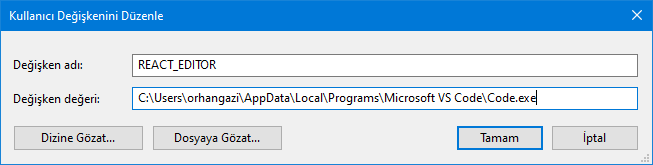
Here User Environment Variable:
Here User Environment Path:
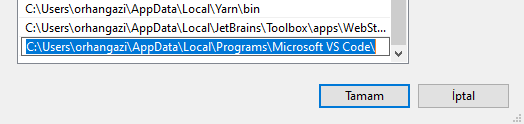
I did the same things with System Environment Variable and System Environment Path.
FYI: I can open react editor with write %REACT_EDITOR% in run but not REACT_EDITOR.
package.json
```
{
"name": "test2",
"version": "1.0.0",
"main": "node_modules/expo/AppEntry.js",
"scripts": {
"start": "expo start",
"android": "expo start --android",
"ios": "expo start --ios",
"web": "expo start --web",
"eject": "expo eject"
},
"dependencies": {
"expo": "~44.0.0",
"expo-status-bar": "~1.2.0",
"react": "17.0.1",
"react-dom": "17.0.1",
"react-native": "0.64.3",
"react-native-reanimated": "^2.8.0",
"react-native-web": "0.17.1",
"reactotron-react-native": "^5.0.1"
},
"devDependencies": {
"@babel/core": "^7.12.9"
},
"private": true
}
```
I am looking to the list, I see when click stack trace error it sending request localhost:8081 but other requests going to the 192.168.1.36. Is this a cause? But they are same thing? Is isn't? Because I am opening http:localhost and opening http:192.168.1.36 same page. Am I wrong? And 8081 port is true? I am using port 9999 to connect to the application on my expo react native app.

Hi again, I find the solution but not opening still. I touch a stack error line on the expo mobile and it send same (not same hostname and port) url send same variable and then It is working. So change the use(openInEditor()) to use(openInEditor({url:"http://192.168.1.36:19000"})) and then click stack error line on the reactotron it is working correctly.
But unfortunately it did not open. Because visual studio code saying: "error Could not open App.js in the editor.
info When running on Windows, file names are checked against a whitelist to protect against remote code execution attacks. File names may consist only of alphanumeric characters (all languages), periods, dashes, at signs, slashes, and underscores."
**So I will never be able to use the openInEditor feature on windows?**
Contributor guide
Research direction
Start by tracing the openInEditor() entry point and the POST /open-stack-frame request, using the reported Windows and VS Code behavior as the reproduction case. Check how the configured editor URL and file path are handled; done means clicking a React Native stack frame opens the referenced file and line successfully on Windows.
Written by the indexing model from the issue text.
Assessment
- Tech stack
- react-native, typescript, vscode
- Domain
- desktop, devtools, tooling
- Issue type
- Bug
- Difficulty
- 4/5
- Estimated time
- 3-5 days
- Activity status
- Stale
- Clarity
- Mostly clear
- Newbie friendliness
- 35/100