Should the current active window has its header bar's color changed by default?
- Dominant language
- Python
- Stars
- 3.2k
- Forks
- 245
- Avg merge
- 13m
- Merged PRs (30d)
- 5
Description
Currently, only the title changes color. In the image below, it's hard to tell right away that the `Variables` window is active. Other tools don't have this problem because they always have a blinking cursor on the screen.

If we change the color of the whole header, it's much easier.
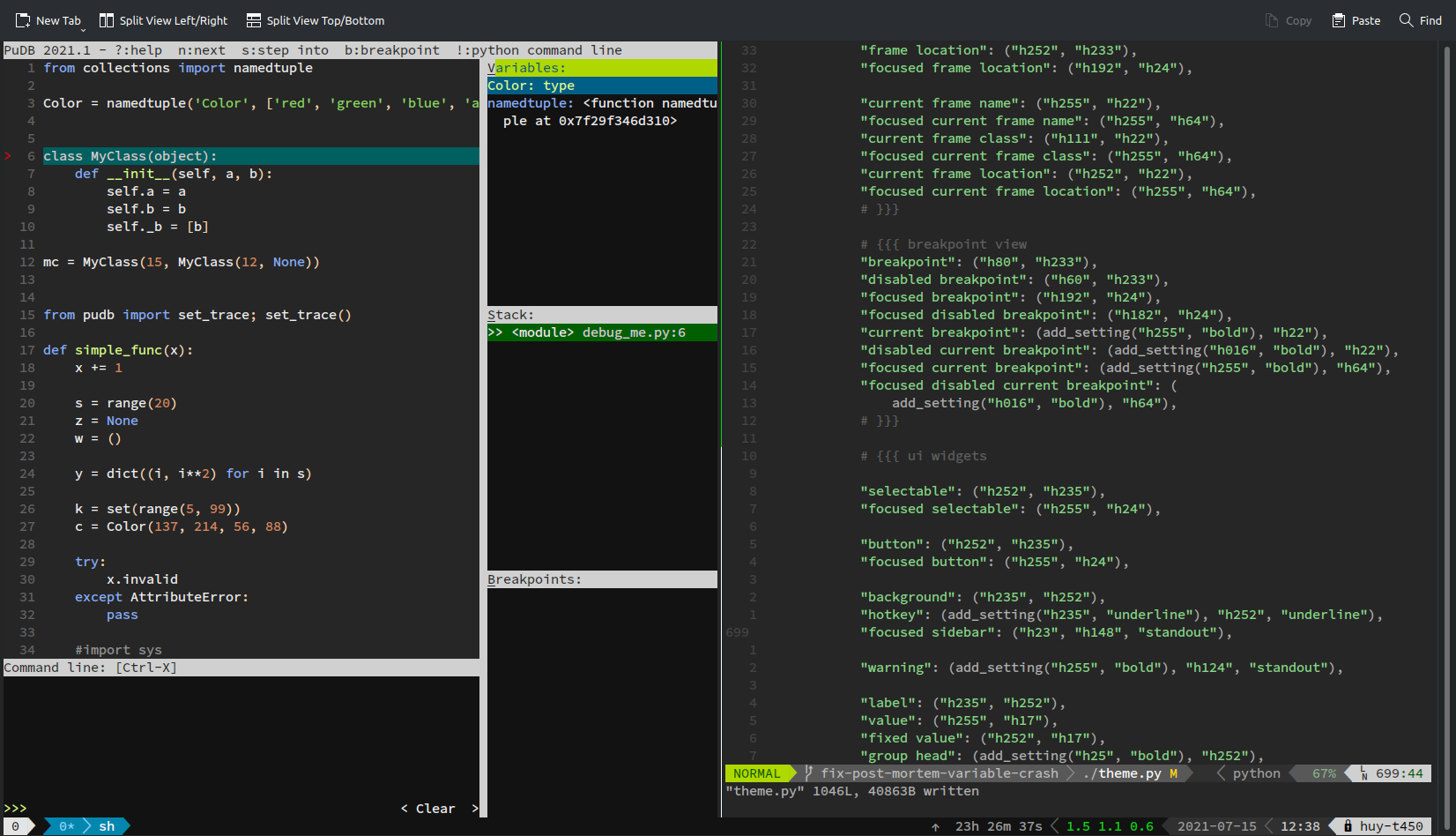
Of course the user can do it themselves by creating custom theme and modify the `focused_sidebar` element but I think this is asking too much.
Contributor guide
No contributing guide indexed for this repository
Research direction
Start with the Variables window and the theme's `focused_sidebar` element mentioned in the issue, then trace how the active header is rendered. Compare the existing title-only change with the screenshots and determine where the default focused-header color is configured. Done means the active window's whole header is visibly distinguished by default without requiring a custom theme.
Written by the indexing model from the issue text.
Assessment
- Tech stack
- python
- Domain
- cli, devtools
- Issue type
- Feature
- Difficulty
- 3/5
- Estimated time
- 1-2 days
- Activity status
- Stale
- Clarity
- Mostly clear
- Newbie friendliness
- 35/100