UI improvements
- Dominant language
- Python
- Stars
- 3.2k
- Forks
- 245
- Avg merge
- 13m
- Merged PRs (30d)
- 5
Description
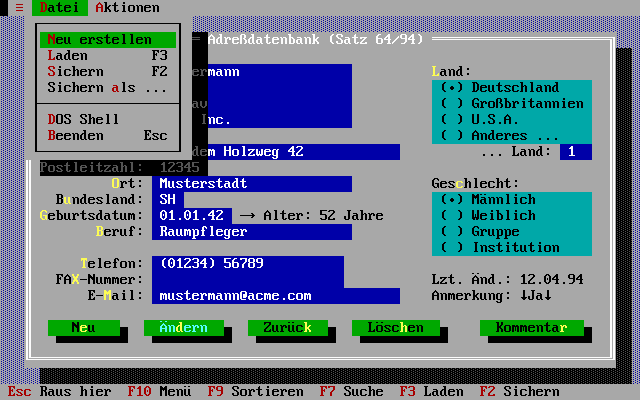
I like PuDB since it runs in a terminal itself. I noticed that one of the inspirations was a DOS-based Turbo Pascal, which I used to use a lot. Its text user interface (TUI), called Turbo Vision, was excellent. Compared to it, all TUI that we have on linux feel unpolished, hard to navigate, bad mouse support etc. To understand what I mean, compare the look of the old Turbo Vision (you can find more screenshots e.g. of Turbo Pascal IDE itself [here](http://yvz.manisateknikservis.com/kutuphane/free-pascal/user/node7.htm)):
or Turbo Debugger:
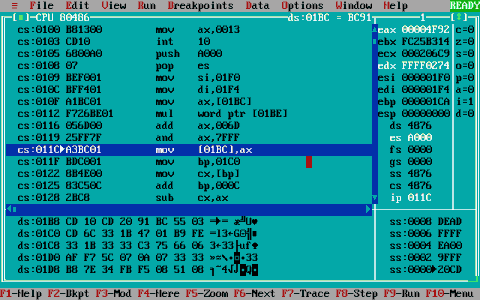
with PuDB:

The PuDB just feels like a poor cousin. It's very unintuitive for me to see which of the subwindows has focus, it doesn't seem to react on mouse properly, and overall the look and feel seems very unpolished. I have no doubts that the pleasure of debugging can be vastly improved if the TUI itself is inviting.
I spent some time investigating what can be done about this. One question is philosophical --- does it makes sense to spend time doing text UI (TUI), when we can just use some rich GUI like Qt? For me the answer is definitely yes, as when using a terminal only, then my development environment looks exactly the same locally on a desktop, as well as remotely over ssh. And a modern terminal is pretty pleasurable to work with.
Another question is --- why not to move his into a browser? Similar to the [Jupyter notebook](http://jupyter.org/). I.e. you run the application locally or remotely in a terminal, forward the HTTP and use a local browser. Then you can use all kinds of great GUIs in the browser itself. That might be the way to go. I don't know.
Another similar idea is to improve the terminal itself, to be better at UI. E.g. there is the [Qt Console](http://jupyter.org/qtconsole/stable/), then it looks like a terminal, but can do images. It could in principle be extended to allow windows, menus, scrollbars, etc. Other, discontinued, projects are [TermKit](https://github.com/unconed/TermKit), [finalterm](https://github.com/p-e-w/finalterm) that tried to improve the terminal itself. Then there are projects to improve the shell experience ([Xiki](https://www.kickstarter.com/projects/xiki/xiki-the-command-revolution/description), [Xonsh](http://xon.sh)). Some people say that if `TermKit` was build using the [Electron](http://electron.atom.io/) platform today, it would be successful (see e.g. the screenshots of [Mancy](https://github.com/princejwesley/Mancy), which is build using `Electron`).
Some of these new tools might become the way to go. But in the meantime, I still see value in simply using the plain old terminal, and do the best one can do using it, because terminals are versatile, cross platform and ubiquitous.
There is an open source implementation of Turbo Vision, called [Free Vision](http://wiki.freepascal.org/Free_Vision) which is actively maintained, and the Free Pascal Compiler IDE is written in it, here is a screenshot:

You can download it [here](http://www.freepascal.org/download.var), it works in a terminal (I tried it on Ubuntu 14.04), and it feels pretty much exactly like the old Turbo Pascal.
I think one would need to write a library (either improving [urwid](http://urwid.org/), or start a new one), that has such a nice TUI. I think it would be widely successful, since urwid itself is successful, and this would make it look nice and polished. There is a library for NodeJS called [Blessed](https://github.com/chjj/blessed) (see the screencast there), which I tried as well, and they have some nice looking things, but overall, it still feels less polished than Turbo Vision (or Free Vision). It's obviously a lot of work, but I think it is worth it, to have a modern, nice looking and polished TUI library.
A separate and relevant question is mouse support. For some reason most apps do not use mouse, it seems pudb doesn't use it either. Free Vision as well as Blessed work with mouse. I looked at it, and one has to use the [1003 mouse reporting mode](http://stackoverflow.com/questions/5966903/how-to-get-mousemove-and-mouseclick-in-bash/5970472#5970472) in a terminal, which makes the terminal app send ANSI escape sequences for mouse movement, that you just read in your code. For some reason, ncurses doesn't seem to support it (it can read mouse clicks, but not mouse movement --- which is useless, if you want to implement, say, a scrollbar). So I wrote my own [simple app](https://gist.github.com/certik/47910b9c9964ca55743f413a670240e6) that moved a character on a screen based on the mouse movement, here is a screencast:
[](https://asciinema.org/a/612ignepn8g1ajv85fpqti33o)
it also reads the mouse clicks (the top left character, that would have to be decoded). I tested in `gnome-terminal` in Ubuntu 14.04 and 16.04, as well as the default terminal on OS X El Capitan. I also tested over ssh (two hops in fact...) and in `screen`. It works like a charm everywhere, with default settings. So I think that terminal apps should support mouse by default (in addition to keyboard, not instead of it). In particular, this would be very useful for a scrollbar in the PuDB window, so that you can use it exactly like a regular scrollbar, say in a web browser, only this would be in the terminal itself. Minor point: note that my app shows the pointer in the text mode, but since the terminal (both on Linux and Mac) also shows the mouse pointer anyway, perhaps it's not necessary to show the "text mouse pointer" (like Turbo Pascal did) -- I think the text mouse pointer should be off by default, but you could turn it on with a command line option, so that when you do a screencast (like I did above), the user could see where the pointer is (since the screencast does not record the desktop mouse pointer). I noticed that both `Blessed` as well as `Turbo Pascal` for some reason have a bit different behavior of the mouse than one is used to (e.g. neither allows you to "grab" the scrollbar), which is a shame, it should behave just like on a desktop.
Conclusion: I would really like to see a modern looking TUI, with first class mouse support, and a nice, polished interface, inspired by the style of Turbo Vision. And PuDB can then use it.
@inducer, let me know what your thoughts are about this.
Contributor guide
No contributing guide indexed for this repository
Assessment
This issue has not been assessed yet.