Problem with Remotely on Ubuntu 18.04
Nobody has claimed this yet.
- Dominant language
- C#
- Stars
- 5.1k
- Forks
- 1.6k
- PR merge metrics
- No merged PRs in 30d
Description
Hello,
We use your Remotely product.
We have a Remotely server and we have installed the agent on different Windows 10/11 workstations.
We saw on the "Download" page that there is a version for Ubuntu 18.04 with an installation script.
After installing the agent on a machine running Ubuntu 18.04, we can clearly see the machine which goes back to the Remotely server. However when we try to take control of the machine, Remotely opens a new tab for us but nothing is displayed.
Looking at the server and client side logs, we only see these logs:
- Server log :

- Client log :

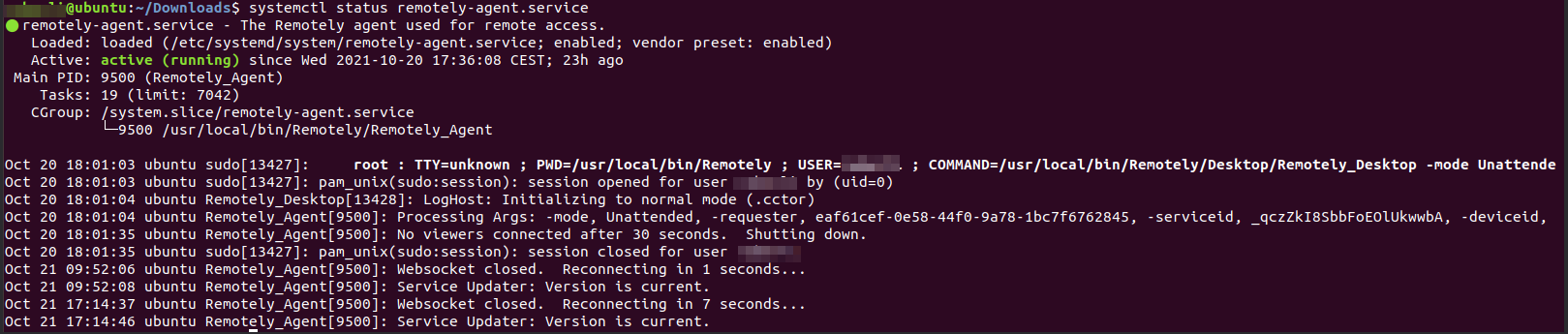

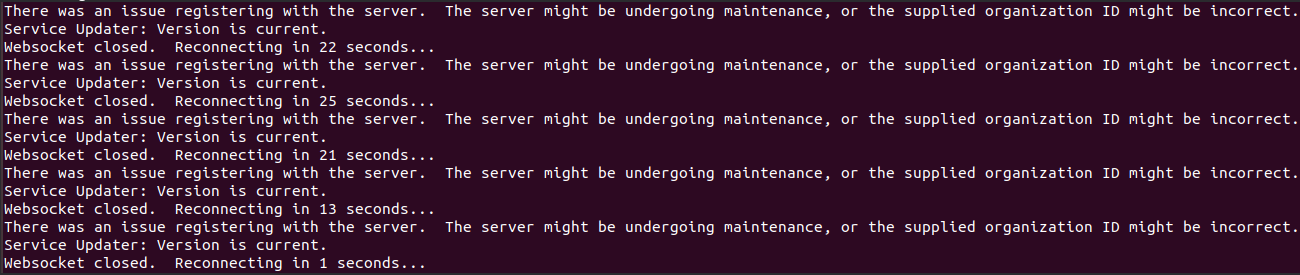
Do you know what the problem would be? If so, how to solve it?
Thank you,
Regards
Contributor guide
No contributing guide indexed for this repository
First steps
- Read the whole issue, then the project's contributing guide.
- Comment on the issue to say you are picking it up — it saves two people doing the same work.
- Fork the repository and make your change on a branch.
- Open a pull request that references the issue number.
Research direction
Start by reproducing the blank control tab with the Ubuntu 18.04 agent and reviewing the server and client logs attached to the issue. Done means the Ubuntu machine can be selected and its remote-control session renders and accepts control.
Written by the indexing model from the issue text.
Assessment
- Tech stack
- csharp, ubuntu
- Domain
- desktop, operating-systems
- Issue type
- Bug
- Difficulty
- 4/5
- Estimated time
- 3-5 days
- Activity status
- Stale
- Clarity
- Needs clarification
- Newbie friendliness
- 25/100