Chart content is overflowing constraining widget's boundaries
Open
bug
Fundamental
- Dominant language
- Dart
- Stars
- 7.6k
- Forks
- 2k
- Avg merge
- 9d 1h
- Merged PRs (30d)
- 2
Description
As the title says, the chart widget is overflowing if no margins are added manually to "fix it":
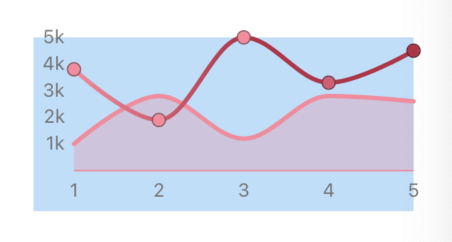
The blue background in the above image is set on the containing widget. As can be seen, the axis labels are properly distanced from the left and bottom boundaries of the container, but not from the top and right boundaries.
Contributor guide
Research direction
Start by reproducing the chart widget shown in the issue inside a containing widget, then inspect how axis labels are positioned relative to each boundary. Done means the labels remain within the widget without manually added margins. No file, test, or specific chart entry point is named, so the relevant implementation and tests must first be located.
Written by the indexing model from the issue text.
Assessment
- Tech stack
- dart, flutter
- Domain
- frontend
- Issue type
- Bug
- Difficulty
- 3/5
- Estimated time
- 1-2 days
- Activity status
- Stale
- Clarity
- Mostly clear
- Newbie friendliness
- 38/100