Dayjs returns Invalid Date
- Dominant language
- JavaScript
- Stars
- 48.7k
- Forks
- 2.5k
- PR merge metrics
- No merged PRs in 30d
Description
**Describe the bug**
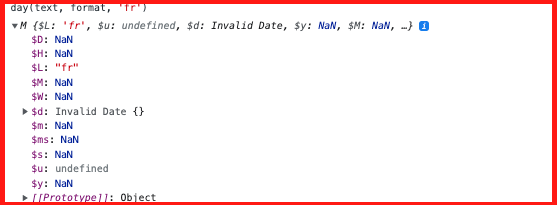
Dayjs returns Invalid Date if the date entered by a user starts with day name.
**Example code:**
```
import * as dayjs from 'dayjs';
import 'dayjs/locale/fr';
var customParseFormat = require('dayjs/plugin/customParseFormat')
dayjs.extend(customParseFormat);
var localizedFormat = require('dayjs/plugin/localizedFormat')
dayjs.extend(localizedFormat)
var day = dayjs;
day.locale('fr'); //Using french locale
text = 'vendredi 1 janvier 2021 11:40:39 heure' ;
format = 'dddd D MMMM YYYY h:mm:ss A';
day(text, format, 'fr');
```
**Executing the above line(day(text, format, 'fr')) is throwing the below error. It works only if the day name is given after YYYY. Example: '1 janvier 2021, vendredi 11:40:39 heure'.**
**ERROR:** M {$L: 'fr', $u: undefined, $d: Invalid Date, $y: NaN, $M: NaN, …}
**Expected behavior**
Dayjs should return correct Date if the date entered by a user starts with day name.
**Information**
- Day.js Version - 1.10.7
- OS - macOS Big Sur
- Browser - Chrome 93.0.4577.82
Contributor guide
Research direction
Start at the customParseFormat plugin entry point and reproduce the supplied French date example with the day name at the beginning. Trace how the dddd token is parsed before the date components, then verify that the example returns a valid Date while preserving the existing ordering behavior.
Written by the indexing model from the issue text.
Assessment
- Tech stack
- javascript
- Domain
- tooling
- Issue type
- Bug
- Difficulty
- 3/5
- Estimated time
- 1-2 days
- Activity status
- Stale
- Clarity
- Mostly clear
- Newbie friendliness
- 48/100