hypothesis / hypothesis/support-legacy
PDF annotation for https://github.com/hypothesis/support/files/3605397/SecondChance_CommColl.pdf, in Chromium/Windows, is weird and/or broken
- Dominant language
- No language data
- Stars
- 3
- Forks
- 0
- PR merge metrics
- No merged PRs in 30d
Description
## Summary
From: https://hypothesis.zendesk.com/agent/tickets/5976
When annotating the following PDF in Chrome for Windows:
[SecondChance_CommColl.pdf](https://github.com/hypothesis/support/files/3605397/SecondChance_CommColl.pdf)
Turning on the extension results in a bunch of boxes appearing over the text layer of the PDF:
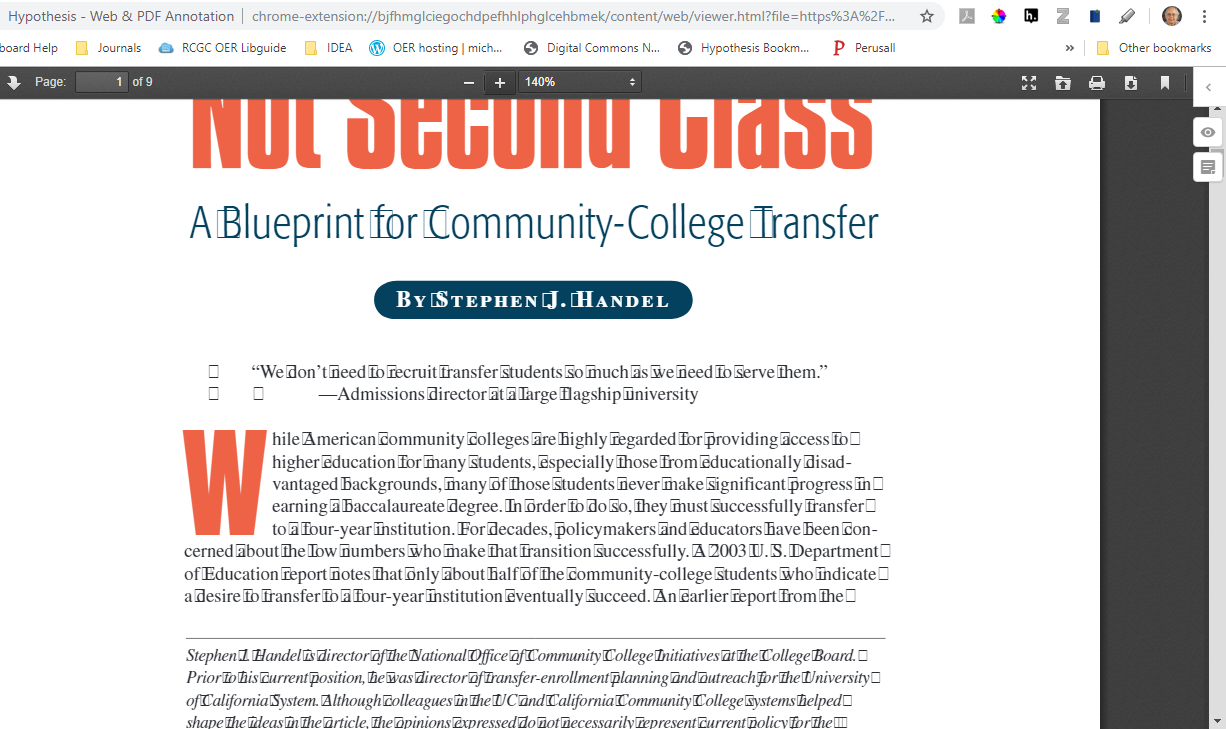
The user had a lot of Chrome extensions enabled, but I was able to reproduce on my Windows machine (Windows 10, latest version of Chrome) with all extensions turned off.
## Steps to reproduce
1. Using Chrome for Windows, open [SecondChance_CommColl.pdf](https://github.com/hypothesis/support/files/3605397/SecondChance_CommColl.pdf)
2. Activate the Hypothesis extension
### Expected behavior
Hypothesis sidebar appears, user can annotate
### Actual behavior
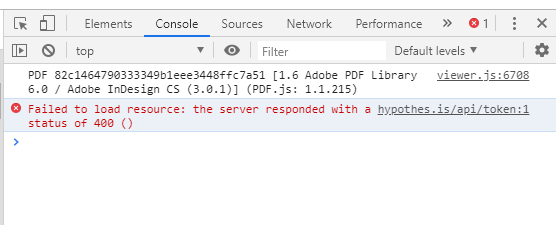
As shown in the screenshot above, a bunch of boxes appear over the text layer of the PDF, making it hard to read/annotate. Also, the following console error occurs:
Contributor guide
No contributing guide indexed for this repository
Assessment
This issue has not been assessed yet.