hypothesis / hypothesis/support-legacy
In Canvas, user resubmissions trigger a confusing instructor workflow in 0-point assignments
- Dominant language
- No language data
- Stars
- 3
- Forks
- 0
- PR merge metrics
- No merged PRs in 30d
Description
**Describe the bug**
When instructors create 0-point Complete/Incomplete assignments in Canvas they are seeing resubmission icons appear even when they’ve graded an assignment as “Complete”. They mistake these icons for the “needs grading” icon, and spend time re-grading things they shouldn’t. If they use the “use the same grade you used before” button, the grade actually changes from “Complete” to “Incomplete”.
**To Reproduce**
Steps to reproduce the behavior:
1. As an instructor, in Canvas create a 0-point Complete/Incomplete assignment
2. As a student, visit that assignment
3. As an instructor, grade the assignment as "Complete". Note the grade in the Gradebook.
4. As a student visit the same assignment again
5. As an instructor, visit the Gradebook and see how the grade has been replaced by an icon.
I made a thorough video (almost 5 minutes; sorry for the length) demonstrating what's going on: https://drive.google.com/file/d/17tGMSfBX8TQriR7Z5-v6v-vXcJSdQ0jc/view?usp=sharing
To sum up:
1 - The Canvas "resubmission" icon is green, but otherwise identical to the "needs grading" icon.
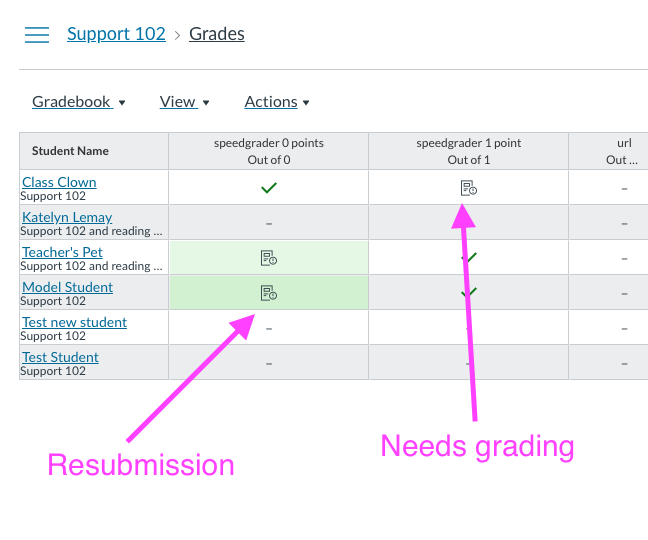
2 - Clicking on the green "resubmission" icon in the Gradebook reveals the current grade, whether it is Complete or Incomplete.
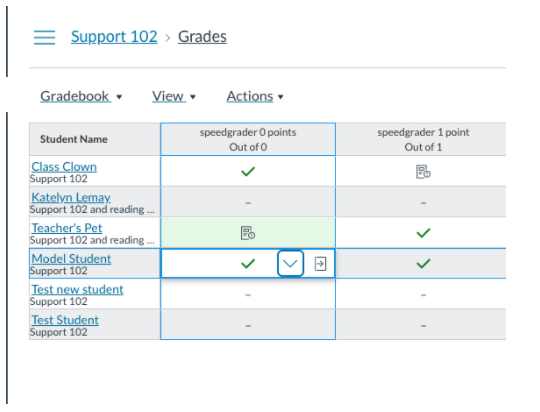
3 - Canvas only shows a "resubmission" icon on resubmission when the grade is Incomplete, so the instructor knows to re-grade a new submission that wasn’t complete. Instructors don’t seem to get this difference and think all uses of this icon mean “I am supposed to grade this item”.
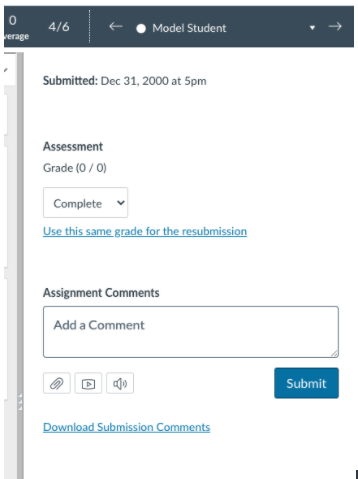
4 - Canvas considers a grade of 0 to mean Incomplete, even if you've graded it as Complete. So all 0-point assignments will get resubmission icons when students revisit in Hypothesis
This is why pressing "Use this same grade for the resubmission" changes the grade from Complete to Incomplete; Canvas considers grades of 0 to be Incomplete.
**Expected behavior**
Note that part of this issue is how Canvas treats 0-point assignments. Still, instructors do not expect students re-visiting an assignment o trigger a new submission. The expected behavior would be for students to visit the assignment without the resubmission icon appearing in the Gradebook.
**Additional context**
Likely to be solved by https://github.com/hypothesis/lms/issues/924
Contributor guide
No contributing guide indexed for this repository
Research direction
Start by reviewing the reproduction steps and the related hypothesis/lms issue #924, since the report says that work likely addresses this behavior. Verify the Gradebook flow for a 0-point Complete/Incomplete assignment after a student revisits it; done means revisiting does not create a misleading resubmission icon or change Complete to Incomplete.
Written by the indexing model from the issue text.
Assessment
- Domain
- frontend
- Issue type
- Bug
- Difficulty
- 4/5
- Estimated time
- 3-5 days
- Activity status
- Stale
- Clarity
- Needs clarification
- Newbie friendliness
- 25/100