hypothesis / hypothesis/product-backlog
Create user-friendly error window for Canvas error {"error":"invalid_client","error_description":"unknown client"}
- Dominant language
- No language data
- Stars
- 122
- Forks
- 7
- PR merge metrics
- No merged PRs in 30d
Description
The LMS app error message generated in Canvas when a developer key has been deleted does not display to the user in the typical user-friendly view:

Error text: `{"error":"invalid_client","error_description":"unknown client"}`
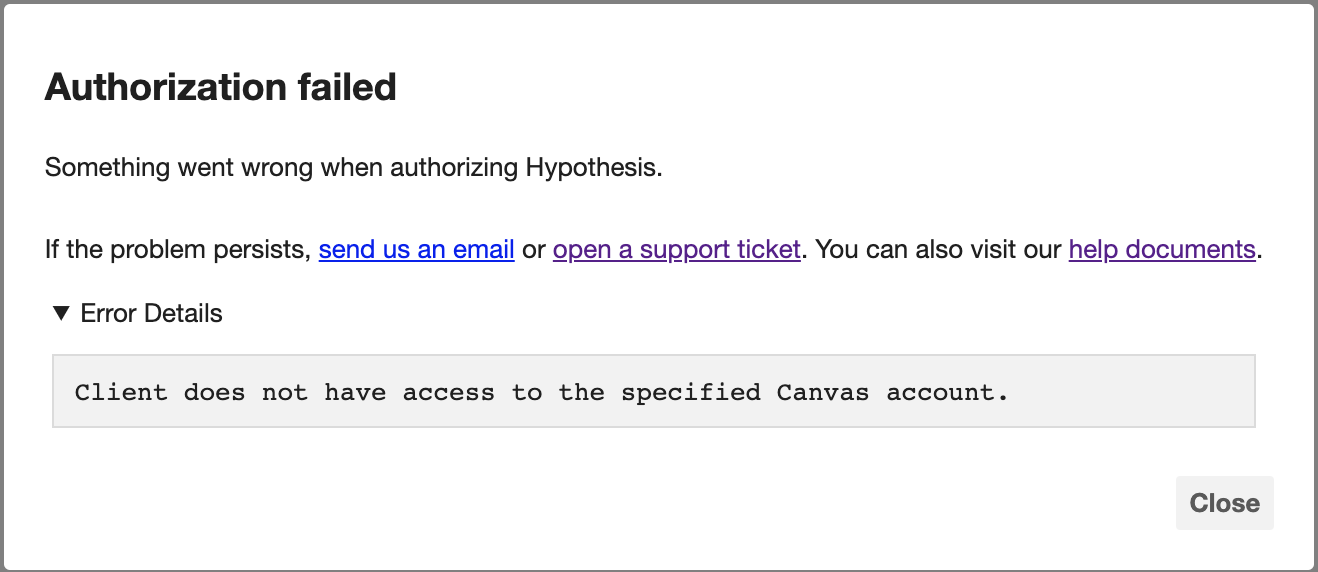
Ideally, we would display for the user an error message in the format as below (example error is generated when a Canvas developer key is turned off):
Contributor guide
No contributing guide indexed for this repository
Research direction
No files, tests, or entry points are named. Start by reproducing the Canvas developer-key deletion flow and compare the raw invalid_client response with the user-friendly example in the issue. Done means the error is presented to users in a comparable readable format rather than as raw JSON.
Written by the indexing model from the issue text.
Assessment
- Domain
- authentication
- Issue type
- Bug
- Difficulty
- 4/5
- Estimated time
- 3-5 days
- Activity status
- Stale
- Clarity
- Needs clarification
- Newbie friendliness
- 28/100