Confusing behavior when our page's JWT has expired
- Dominant language
- Python
- Stars
- 53
- Forks
- 16
- Avg merge
- 14d 5h
- Merged PRs (30d)
- 14
Description
## Problem
Both when creating an assignment (of any kind) and when launching a Canvas files assignment, our frontend code uses a JWT to authenticate itself to our server. This JWT expires after one hour, so if the tab has been open for more than an hour then authentication fails. I believe this could happen if:
* The user leaves the tab open for more than an hour then comes back and tries to continue using it, without reloading the page (possibly with sleeping and waking their computer in the meantime, or browsing in other tabs, using other apps, quitting and later re-opening the browser, etc)
* User uses back button to go back to an old page and continue using it
### Problem Details
An expired JWT can't currently cause a problem when _launching_ an assignment because the only JWT-authenticated request that is made is the `via_url` request and that's made automatically on page load so the JWT can't have expired yet. However, in the future we're likely to add additional functionality to the assignment launch page (e.g. to submit work for grading) that will make use of the JWT, so I think we should just assume that the JWT is also needed when launching any kind of assignment.
An expired JWT _can_ currently cause problems when _creating_ an assignment:
1. When creating an assignment using content item selection in Canvas
2. When an instructor launches an unconfigured assignment in another LMS, and we ask them to choose the assignment's document
Technically the JWT is not always needed to complete the task of creating an assignment:
* When the user creates a URL or Google Drive assignment in Canvas with content item selection, the URL or file ID is submitted back to Canvas rather than to our server, so the JWT is never used
* When creating a Canvas file assignment with content item selection the JWT **is** used to get the list of files, though once the files have been listed the chosen file_id is passed back to Canvas, not to our server, without using the JWT
* When creating any type of assignment in an LMS that isn't using content item selection, the chosen URL, Google Drive or Canvas file is submitted back to our server, not to the LMS, and this **does** us the JWT
^ Rather than trying to guess whether the user is going to do something that actually requires the JWT or not and implement logic for that, I think it's going to be simpler and more robust to just **always assume the JWT will be needed** and just disable the whole UI whenever the JWT has expired.
### Current behaviour
When the JWT is expired then our frontend's XHR requests to our server's proxy API (for example the list_files or public_url APIs) will receive 403-status responses with this JSON body:
```json
{"message": "You're not authorized to view this page"}
```
The frontend currently responds to this with an error dialog with an Authorize button that opens the authorization popup window. But...
GET requests to open our Canvas authorization page in a popup window will receive 500-status responses containing an HTML "Authorization failed" page with a _Try again_ button that can never succeed (the popup window is stuck in an infinite _Try again_ -> _Authorization failed_ loop).
When creating an assignment in an LMS that doesn't support content item selection the behaviour is slightly different: on submitting the form the user gets an authorization error page from the server.
### Remediation
* When our app has been launched inside an iframe then reloading the page (e.g. with Ctrl+r or by clicking the browser's Reload button) will fix the problem. The LMS's page will be reloaded and will generate a new LTI launch form, with an updated OAuth 1 signature, and the LMS page's JavaScript will submit that launch form to us, re-launching our app and causing us to generate a fresh page with a fresh JWT.
* When our app has been launched in a new tab then **reloading the page will not fix the problem**. The user has to close the tab and re-launch our app from the original LMS tab.
## Reproducing
Instead of waiting an hour just change the code to generate JWTs that expire in one second:
```diff
diff --git a/lms/validation/_helpers/_jwt.py b/lms/validation/_helpers/_jwt.py
index 06c5b2a..eb6f742 100644
--- a/lms/validation/_helpers/_jwt.py
+++ b/lms/validation/_helpers/_jwt.py
@@ -57,7 +57,7 @@ def encode_jwt(payload, secret):
:rtype: str
"""
payload = copy.deepcopy(payload)
- payload["exp"] = datetime.datetime.utcnow() + datetime.timedelta(hours=1)
+ payload["exp"] = datetime.datetime.utcnow() + datetime.timedelta(seconds=1)
jwt_bytes = jwt.encode(payload, secret, algorithm="HS256")
```
## Desired behaviour
Our frontend code should **read the JWT's expiry time** on page load and set a timeout that will run when the JWT expires and put the UI into a special "JWT has expired mode" that disables the entire UI and asks the user to reload the page. This error mode should look like this:
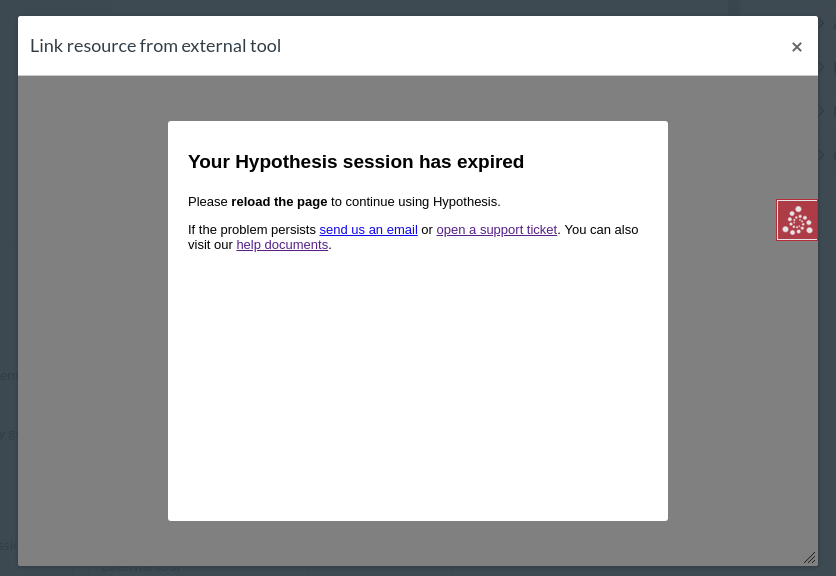
Some notes about this error dialog:
* There is no x or Cancel buttons -- the dialog is not dismissable
* There's no Try again button or action button of any kind. There's nothing a button can do to help here, the user has to reload the page theirself
**If our app has been launched in a new tab** rather than in an iframe then reloading the page will not fix the problem. The frontend code will need to detect when it is running in the top-level frame and show this alternative error dialog instead:
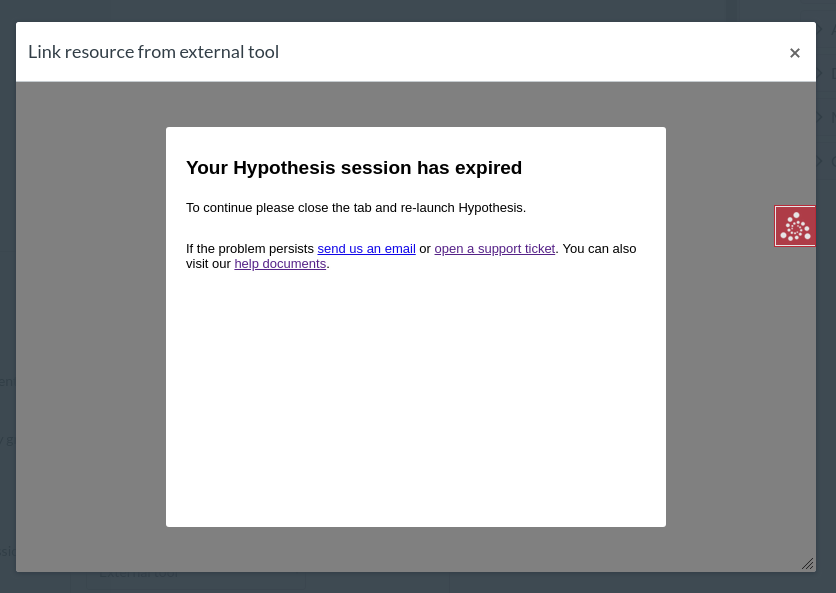
As noted above our JWT-authenticated proxy API will send 403 responses if the JWT has expired (as opposed to 200 normally, 400 in the case of Canvas API problems , or 500 in the case of an unexpected bug in our code). But **it shouldn't be necessary for the frontend code to handle 403 responses* specially though -- the above error dialogs should instead be triggered by a timer based on reading the JWT's expiry time.
Contributor guide
No contributing guide indexed for this repository
Assessment
This issue has not been assessed yet.