Clipboard only show on external monitor and not the main monitor
- Dominant language
- C++
- Stars
- 12.3k
- Forks
- 593
- Avg merge
- 2d 8h
- Merged PRs (30d)
- 9
Description
**Describe the bug**
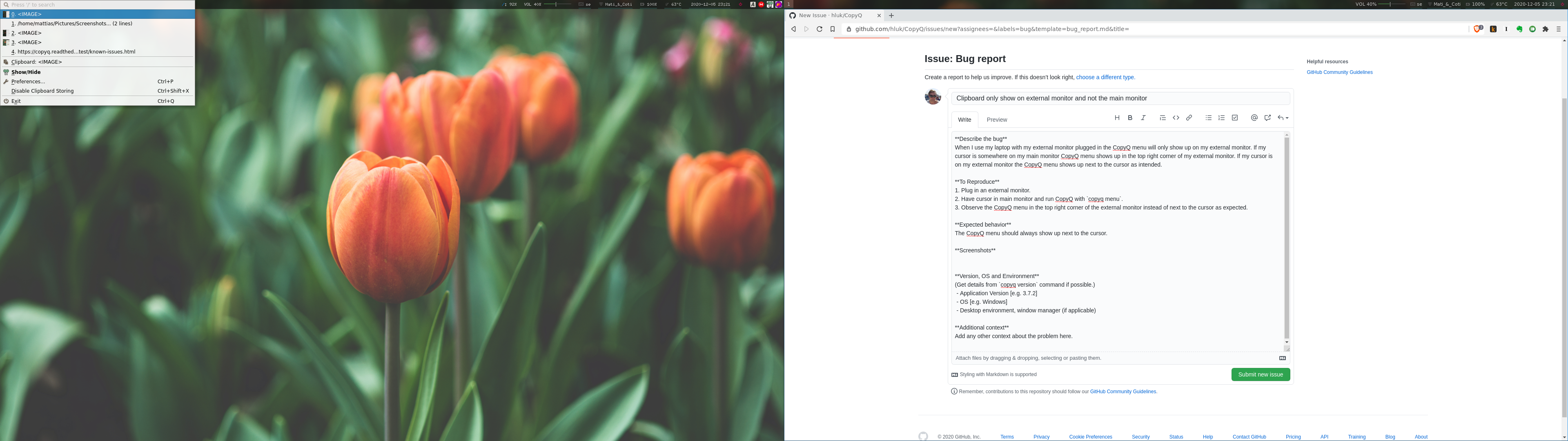
When I use my laptop with my external monitor plugged in the CopyQ menu will only show up on my external monitor. If my cursor is somewhere on my main monitor CopyQ menu shows up in the top left corner of my external monitor. If my cursor is on my external monitor the CopyQ menu shows up next to the cursor as intended.
**To Reproduce**
1. Plug in an external monitor.
2. Have cursor in main monitor and run CopyQ with `copyq menu`.
3. Observe the CopyQ menu in the top left corner of the external monitor instead of next to the cursor as expected.
**Expected behavior**
The CopyQ menu should always show up next to the cursor.
**Screenshots**
**Version, OS and Environment**
(Get details from `copyq version` command if possible.)
- Application Version: 3.13.0
- OS: Ubuntu 18.04
- Desktop environment, window manager: i3-wm
Contributor guide
No contributing guide indexed for this repository
Assessment
This issue has not been assessed yet.