Gmail - CopyQ - Round Trip Fails (HTML pasted as text into GMAIL) - WHEN NEW ITEM USED
- Dominant language
- C++
- Stars
- 12.3k
- Forks
- 593
- Avg merge
- 2d 8h
- Merged PRs (30d)
- 9
Description
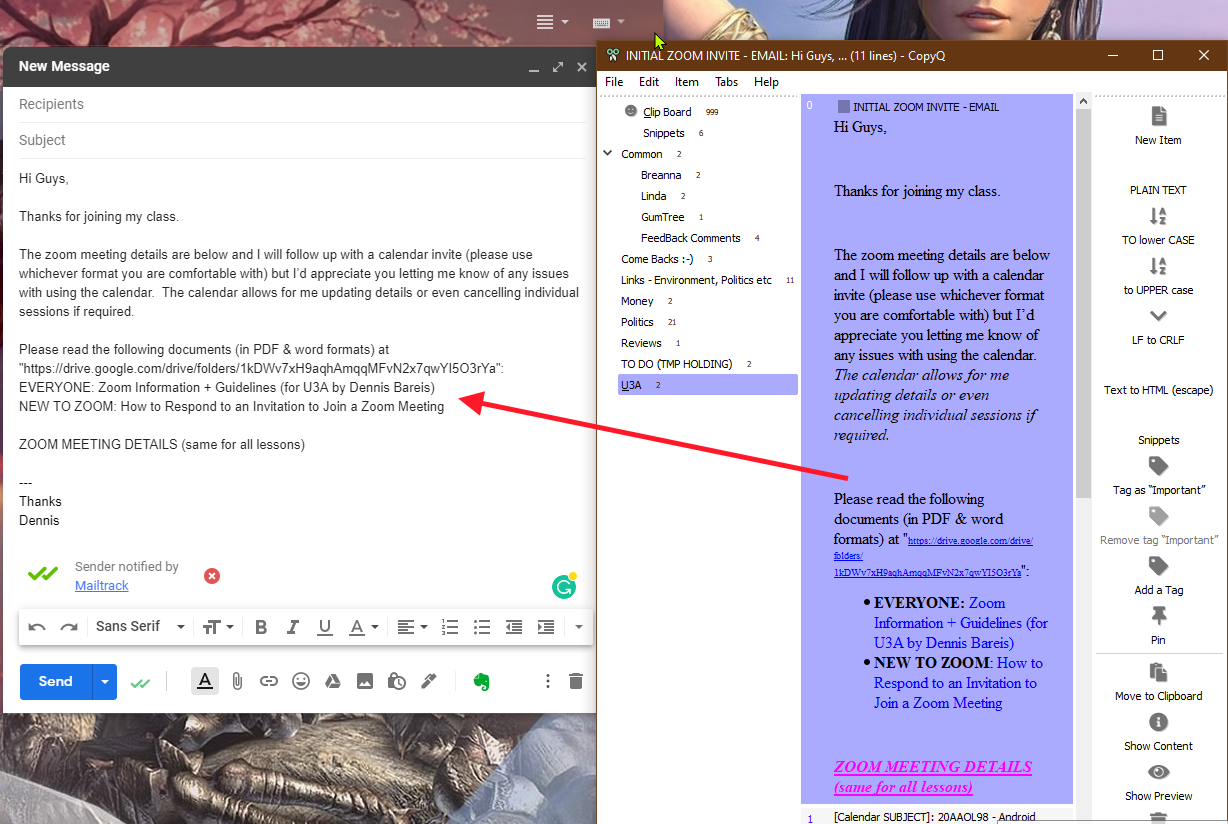
I'm trying to capture the contents on an email (gmail) and save it as a template within CopyQ, it more or less looks OK in COPYQ (purple text font, bolding, links etc). When I paste it into a new email its as if it was plain text.
I just realised that the issue is with "**New Item**", if I copy the clipboard there it looks Ok but doesn't work, if I use what is in the "Clip Board" tab then it works OK. **With all log options ticked, nothing gets logged**, to reproduce:
- Select and copy formatted text in gmail email description\
- in CopyQ click "new Item" (in a "template" tab)
- Paste copied stuff in.
- double click to copy to clipboard
- paste into a new email (pastes plain text)

CopyQ Clipboard Manager : v3.9.3
Windows 10 x64
Contributor guide
No contributing guide indexed for this repository
Assessment
This issue has not been assessed yet.