CopyQ Creates a Blank Unclosable Window, Subsequently opens Second Window
- Dominant language
- C++
- Stars
- 12.3k
- Forks
- 593
- Avg merge
- 2d 8h
- Merged PRs (30d)
- 9
Description
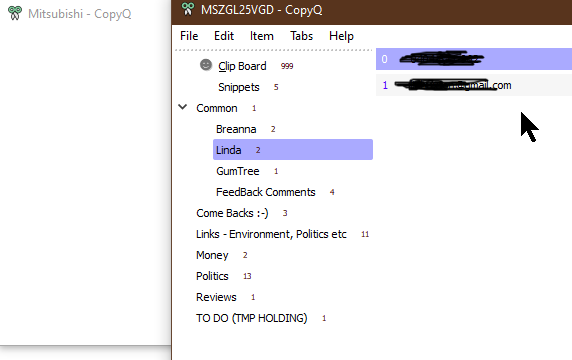
Sometimes when I try to open CopyQ to select an entry it opens a **completely Blank & Unclosable Window**. Trying again successfully **opens a second Window**.
I do not know how to reproduce this, perhaps click too many times or too fast on tray icon. Its happened enough times that it can't be too hard to do.
I don't think the log shows anything, will look at it closer next time, but no events logged today and all options ticked.
_The only way to close the first blank window is to kill the process._
Environmental Information That should be displayed in the About Box
~~~~~~~~~~~~~~~~~~~~~~~~~~~~~~~~~~~~~~~~~~~~~~
CopyQ Version: v3.8.0
Windows 10 64 bit
(any other info you need)
Contributor guide
No contributing guide indexed for this repository
Assessment
This issue has not been assessed yet.