hasura / hasura/graphql-engine
BigQuery Connection Issue From Hasura CLI Console
- Dominant language
- TypeScript
- Stars
- 32.1k
- Forks
- 3k
- PR merge metrics
- PR metrics pending
Description
### Version Information
- Server Version: **v2.13.0.cli-migrations-v3**
- CLI Version (for CLI related issue): **v2.14.0-beta.2**
### Environment
- Open Source Software
### What is the current behaviour?
When i'm trying to connect to a Big Query Database from Hasura Console spun up by Hasura CLI, i'm getting the following error **"cannot determine source kind for "** as a console alert.
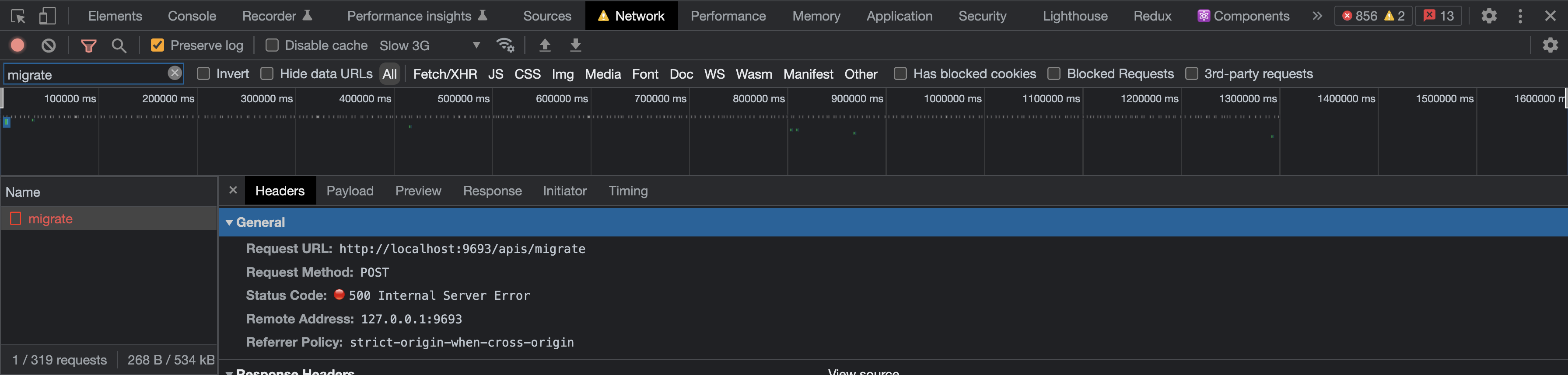
I've further explored to see which network call is failing, as it turns out
`{{CLI_CONSOLE_HOST_URL}}/apis/migrate`, this API Call is failing with a `500 Internal Server Error` and the error response is as follows,
```
{
"code": "request_parse_error",
"message": "cannot determine source kind for "
}
```
This only happens from CLI Console and not Server Console, from Server console i'm able to establish a connection to my Big Query Database with the same configurations. So i'm guessing something is going wrong when the CLI Console is trying to parse my configs and write it to the configuration files.
### What is the expected behaviour?
- A Connection to the Big Query Database should be established.
- The Metadata and Migrations directory should be updated with the configuration details about the connection.
### How to reproduce the issue?
1. Spin up a **graphql-engine** with the above mentioned version as a docker container.
2. Install the above mentioned Hasura CLI tool.
3. Once the **graphql-engine** is up, type `hasura console` in the terminal to spin up the CLI console.
4. Navigate to the CLI console (usually runs in localhost:9695).
5. Open the data tab from the navigation bar and click on connect database.
6. Select BigQuery from the dropdown and provide the necessary details like datasets, database name, service-account.json file (exported it as an environment variable and give the environment variable name).
7. After filling in all the details click on connect.
8. Now the error alert with the above mentioned error message should appear in the top right of the browser.
### Screenshots or Screencast
**1. Alert Message After Clicking On Connect Button**

**2. Failed Network Call**
### Please provide any traces or logs that could help here.
There are no logs for this, But as mentioned before I can give the failed API call details
**Request URL**
```
POST -> {{CLI_CONSOLE_HOST_URL}}/apis/migrate
```
**Payload**
```
{
"name": "add_data_source",
"up": [
{
"type": "bigquery_add_source",
"args": {
"name": "",
"configuration": {
"service_account": { "from_env": "BIG_QUERY_SERVICE_ACCOUNT" },
"global_select_limit": 1000,
"project_id": "",
"datasets": [""]
},
"replace_configuration": false,
"customization": { "naming_convention": "hasura-default" }
}
}
],
"down": [],
"datasource": "",
"skip_execution": false
}
```
**Response**
```
{
"code": "request_parse_error",
"message": "cannot determine source kind for "
}
```
### Any possible solutions/workarounds you're aware of?
- The main reason I want to use the console spun up by CLI instead of the server console is, to get the configurations automatically getting reflected in my metadata and migrations directory. Because of the above mentioned issue I'm missing this functionality.
- So the workaround what I did was to add the connections from Server Console (localhost:8080) and then used the command `hasura metadata export` to manually load the configurations inside the metadata directory. This solves the metadata problem.
- And for the migrations, during automatic apply process because of the CLI Base Image during the hasura engine startup, it expects a folder with the name of the database which got added. So I manually created that folder under migrations directory with the same name as my Big Query Database.
### Keywords
- adding data source failed
- cli console big query connection issue
- request parse error
- cannot determine source kind
Contributor guide
Research direction
Start by tracing the CLI console's POST /apis/migrate request for the bigquery_add_source operation and compare it with the working server-console path. Reproduce with the supplied payload and versions, then verify that connecting BigQuery succeeds and updates the metadata and migrations directories without requiring the documented workarounds.
Written by the indexing model from the issue text.
Assessment
- Domain
- cli, databases
- Issue type
- Bug
- Difficulty
- 4/5
- Estimated time
- 3-5 days
- Activity status
- Stale
- Clarity
- Mostly clear
- Newbie friendliness
- 35/100