hasura / hasura/graphql-engine
Hasura-CLI "hasura console": all migrations are deleted directly after creating them
- Dominant language
- TypeScript
- Stars
- 32.1k
- Forks
- 3k
- PR merge metrics
- PR metrics pending
Description
### Version Information
Server Version: v2.0.8-cloud.3
CLI Version (for CLI related issue): 2.0.8 (Also tried 2.0.9 and 2.1.0-beta.1)
### Environment
Windows 10 Pro (Version 20H2, Build 19042.1237),
Hasura-CLI installed via npm v6.14.10
### What is the expected behaviour?
When i run "hasura console" and make a change to the schema, i expect migration files (folder, up.sql, down.sql) to be created locally under my migrations folder.
### Keywords
hasura, cli, migrations, deleted, locally, hasura console
### What is the current behaviour?
The migrations folders and files get created and persist for about 3 seconds.
Then they are automatically deleted. In the moment, they are deleted, i see an empty green success toast-popup on hasura.
I could copy them during this time and they were correct.
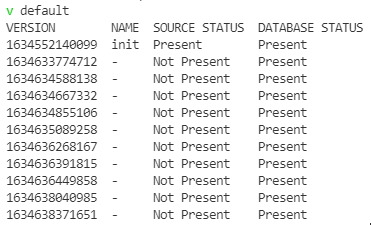
When i run "hasura migrate status", i see all migrations on the server, however not locally.
### How to reproduce the issue?
1. Set Up Hasura Cloud
2. Connect to Postgres DB (I am using Postgres Flexible v13.3 on Azure)
3. Create some Tables
4. Use "hasura migrate create" to create the "init" migration
5. Use "hasura console" to change the schema
### Screenshots or Screencast
### Please provide any traces or logs that could help here.
(I censored some values with ***)
```javascript
> hasura console --log-level DEBUG
DEBU global config file exists, verifying contents
DEBU global config is pre-set to &cli.GlobalConfig{UUID:"***", EnableTelemetry:true, ShowUpdateNotification:true, CLIEnvironment:"default"}
DEBU global config: uuid: ***
DEBU global config: enableTelemetry: true
DEBU global config: showUpdateNotification: true
DEBU global config: cliEnvironment: default
DEBU ENV vars read from: C:\***\hasura\.env
DEBU graphql engine endpoint: https://***.hasura.app
DEBU graphql engine admin_secret: ***
DEBU versions: cli: [v2.0.8] server: [v2.0.8-cloud.3]
DEBU compatibility check: [true] compatible CLI and Server
DEBU server: uuid: ***
DEBU skipping state migration, found IsStateCopyCompleted: true Migrations: map[default:map[1634552140099:false 1634633774712:false 1634634588138:false 1634634667332:false 1634634855106:false 1634635089258:false 1634636268167:false 1634636391815:false 1634636449858:false 1634638040985:false 1634638371651:false]]
DEBU rendering console template [v2.0] with assets [channel/stable/v2.0]
DEBU rendering console template [v2.0] with assets [channel/stable/v2.0]
INFO console running at: http://localhost:9695/
DEBU telemetry: beamed fields.time=153.4706ms isError=false
DEBU skipping state migration, found IsStateCopyCompleted: true Migrations: map[default:map[1634552140099:false 1634633774712:false 1634634588138:false 1634634667332:false 1634634855106:false 1634635089258:false 1634636268167:false 1634636391815:false 1634636449858:false 1634638040985:false 1634638371651:false]]
DEBU reading functions node from metadatanode not found:
github.com/goccy/go-yaml.init
/go/pkg/mod/github.com/goccy/go-yaml@v1.8.8/error.go:12
DEBU reading functions node from metadatanode not found:
github.com/goccy/go-yaml.init
/go/pkg/mod/github.com/goccy/go-yaml@v1.8.8/error.go:12
WARN Unable to find an embedded cli-ext. So trying to fetch it from CDN
WARN Tip: --cli-ext-path can be used for setting up cli-ext from local file system
DEBU output: command="sdl to"
DEBU cannot export actions from metadata: error parsing metadata
object: actions
file: actions.yaml
error: error in converting metadata to sdl: exit status 1: internal/modules/cjs/loader.js:59
const internalModuleStat = function (f) { return require('fs').internalModuleStat(f); };
^
TypeError: require(...).internalModuleStat is not a function
at internalModuleStat (internal/modules/cjs/loader.js:59:64)
at stat (internal/modules/cjs/loader.js:143:18)
at Function.Module._findPath (internal/modules/cjs/loader.js:645:16)
at Function.Module._resolveFilename (internal/modules/cjs/loader.js:951:27)
at Function.Module._load (internal/modules/cjs/loader.js:840:27)
at Module.require (internal/modules/cjs/loader.js:1024:19)
at Module._preloadModules (internal/modules/cjs/loader.js:1276:12)
at loadPreloadModules (internal/bootstrap/pre_execution.js:444:5)
at prepareMainThreadExecution (internal/bootstrap/pre_execution.js:76:3)
at internal/bootstrap/pkg.js:7:1
```
### Any possible solutions?
I recently had a similar error message to the one shown above when trying to apply metadata to the server (something with "sdl" and "internalModuleStat").
This could be fixed by setting the environment variable "NODE_OPTIONS" to an empty string. See:
[#4953](https://github.com/hasura/graphql-engine/issues/4953)
[#7554](https://github.com/hasura/graphql-engine/issues/7554)
I tried it here and it worked! The migration files now persist, as they should.
For Powershell users, simply enter:
```powershell
$env:NODE_OPTIONS = ""
```
### Can you identify the location in the source code where the problem exists?
No.
### If the bug is confirmed, would you be willing to submit a PR?
No.
Contributor guide
Assessment
This issue has not been assessed yet.