hashicorp / hashicorp/vagrant_cloud
Direct Upload Failures
- Dominant language
- Ruby
- Stars
- 16
- Forks
- 13
- PR merge metrics
- No merged PRs in 30d
Description
@chrisroberts Hi Chris, I've used the direct upload interface for a few robox releases, and it has been provided a big performance imporvement.
Unfortunately, I also seem to be running into a bug that is causing some of those uploads to fail. Unfortunately, unlike the failures via the old API, these errors have proven difficult to detect automatically... which means I don't actually realize the upload failed until I try to use the box in question, and the checksum fails. That's because with this issue, the Vagrant cloud thinks it has the box file, and provides Vagrant with a URL, that either errors or returns an empty file.
I managed to add logic to the `direct.sh` upload script which detects the upload problem and retries it. But that hasn't fixed anything, because the upload simply fails 10 times in a row, and gives up.
I have a test script that can check to ensure all of the boxes have been uploaded (without actually downloading them), but these errors slip past because all the usual error indicators pass.
The last time I ran into an issue like this, i ended up creating Travis-CI jobs to check for broken downloads. But that process was really inefficient, and as the project grew, the bandwidth costs got out of hand. issue. That was 2 years ago. With the size of each release these days, that option is even less viable, so I'm hoping you can help.
The only indication I've found so far that there was an issue, is by visiting the Vagrant Cloud website. If a problem occurred, I'll see the provider listed, but with a size of 0 bytes. See the screenshot below.
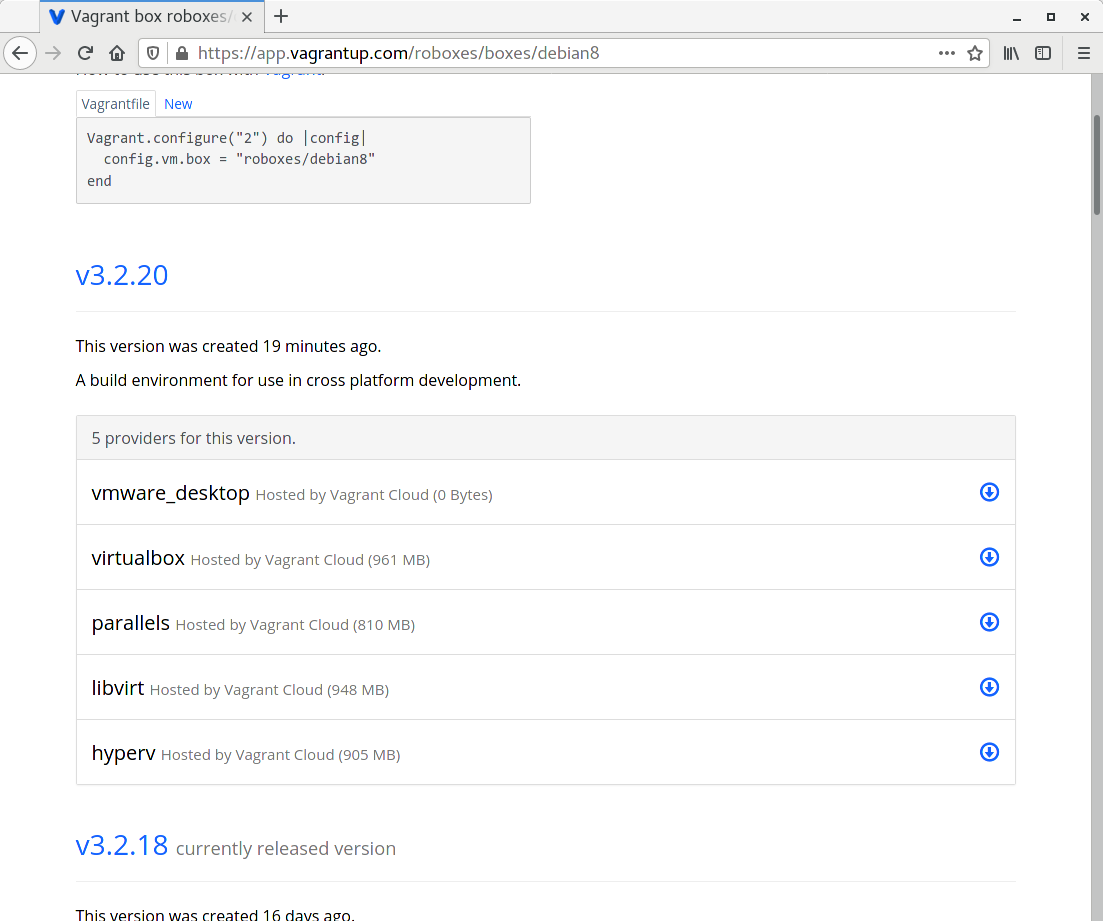
Using the old API, whenever an upload failed, the size would be absent on the website, and Vagrant wouldn't see the provider as being available.
As for the log output from my upload attempts, I'll include it here, although I truncated the upload URL, both for readability, and because I don't whether those S3 URL contain any sensitive info:
```
FILE: roboxes-debian8-vmware-3.2.20.box
CODE: 400
IP: 13.249.22.85
BYTES: 12386304
RATE: 5024869.000
TOTAL TIME: 2.465769
FILE: roboxes-debian8-vmware-3.2.20.box
CODE: 400
IP: 13.249.22.85
BYTES: 15990784
RATE: 29287150.000
TOTAL TIME: 0.546655
FILE: roboxes-debian8-vmware-3.2.20.box
CODE: 400
IP: 13.249.22.85
BYTES: 14090240
RATE: 26585358.000
TOTAL TIME: 0.530695
FILE: roboxes-debian8-vmware-3.2.20.box
CODE: 400
IP: 13.249.22.85
BYTES: 16318464
RATE: 30275443.000
TOTAL TIME: 0.539022
FILE: roboxes-debian8-vmware-3.2.20.box
CODE: 400
IP: 13.249.22.85
BYTES: 19791872
RATE: 52498334.000
TOTAL TIME: 0.377990
FILE: roboxes-debian8-vmware-3.2.20.box
CODE: 400
IP: 13.249.22.85
BYTES: 15597568
RATE: 39993764.000
TOTAL TIME: 0.390117
FILE: roboxes-debian8-vmware-3.2.20.box
CODE: 400
IP: 13.249.22.85
BYTES: 13762560
RATE: 24144842.000
TOTAL TIME: 0.570653
FILE: roboxes-debian8-vmware-3.2.20.box
CODE: 400
IP: 13.249.22.85
BYTES: 15138816
RATE: 27828705.000
TOTAL TIME: 0.544366
FILE: roboxes-debian8-vmware-3.2.20.box
CODE: 400
IP: 13.249.22.85
BYTES: 10878976
RATE: 32571784.000
TOTAL TIME: 0.334831
FILE: roboxes-debian8-vmware-3.2.20.box
CODE: 400
IP: 13.249.22.85
BYTES: 14745600
RATE: 26237722.000
TOTAL TIME: 0.562949
curl: (22) The requested URL returned error: 400 Bad Request
/opt/vagrant/embedded/bin/curl --tlsv1.2 --fail --silent --output /dev/null --show-error --request PUT --max-time 7200 --expect100-timeout 7200 --header Connection: keep-alive --write-out FILE: roboxes-debian8-vmware-3.2.20.box CODE: %{http_code}IP: %{remote_ip}BYTES: %{size_upload}RATE: %{speed_upload}TOTAL TIME: %{time_total} --upload-file /home/ladar/robox/output/roboxes-debian8-vmware-3.2.20.box https://vagrantcloud-files-production.s3-accelerate.amazonaws.com/archivist/boxes/ failed... retrying 2 of 10.
curl: (22) The requested URL returned error: 400 Bad Request
/opt/vagrant/embedded/bin/curl --tlsv1.2 --fail --silent --output /dev/null --show-error --request PUT --max-time 7200 --expect100-timeout 7200 --header Connection: keep-alive --write-out FILE: roboxes-debian8-vmware-3.2.20.box CODE: %{http_code}IP: %{remote_ip}BYTES: %{size_upload}RATE: %{speed_upload}TOTAL TIME: %{time_total} --upload-file /home/ladar/robox/output/roboxes-debian8-vmware-3.2.20.box https://vagrantcloud-files-production.s3-accelerate.amazonaws.com/archivist/boxes/ failed... retrying 3 of 10.
curl: (22) The requested URL returned error: 400 Bad Request
/opt/vagrant/embedded/bin/curl --tlsv1.2 --fail --silent --output /dev/null --show-error --request PUT --max-time 7200 --expect100-timeout 7200 --header Connection: keep-alive --write-out FILE: roboxes-debian8-vmware-3.2.20.box CODE: %{http_code}IP: %{remote_ip}BYTES: %{size_upload}RATE: %{speed_upload}TOTAL TIME: %{time_total} --upload-file /home/ladar/robox/output/roboxes-debian8-vmware-3.2.20.box https://vagrantcloud-files-production.s3-accelerate.amazonaws.com/archivist/boxes/ failed... retrying 4 of 10.
curl: (22) The requested URL returned error: 400 Bad Request
/opt/vagrant/embedded/bin/curl --tlsv1.2 --fail --silent --output /dev/null --show-error --request PUT --max-time 7200 --expect100-timeout 7200 --header Connection: keep-alive --write-out FILE: roboxes-debian8-vmware-3.2.20.box CODE: %{http_code}IP: %{remote_ip}BYTES: %{size_upload}RATE: %{speed_upload}TOTAL TIME: %{time_total} --upload-file /home/ladar/robox/output/roboxes-debian8-vmware-3.2.20.box https://vagrantcloud-files-production.s3-accelerate.amazonaws.com/archivist/boxes/ failed... retrying 5 of 10.
curl: (22) The requested URL returned error: 400 Bad Request
/opt/vagrant/embedded/bin/curl --tlsv1.2 --fail --silent --output /dev/null --show-error --request PUT --max-time 7200 --expect100-timeout 7200 --header Connection: keep-alive --write-out FILE: roboxes-debian8-vmware-3.2.20.box CODE: %{http_code}IP: %{remote_ip}BYTES: %{size_upload}RATE: %{speed_upload}TOTAL TIME: %{time_total} --upload-file /home/ladar/robox/output/roboxes-debian8-vmware-3.2.20.box https://vagrantcloud-files-production.s3-accelerate.amazonaws.com/archivist/boxes/ failed... retrying 6 of 10.
curl: (22) The requested URL returned error: 400 Bad Request
/opt/vagrant/embedded/bin/curl --tlsv1.2 --fail --silent --output /dev/null --show-error --request PUT --max-time 7200 --expect100-timeout 7200 --header Connection: keep-alive --write-out FILE: roboxes-debian8-vmware-3.2.20.box CODE: %{http_code}IP: %{remote_ip}BYTES: %{size_upload}RATE: %{speed_upload}TOTAL TIME: %{time_total} --upload-file /home/ladar/robox/output/roboxes-debian8-vmware-3.2.20.box https://vagrantcloud-files-production.s3-accelerate.amazonaws.com/archivist/boxes/ failed... retrying 7 of 10.
curl: (22) The requested URL returned error: 400 Bad Request
/opt/vagrant/embedded/bin/curl --tlsv1.2 --fail --silent --output /dev/null --show-error --request PUT --max-time 7200 --expect100-timeout 7200 --header Connection: keep-alive --write-out FILE: roboxes-debian8-vmware-3.2.20.box CODE: %{http_code}IP: %{remote_ip}BYTES: %{size_upload}RATE: %{speed_upload}TOTAL TIME: %{time_total} --upload-file /home/ladar/robox/output/roboxes-debian8-vmware-3.2.20.box https://vagrantcloud-files-production.s3-accelerate.amazonaws.com/archivist/boxes/ failed... retrying 8 of 10.
curl: (22) The requested URL returned error: 400 Bad Request
/opt/vagrant/embedded/bin/curl --tlsv1.2 --fail --silent --output /dev/null --show-error --request PUT --max-time 7200 --expect100-timeout 7200 --header Connection: keep-alive --write-out FILE: roboxes-debian8-vmware-3.2.20.box CODE: %{http_code}IP: %{remote_ip}BYTES: %{size_upload}RATE: %{speed_upload}TOTAL TIME: %{time_total} --upload-file /home/ladar/robox/output/roboxes-debian8-vmware-3.2.20.box https://vagrantcloud-files-production.s3-accelerate.amazonaws.com/archivist/boxes/ failed... retrying 9 of 10.
curl: (22) The requested URL returned error: 400 Bad Request
/opt/vagrant/embedded/bin/curl --tlsv1.2 --fail --silent --output /dev/null --show-error --request PUT --max-time 7200 --expect100-timeout 7200 --header Connection: keep-alive --write-out FILE: roboxes-debian8-vmware-3.2.20.box CODE: %{http_code}IP: %{remote_ip}BYTES: %{size_upload}RATE: %{speed_upload}TOTAL TIME: %{time_total} --upload-file /home/ladar/robox/output/roboxes-debian8-vmware-3.2.20.box https://vagrantcloud-files-production.s3-accelerate.amazonaws.com/archivist/boxes/ failed... retrying 10 of 10.
curl: (22) The requested URL returned error: 400 Bad Request
The command failed 10 times.
```
Contributor guide
No contributing guide indexed for this repository
Assessment
This issue has not been assessed yet.