Implement the figma design for the copy button element in the design system
- Dominant language
- JavaScript
- Stars
- 363
- Forks
- 872
- Avg merge
- 2d 21h
- Merged PRs (30d)
- 18
Description
### Dependency
After Design adds the classes to the components in figma, review if this is still necessary.
### Overview
We need to update the design system with new elements so developers can use them in the website.
### Details
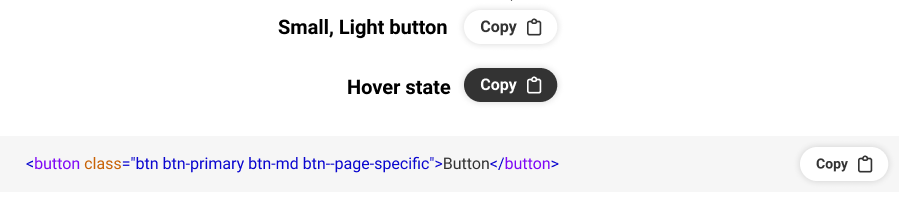
Create new classes to implement the design for the copy button. Afterwards, add the copy button information in the [design system page](https://www.hackforla.org/design-system/components/button.html) as necessary.
The actual implementation of the button on the design page where the button is placed next to the scss code, with the JS functionality of copying the code, should be a separate issue that is dependent on this.
[Figma design](https://www.figma.com/file/0RRPy1Ph7HafI3qOITg0Mr/Hack-for-LA-Website?node-id=12438%3A96181)
Click for screenshot
### Action Items
- [ ] In _buttons.scss, create a new class called `.btn-light` under the Button Colors section
- [ ] This class should have the color properties based on the figma design
- [ ] This class' color properties should change on mouse hover
- [ ] In _buttons.scss, create a new class called `.btn-sm` under Button Sizes section
- [ ] This class should have the proper size and text properties based on the figma design
- [ ] Comment the above classes as necessary in the scss file
- [ ] Update the button.md data file with the proper title, description, and example for the newly created short button class under Sizes
- [ ] Create a new html file under `_includes/design-system-page/examples/buttons` called size-small.html, which should be the referenced example property above
- [ ] Update the button.md data file with the proper title, description, and example for the newly created light button class under Colors
- [ ] Create a new html file under `_includes/design-system-page/examples/buttons` called color-light.html, which should be the referenced example property above
- [ ] Ensure that the new data shows up in your local environment
### Resources/Instructions
[Original issue for design](#2154)
[button.md](https://github.com/hackforla/website/blob/gh-pages/_design-system/components/button.md)
[_includes/design-system-page/examples/buttons directory](https://github.com/hackforla/website/tree/gh-pages/_includes/design-system-page/examples/buttons)
[buttons.scss](https://github.com/hackforla/website/blob/gh-pages/_sass/elements/_buttons.scss)
[Figma design](https://www.figma.com/file/0RRPy1Ph7HafI3qOITg0Mr/Hack-for-LA-Website?node-id=12438%3A96181)
Contributor guide
Assessment
This issue has not been assessed yet.