gregnb / gregnb/mui-datatables
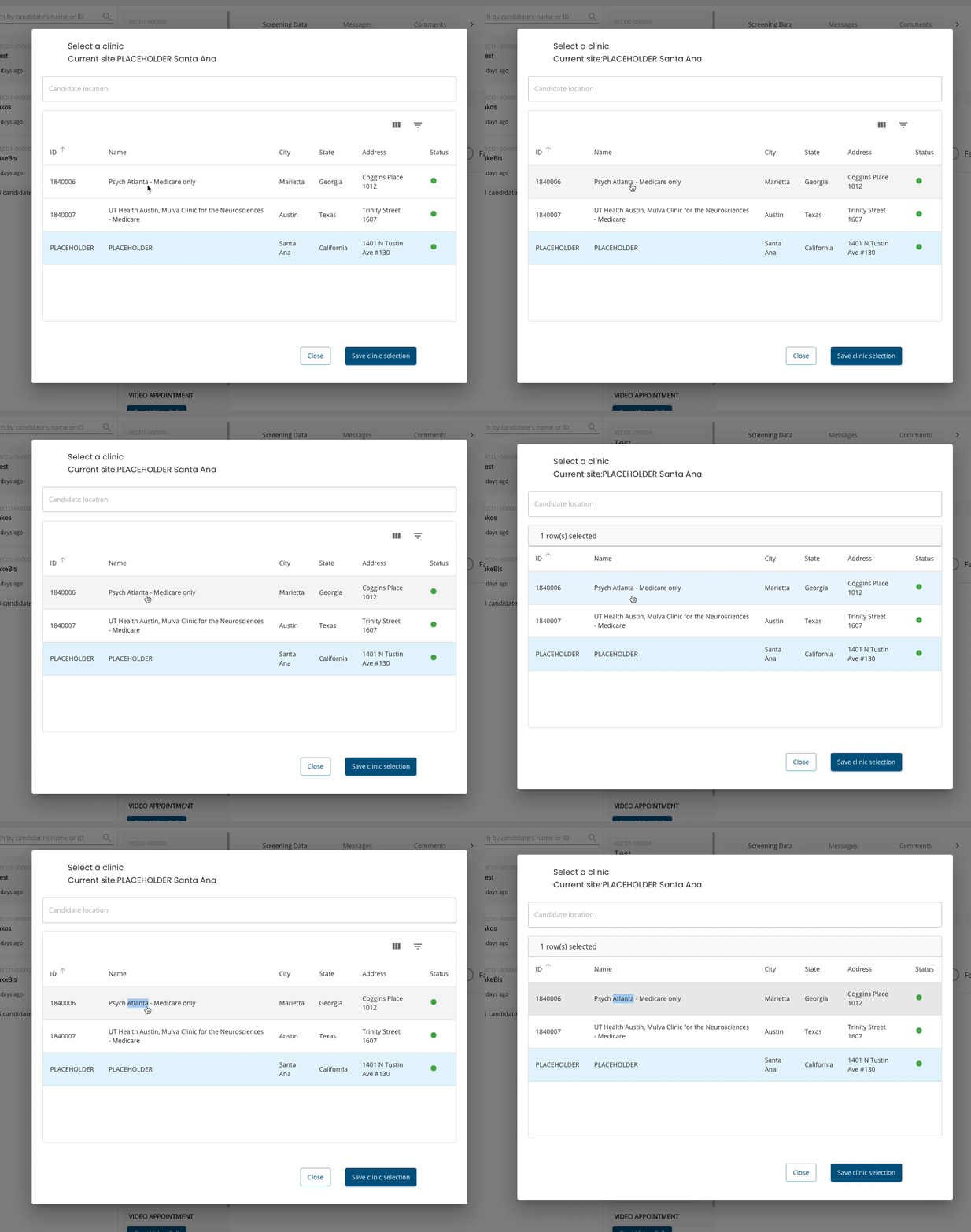
Selecting a row of the table inside a dialog changes the height of the dialog
- Dominant language
- JavaScript
- Stars
- 2.7k
- Forks
- 906
- PR merge metrics
- No merged PRs in 30d
Description
Hello,
The issue I'm having is that when I interact with the table, like selecting a row or removing/adding the filters, the dialog which contains the table changes the height. The dialog is a part of the MUI Core library. Seems the height of the table or one of the components interferes with the height of the dialog. I'm new to MUI in general and don't know how to solve this issue. thank you for the help.
## Expected Behavior
When selecting a row or other table interaction in the table the dialog should keep the same height.
## Current Behavior
Please look at the video
## Steps to Reproduce (for bugs)
No steps but please have a look at my code after line 300 the dialog in details
[Link to code](https://pastebin.com/dj8MEV2M?fbclid=IwAR1LXkiLfBfERCxgvotoa7DCX-PhIy5GsjhopmpGtTqtrSL5XKu77457YB8)
## Your Environment
| Tech | Version |
|--------------|---------|
| Material-UI | ^4.11.3 |
| MUI-datatables | ^3.7.3 |
| React | 16.14.0 |
| browser | chrome, firefox |
| etc | |
Contributor guide
No contributing guide indexed for this repository
Research direction
Start with the linked reproduction code, especially the dialog details after line 300, and compare its behavior when selecting rows or changing filters. Reproduce the issue in the stated Material-UI, MUI-datatables, React, Chrome, or Firefox environment; done means the dialog keeps the same height during those table interactions.
Written by the indexing model from the issue text.
Assessment
- Tech stack
- javascript, react
- Domain
- frontend
- Issue type
- Bug
- Difficulty
- 3/5
- Estimated time
- 1-2 days
- Activity status
- Stale
- Clarity
- Needs clarification
- Newbie friendliness
- 25/100