gregnb / gregnb/mui-datatables
Toolbar Tooltip displays back after using alt + tab command
- Dominant language
- JavaScript
- Stars
- 2.7k
- Forks
- 906
- PR merge metrics
- No merged PRs in 30d
Description
Mui Datatable Toolbar options tooltip issue.
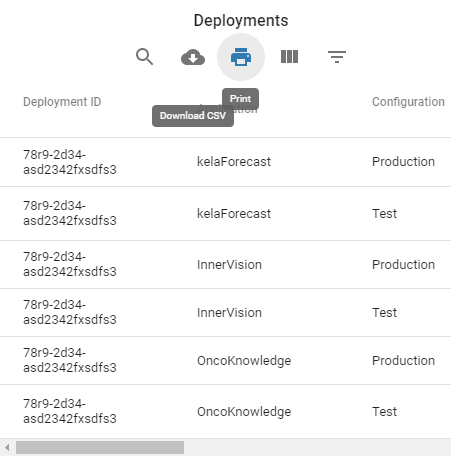
For example, when we click on the download CSV option, the CSV gets download. Now without clicking anywhere on the screen open downloaded CSV. Once the CSV is opened. Now press Alt + Tab command the tooltip will still be displaying.
## Expected Behavior
Once you remove your cursor from the icon the tooltip should disappear.
## Current Behavior
It appears until and unless you click anywhere on the screen
## Steps to Reproduce (for bugs)
1. Click the Download CSV option from the table toolbar
2. Now without any mouse events on the screen, click and open downloaded CSV file
3. Press Alt + Tab command and you will see the tooltip appears again
4. Now if you move your cursor on another icon, 2 tooltips will be appearing, the present one and the previous one
For reference, I am attaching a screenshot of the issue.
Contributor guide
No contributing guide indexed for this repository
Research direction
Reproduce the issue from the toolbar's Download CSV option, then inspect the tooltip behavior around focus changes after opening the downloaded file and returning with Alt+Tab. Done means the tooltip disappears when the pointer leaves the icon and a second tooltip does not remain visible when moving to another icon.
Written by the indexing model from the issue text.
Assessment
- Tech stack
- javascript, react
- Domain
- frontend
- Issue type
- Bug
- Difficulty
- 3/5
- Estimated time
- 1-2 days
- Activity status
- Stale
- Clarity
- Clearly specified
- Newbie friendliness
- 35/100