Cannot build to Apple silicon
Nobody has claimed this yet.
Assessment
- Difficulty
- 4/5
- Estimated time
- 3-5 days
- Newbie friendliness
- 35/100
- Issue type
- Bug
- Clarity
- Mostly clear
- Activity status
- Stale
- Tech stack
- macos, objective-c, unity
- Domain
- build-system, desktop
Research direction
Reproduce the failure in the sample project using Unity 2020.3.30f1 on an M1 Mac, then inspect the native Mac plugin and its Xcode target, which is currently set to macOS 10.13. Confirm whether the missing DLL and target configuration prevent Intel 64-bit plus Apple silicon and Apple silicon builds; done means the sample project builds for both Apple silicon settings.
Written by the indexing model from the issue text.
Description
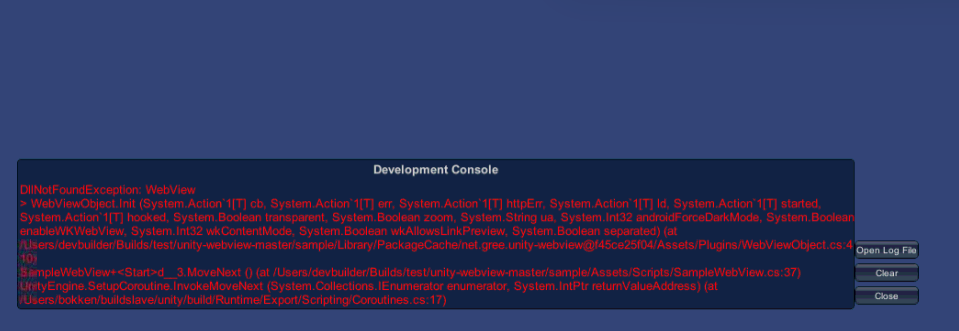
We cannot build to Mac with the Architecture in the Build Settings being set to "Intel 64-bit + Apple silicon", nor to "Apple silicon".
A dll is missing for this. Actually, we think the problem may derive from the fact that in the native code for the Mac plugin the Xcode target is: 10.13. Could you help us with this issue? And probably you should raise it so that Apple silicon should be supported.
We've experienced this problem in the sample project provided here in this repo. We tried to build it from Unity version 2020.3.30f1 and on a Mac Mini with M1 chip running macOS version Monterey 12.4. (On Intel 64-bit there was no problem.)
- Dominant language
- Objective-C++
- Stars
- 2.7k
- Forks
- 734
- Avg merge
- 11h 39m
- Merged PRs (30d)
- 1
Contributor guide
No contributing guide indexed for this repository
First steps
- Read the whole issue, then the project's contributing guide.
- Comment on the issue to say you are picking it up — it saves two people doing the same work.
- Fork the repository and make your change on a branch.
- Open a pull request that references the issue number.
More from gree/unity-webview
-
Difficulty 2/5 1-3 hours Newbie friendliness 55/100
gree/unity-webview#1233 ·
-
Difficulty 3/5 1-2 days Newbie friendliness 42/100
gree/unity-webview#1232 · 1 comment ·
-
[macOS] Buttons and clicks not working in integrated overlay mode (scrolling works) — Editor & Build Open
Difficulty 4/5 3-5 days Newbie friendliness 52/100
gree/unity-webview#1225 · 6 comments ·
-
Difficulty 4/5 3-5 days Newbie friendliness 25/100
gree/unity-webview#1218 · 1 comment ·
-
Difficulty 4/5 3-5 days Newbie friendliness 35/100
gree/unity-webview#1217 · 3 comments ·
All issues in gree/unity-webview
Similar issues
-
comp/dashboard P3 type/bug
Difficulty 2/5 1-3 hours Newbie friendliness 86/100
NousResearch/hermes-agent#117722 ·
-
Needs Design Priority: Wishlist
Difficulty 2/5 1-3 hours Newbie friendliness 84/100
elementary/flatpak-platform#253 ·
-
Difficulty 2/5 1-3 hours Newbie friendliness 78/100
objectionary/hone-maven-plugin#1060 ·
-
0.kind: build failure
Difficulty 2/5 1-3 hours Newbie friendliness 74/100
-
Update Vish to 1.1.5 Openpackage-update
Difficulty 2/5 1-3 hours Newbie friendliness 78/100
oSoWoSo/vOid_Community_repOsitory#144 · 1 comment ·