Grant access for location permission
Nobody has claimed this yet.
- Dominant language
- Objective-C++
- Stars
- 2.7k
- Forks
- 734
- Avg merge
- 11h 39m
- Merged PRs (30d)
- 1
Description
Hello.
Many thanks for this plugin!
Such a great and useful for me.
However, i have a problem when loading a page with GPS Feature in it.
In normal browser (Desktop), if we access a gps web page for example (map.google.com), we are asked about allowing location permission or not. My question is how to do it in this plugin? I mean, i read about Java WebView, they aresdoing this by calling callback.invoke(); How to call a method like that?
example solution from java :
 @Override
 public void onGeolocationPermissionsShowPrompt(
 String origin,GeolocationPermissions.Callback callback) {
 callback.invoke(origin, true, false);
 }
*Example from a normal browser
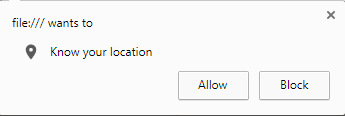
Or if you have another fast solution, i just want it to be always allowed.
PS : I've already put this permission in manifest and nothing worked.
 <uses-permission android:name="android.permission.INTERNET"/>
 <uses-permission android:name="android.permission.ACCESS_NETWORK_STATE"/>
 <uses-permission android:name="android.permission.ACCESS_COARSE_LOCATION"/>
 <uses-permission android:name="android.permission.ACCESS_FINE_LOCATION"/>
 <uses-permission android:name="android.permission.ACCESS_NETWORK_STATE"/>
 <uses-permission android:name="android.permission.ACCESS_GPS" />
 <uses-permission android:name="android.permission.ACCESS_ASSISTED_GPS" />
 <uses-permission android:name="android.permission.ACCESS_LOCATION" />
 <uses-feature android:name="android.hardware.location.gps" />
Is there any solution for this?
I've scrolled to all pages of issue that are similar to me and nothing found. (If im not mistaken)
Thanks again!
Contributor guide
No contributing guide indexed for this repository
First steps
- Read the whole issue, then the project's contributing guide.
- Comment on the issue to say you are picking it up — it saves two people doing the same work.
- Fork the repository and make your change on a branch.
- Open a pull request that references the issue number.
Research direction
The issue names the Unity WebView Android integration and Java WebView geolocation callback, but no repository file or test. First locate the Android WebView permission handling and compare it with the requested callback and runtime location permission flow. Done means a GPS-enabled page receives the intended permission result.
Written by the indexing model from the issue text.
Assessment
- Tech stack
- android, java, unity
- Domain
- mobile
- Issue type
- Feature
- Difficulty
- 4/5
- Estimated time
- 3-5 days
- Activity status
- Stale
- Clarity
- Needs clarification
- Newbie friendliness
- 30/100