need global variables for big data to put it on GPU only once
- Dominant language
- JavaScript
- Stars
- 15.5k
- Forks
- 663
- PR merge metrics
- No merged PRs in 30d
Description
## *What* i am working at?
I am developing a program to visualize voxel data by placing many canvases in space, my voxel data is stored as
`[ [ Int16Array(2), Int16Array(2) ],[ Int16Array(2), Int16Array(2) ] ]` (that is example for 2x2x2px voxel data)
but in real tasks data is often 512x512x512px ( so i need near **256MiB** for this data)
let example of voxel data is `[[ [0,1], [2,3] ],[ [4,5], [6,7] ]]`
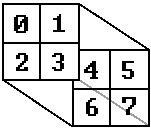
so i have 2 x layers `0: [ [0,4], [2,6] ], 1: [ [1,5], [3,7] ]`
so i have 2 y layers `0: [ [0,1], [4,5] ], 1: [ [2,3], [6,7] ]`
so i have 2 z layers `0: [ [0,1], [2,3] ], 1: [ [4,5], [6,7] ]`
and before placing one layer of voxel data on canvas i need to replace voxel value with color
and for this i have array to replace values to color but in special way:
ColArray example:

(in program it is `Uint8Array([r0,g0,b0,a0, r1,g1,b1,a1, ...])` )
## *What* is wrong?
so to get color value i must do next operations for each voxel

which will do next

what i can do with is gpu.js is for example:
(lenM1 = colArray.lenght - 1, delta = max - min)
```JavaScript
const calc = gpu.createKernel(function(data,min,delta,lenM1) {
return Math.round( (data[this.thread.z][this.thread.y][this.thread.x]-min)/delta*lenM1 )
}, { output: [Xsize,Ysize,Zsize] })
const ColArrayIndexes = calc(...)
```
but if i give data (int16 512x512x512 memory usage **256 MiB**)
and i get result (float32 512x512x512 memory usage **512 MiB**)
and once i get **alocation error** when trying to get result (and that is not PC problem it is js memory managment problem)
also i dont need all result for one layer i need only part of it
Another way to solve the problem was to calc and return only one canvas
```JavaScript
const render = gpu.createKernel(function( data, __ ) {
this.color( __ );
}).setOutput([ __ , __ ]).setGraphical(true);
render();
const pixels = render.getPixels();
// and put pixels to canvas
```
buuuuuut to calc one Canvas i need parts from all data, and if for z layers i can just use js array.slice() method for x and y i need to give all data (i said what are x y and z layers for me near first img)
so when i dive all data (256 MiB) from RAM to GPU memory (if i correctly undarstand how it works) it take some time
and when i want to calc all 512 X layers + all 512 Y layers + all 512 Z layers i give same data (256 MiB) 1536 times and that is not OK and need some time
## *Where* does it happen?
PC:
i7 9700K
RTX 3070
16GB RAM
(but my program also must work normal on mobile and so big memory changes is not good)
## Expected solution
i think that my problem can have solution like this
`const gpu = new GPU();`
```JavaScript
gpu.setGlobalVariable( dataName , data ) // put data to GPU memory
const render = gpu.createKernel(function( ___ ) {
return dataName[] // do some math operations (i need only read, but modify can be also cool and useful)
}).setOutput([ __ , __ ])
gpu.destroyGlobalVariable( dataName ) // delete data from GPU memory
```
also a little better way
```JavaScript
const func = gpu.createKernel(function( data ) {
return data[this.thread.z][this.thread.y][this.thread.x] // some operations with given values
}).setOutput([ __ , __ ]).setOutputIsGPUglobalVariable(true) // function will save result only in GPU memory, and can return some parts of it when it is needed
const CalcResultID = func(data) //return only link on data or function to get parts
// also it is good if can get result of calculations in another GPU functions
gpu.destroyGlobalVariable( CalcResultID ) // delete data from GPU memory
```
Contributor guide
Assessment
This issue has not been assessed yet.