Update "A tag for the selected property already exists" message text
- Dominant language
- JavaScript
- Stars
- 1.4k
- Forks
- 383
- Avg merge
- 4d 14h
- Merged PRs (30d)
- 77
Description
## Feature Description
The current language for the message that displays when the *same* existing UA tag as the one selected in SK settings is detected is:
A tag UA-*** for the selected property already exists on the site.
Make sure you remove it if you want to place the same UA tag via Site Kit, otherwise they will be duplicated.
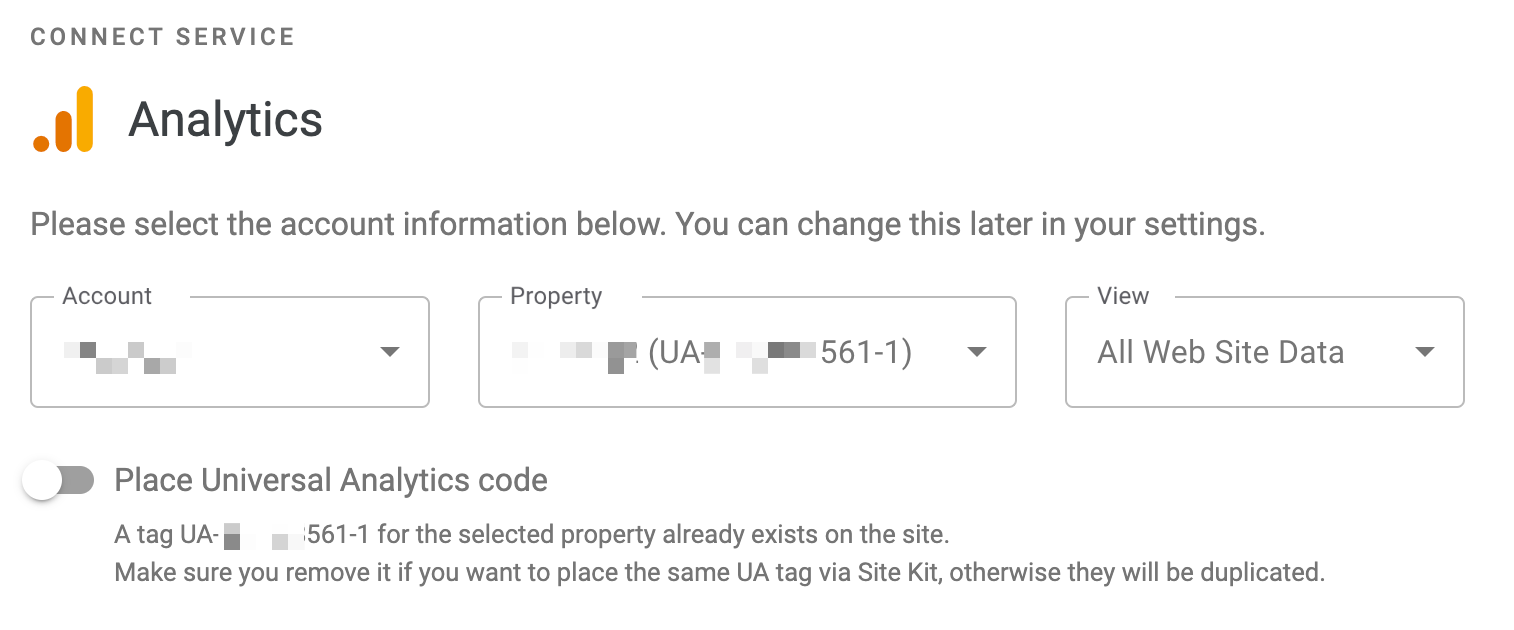
I'd suggest that this should change to:
"A tag for the selected property, UA-***, was found on your site. If you want Site Kit to place the tag for you, remove the existing tag so that it is not duplicated."
@marrrmarrr What do you think? ^^
---------------
_Do not alter or remove anything below. The following sections will be managed by moderators only._
## Acceptance criteria
*
## Implementation Brief
*
### Test Coverage
*
## QA Brief
*
## Changelog entry
*
Contributor guide
Research direction
Locate the existing selected-property duplicate UA tag warning in the Site Kit settings UI. Update its text to match the proposed wording, then verify that the warning displays the new message when the same tag is detected on the site.
Written by the indexing model from the issue text.
Assessment
- Tech stack
- javascript
- Domain
- frontend
- Issue type
- Feature
- Difficulty
- 2/5
- Estimated time
- 1-3 hours
- Activity status
- Stale
- Clarity
- Mostly clear
- Newbie friendliness
- 45/100