when operating “CMake compile and VS2022 Debug build”, meets VS “LNK1107 invalid or corrupt file: cannot read at 0x378” and "gmock_mainpdb_debug_postfix-NOTFOUND.pdb" creates in file systems
- Dominant language
- C++
- Stars
- 39.5k
- Forks
- 10.9k
- Avg merge
- 6d 13h
- Merged PRs (30d)
- 1
Description
Problem:
when operating “CMake compile and VS2022 **Debug** build”, meets VS “LNK1107 invalid or corrupt file: cannot read at 0x378” and "gmock_mainpdb_debug_postfix-NOTFOUND.pdb" creates in file systems
Environment:
Win10
Process:
1 CMake
Choose VS2022, x64
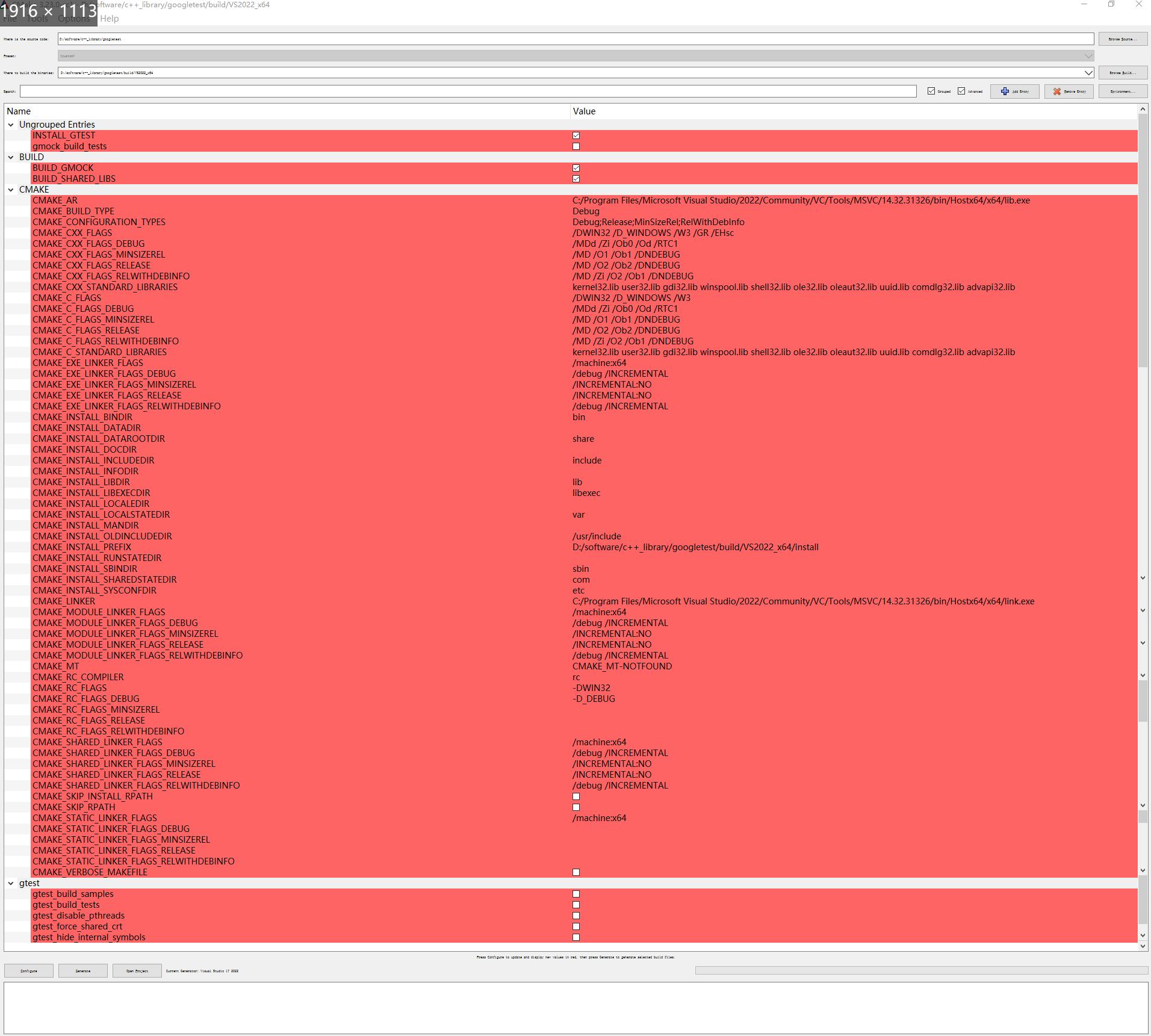
[CMakeCache.txt](https://github.com/google/googletest/files/8760946/CMakeCache.txt)
2 VS
output:
```
Build started...
1>------ Build started: Project: ZERO_CHECK, Configuration: Debug x64 ------
1>Checking Build System
2>------ Build started: Project: gtest, Configuration: Debug x64 ------
3>------ Build started: Project: gmock_main, Configuration: Debug x64 ------
4>------ Build started: Project: gmock, Configuration: Debug x64 ------
2>Building Custom Rule D:/software/c++_library/googletest/googletest/CMakeLists.txt
2>gtest-all.cc
3>Building Custom Rule D:/software/c++_library/googletest/googlemock/CMakeLists.txt
4>Building Custom Rule D:/software/c++_library/googletest/googlemock/CMakeLists.txt
3>gtest-all.cc
4>gtest-all.cc
3>gmock-all.cc
4>gmock-all.cc
2> Creating library D:/software/c++_library/googletest/build/VS2022_x64_Debug/lib/Debug/gtest.lib and object D:/software/c++_library/googletest/build/VS2022_x64_Debug/lib/Debug/gtest.exp
3>gmock_main.cc
4>Generating Code...
2>gtest.vcxproj -> D:\software\c++_library\googletest\build\VS2022_x64_Debug\bin\Debug\gtest.dll
3>Generating Code...
5>------ Build started: Project: gtest_main, Configuration: Debug x64 ------
5>Building Custom Rule D:/software/c++_library/googletest/googletest/CMakeLists.txt
4> Creating library D:/software/c++_library/googletest/build/VS2022_x64_Debug/lib/Debug/gmock.lib and object D:/software/c++_library/googletest/build/VS2022_x64_Debug/lib/Debug/gmock.exp
5>gtest_main.cc
4>gmock.vcxproj -> D:\software\c++_library\googletest\build\VS2022_x64_Debug\bin\Debug\gmock.dll
3> Creating library D:/software/c++_library/googletest/build/VS2022_x64_Debug/lib/Debug/gmock_main.lib and object D:/software/c++_library/googletest/build/VS2022_x64_Debug/lib/Debug/gmock_main.exp
3>gmock_main.vcxproj -> D:\software\c++_library\googletest\build\VS2022_x64_Debug\bin\Debug\gmock_main.dll
5> Creating library D:/software/c++_library/googletest/build/VS2022_x64_Debug/lib/Debug/gtest_main.lib and object D:/software/c++_library/googletest/build/VS2022_x64_Debug/lib/Debug/gtest_main.exp
5>gtest_main.vcxproj -> D:\software\c++_library\googletest\build\VS2022_x64_Debug\bin\Debug\gtest_main.dll
6>------ Build started: Project: ALL_BUILD, Configuration: Debug x64 ------
6>Building Custom Rule D:/software/c++_library/googletest/CMakeLists.txt
========== Build: 6 succeeded, 0 failed, 0 up-to-date, 0 skipped ==========
```
File in Path:
```
Directory of D:\software\c++_library\googletest\build\VS2022_x64_Debug\bin\Debug
2022/05/24 16:36 .
2022/05/24 16:36 ..
2022/05/24 16:36 1,411,584 gmock.dll
2022/05/24 16:36 8,622,080 gmockpdb_debug_postfix-NOTFOUND.pdb
2022/05/24 16:36 1,413,120 gmock_main.dll
2022/05/24 16:36 8,671,232 gmock_mainpdb_debug_postfix-NOTFOUND.pdb
2022/05/24 16:36 1,148,416 gtest.dll
2022/05/24 16:36 7,147,520 gtestpdb_debug_postfix-NOTFOUND.pdb
2022/05/24 16:36 206,336 gtest_main.dll
2022/05/24 16:36 2,682,880 gtest_mainpdb_debug_postfix-NOTFOUND.pdb
```
3. VS runs cpp files

cpp files has #include
4. build using Release
If use Release, no xxx.pdb creates)
Problem:

cpp
```
#include
TEST(a,b) {
EXPECT_EQ(1, 1);
EXPECT_TRUE(true);
}
int main()
{
//testing::InitGoogleTest();
//testing::FLAGS_gtest_filter="";
//testing::FLAGS_gtest_filter=testing::FLAGS_gtest_filter + ":TestFuncBasic.*";
return RUN_ALL_TESTS();
}
```
4. Others
a. If use VS2019, this problem also happens.
b. If not use build_gmock, this problem also happens.
c. If not use build_share_libs, no dll files creates.
Contributor guide
Research direction
Start with the repository CMakeLists.txt files and the supplied CMakeCache.txt, then reproduce the VS2022 x64 Debug build on Windows. Compare the generated Debug PDB names and linker inputs with the reported LNK1107 error; done means the Debug build produces correctly named outputs and the sample test builds and runs without the error.
Written by the indexing model from the issue text.
Assessment
- Tech stack
- cmake, cpp
- Domain
- build-system, testing-qa
- Issue type
- Bug
- Difficulty
- 4/5
- Estimated time
- 3-5 days
- Activity status
- Stale
- Clarity
- Mostly clear
- Newbie friendliness
- 35/100