Open Sans: combining acute accent does not render correctly
- Dominant language
- HTML
- Stars
- 20.5k
- Forks
- 2.9k
- Avg merge
- 1d 21h
- Merged PRs (30d)
- 95
Description
I am trying to display this chacter: "ą́" (SMALL LETTER A WITH OGONEK + COMBINING ACUTE ACCENT) using Open Sans font. It does not render correctly neither in Firefox nor Google Chrome.
Here is an example: http://robinski.org/share/open-sans-error.html
And a screenshot:
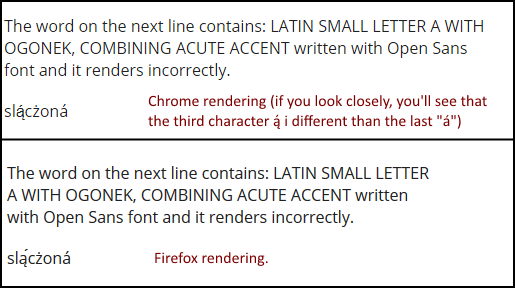
The combination of SMALL LETTER A WITH OGONEK + COMBINING ACUTE ACCENT renders properly using the Open Sans font installed on a local system (NOT using the Google Fonts CSS rules). Open Sans includes the COMBINING ACUTE ACCENT codepoint, but the Google Fonts @font-face rules split the font across multiple faces using unicode-range, and do not include the COMBINING ACUTE ACCENT in the face that has A WITH OGONEK. As a result, font fallback comes into effect. This is because although the "original" Open Sans font would be able to display this combination just fine, the sliced-up version deployed by Google Fonts cannot handle it and so Chrome and Firefox chooses an alternate font for the entire cluster.
Please fix the CSS stylesheet for Open Sans font (https://fonts.googleapis.com/css?family=Open+Sans) so that it properly renders combining acute accent.
Contributor guide
Assessment
This issue has not been assessed yet.