godotengine / godotengine/godot
get_vertex_uv seems to return improper values
- Dominant language
- C++
- Stars
- 117k
- Forks
- 26.8k
- PR merge metrics
- PR metrics pending
Description
### Tested versions
4.3 stable
### System information
Godot v4.3.stable - Linux Mint 22 (Wilma) - X11 - Vulkan (Forward+) - dedicated NVIDIA GeForce RTX 3080 Laptop GPU - AMD Ryzen 9 5900HX with Radeon Graphics (16 Threads)
### Issue description
A lot of copy/paste from godot forums, but as there was no reply, and the more I dig into this, the more I'm thinking it's potentially a bug:
I’ve been trying to utilize “live” painting effects in the game I’m working on, and am running into some trouble. I found this useful project someone worked on a while back, but it’s unfortunately in Godot 3, which I’m working in 4.3 ( Project: [Godot Engine In-game Splat Map Texture Painting (Dirt Removal Effect) - Alfred Reinold Baudisch 1](https://alfredbaudisch.com/blog/gamedev/godot-engine/godot-engine-in-game-splat-map-texture-painting-dirt-removal-effect/) )
I managed to convert the shader and scripts over to Godot 4 compatible format, and the game works and shader looks correct in all the ways - even confirmed w/ a custom mask on it. However, I’m running into one issue: Clicking doesn’t seem to paint on the object. I was able to narrow it down to get_vertex_uv, and found something super confusing, in which I’m seeing no other people mention - so wondering if this is something I’m doing wrong in my conversion of this code, or if it's a unique enough scenario that no one's noticed until now(?)
Basically, I’ve got the get_uv_coords method that was written, as the following:
```gdscript
func get_uv_coords(point, normal, transform = true) -> Vector2:
# Gets the uv coordinates on the mesh given a point on the mesh and normal
# these values can be obtained from a raycast
transform_vertex_to_global = transform
var face = get_face(point, normal)
if face.is_empty():
return -Vector2.ONE
var bc = face[2]
var uv1 = meshtool.get_vertex_uv(_local_face_vertices[face[0]][0])
var uv2 = meshtool.get_vertex_uv(_local_face_vertices[face[0]][1])
var uv3 = meshtool.get_vertex_uv(_local_face_vertices[face[0]][2])
return (uv1 * bc.x) + (uv2 * bc.y) + (uv3 * bc.z)
```
I added some debug statements and all that to right before get_vertex_uv, and compared the conversion to the original project in a separate installation of Godot 3… And I verified the face values and all that are exactly the same, however, get_vertex_uv in Godot 4 keeps returning values like the following to me:
image
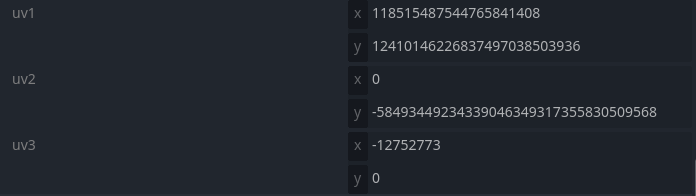
What reasons would this method result in such crazy values, and is there a different way I should be doing this check to get the uv coordinate in Godot 4 vs. 3? Or is this just a bug no one’s reported (and if so - any suggestions on a way around it?)
### Steps to reproduce
See post above, try to call get_vertex_uv on valid coordinates to see it potentially fail
### Minimal reproduction project (MRP)
[GodotRuntimeTextureSplatMapPainting.zip](https://github.com/user-attachments/files/18002123/GodotRuntimeTextureSplatMapPainting.zip)
Contributor guide
Research direction
Start by running the attached GodotRuntimeTextureSplatMapPainting.zip reproduction and inspect the calls to get_vertex_uv in get_uv_coords. Compare the Godot 4 results with the Godot 3 project while checking the supplied face vertices and expected UV range. Done means establishing whether the behavior is a Godot bug or a conversion/API usage issue and documenting the result.
Written by the indexing model from the issue text.
Assessment
- Tech stack
- godot
- Domain
- computer-graphics, game-dev
- Issue type
- Bug
- Difficulty
- 4/5
- Estimated time
- 3-5 days
- Activity status
- Stale
- Clarity
- Mostly clear
- Newbie friendliness
- 35/100