godotengine / godotengine/godot-docs
New default "Attach Node Script" path causes warning not mentioned in tutorial
- Dominant language
- reStructuredText
- Stars
- 5.7k
- Forks
- 3.8k
- Avg merge
- 1d 20h
- Merged PRs (30d)
- 25
Description
**Your Godot version:** 4.2.2
**Issue description:**
Tutorial has:
> Change the Template field from "Node: Default" to "Object: Empty" to start with a clean file. Leave the other options set to their default values and click the Create button to create the script.
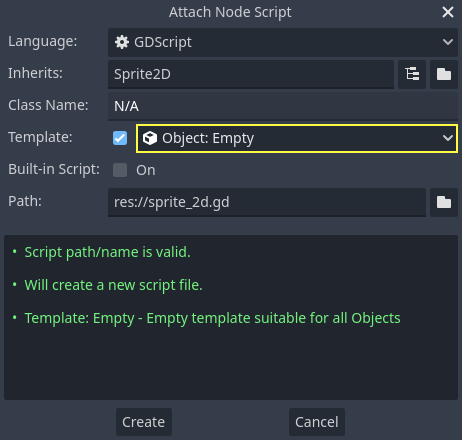
What actually happens:

**URL to the documentation page:** https://docs.godotengine.org/en/stable/getting_started/step_by_step/scripting_first_script.html#creating-a-new-script
It's not clear why the name defaults to `res://Sprite2D.gd` but if you change it to `sprite_2d` to match the tutorial screenshot, the result is pretty close (except the last line, "Template: ...," is now grey instead of green). But the tutorial says, "Leave the other options set to their default values."
So...should the default behaviour of Godot be reverted since it causes a warning, or should the tutorial instructions be updated?
If the latter, maybe the warning could be explained. It's not clear why exactly it's "usually not desired" nor in what case it might actually be desired despite the warning.
Thanks team, you're awesome :heart:
Contributor guide
No contributing guide indexed for this repository
Assessment
This issue has not been assessed yet.