godotengine / godotengine/godot-docs
Light/Dark theme switch
- Dominant language
- reStructuredText
- Stars
- 5.7k
- Forks
- 3.8k
- Avg merge
- 1d 20h
- Merged PRs (30d)
- 25
Description
**Your Godot version:** 4.0.dev
**Issue description:**
I know that Godot Docs detects the browser theme to use but when using privacy-focused browsers it's kinda hard to turn the dark theme.
LibreWolf has built-in feature for resisting fingerprinting that forces light theme ([FAQ](https://gitlab.com/librewolf-community/settings/-/wikis/FAQ#how-do-i-prevent-rfp-resist-fingerprinting-from-forcing-light-theme)), there is a way to change it to dark theme, but it's not recommended.
In Ungoogled-Chromium flatpak version it's using light theme too. To enable dark theme there, they need to edit `~/.var/app/com.github.Eloston.UngoogledChromium/config/chromium-flags.conf` and add the following lines:
```
--force-dark-mode
--enable-features=WebUIDarkMode
```
Many people are not aware of how to do this, and it's not a problem for them as many websites have a light/dark theme switch.
I tried extensions such as DarkReader, but the theme from them is not looking as good as the official one.
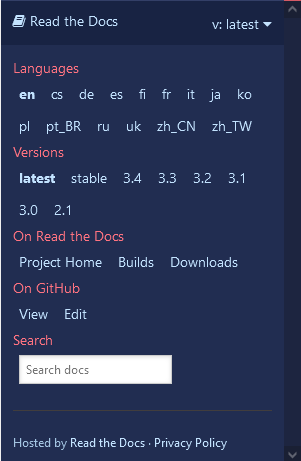
I suggest adding a tiny switch somewhere in this menu:
Contributor guide
No contributing guide indexed for this repository
Assessment
This issue has not been assessed yet.