Authorizing a provider already used by another Gitpod account shows confusing popup
Open
Nobody has claimed this yet.
meta: never-stale
team: webapp
- Dominant language
- TypeScript
- Stars
- 13.8k
- Forks
- 1.4k
- Avg merge
- 17h 58m
- Merged PRs (30d)
- 5
Description
To Reproduce
- Login to Gitpod
- Go to settings, integrations
- Connect to another provider using a login for which you already have a different Gitpod account
Questions about the popup (below)
- What will happen when you press Continue?
- Will something get disconnected?
- Will you be logged out from the current account, and logged into the other account?
- What does it mean to select the "Other Account"
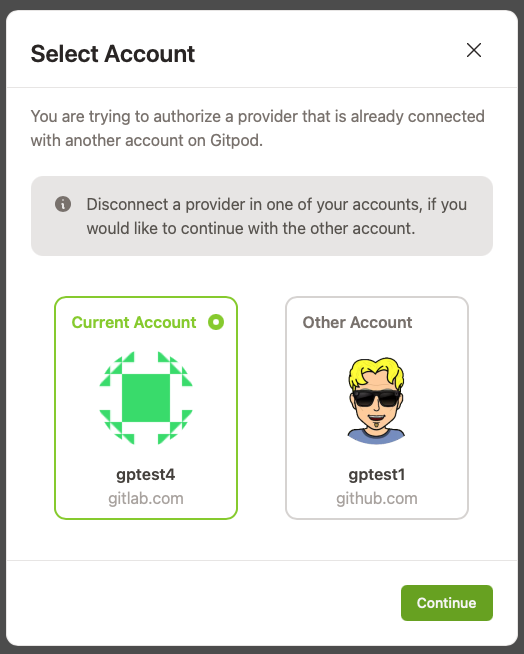
Suggestion
Treat the situation as simple error notification:
Error: you are trying to authorize a provider that is already connected with another Gitpod account.
To connect with this provider account, you'll first need to login to Gitpod and disconnect or delete the other account.
Contributor guide
First steps
- Read the whole issue, then the project's contributing guide.
- Comment on the issue to say you are picking it up — it saves two people doing the same work.
- Fork the repository and make your change on a branch.
- Open a pull request that references the issue number.
Research direction
Start by reproducing the settings integrations flow and reviewing the popup shown when a provider is already connected to another Gitpod account. Update the experience so it clearly explains the authorization conflict and the required account action, then verify the wording and behavior through the reproduction steps.
Written by the indexing model from the issue text.
Assessment
- Tech stack
- typescript
- Domain
- authentication, frontend
- Issue type
- Bug
- Difficulty
- 3/5
- Estimated time
- 1-2 days
- Activity status
- Stale
- Clarity
- Mostly clear
- Newbie friendliness
- 42/100