Prebuild displays wrong time it took for prebuild
Nobody has claimed this yet.
- Dominant language
- TypeScript
- Stars
- 13.8k
- Forks
- 1.4k
- Avg merge
- 17h 58m
- Merged PRs (30d)
- 5
Description
Bug description
I noticed it especially on long prebuilds, it is the same when starting a manual prebuild via URL, or by pushing a commit to a branch and using the Gitpod Projects UI -
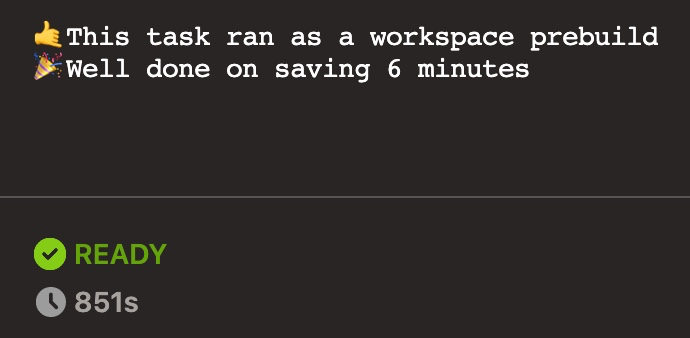
You can see the prebuild took 851 seconds (a little over 14 minutes), but the terminal interface (which will be displayed when anyone open a workspace) displays a much shorter time - Well done on saving 6 minutes
Steps to reproduce
- Fork https://github.com/shaal/DrupalPod (or any other repo with a long
initstart task in.gitpod.yml) - Open a new project for the repo in https://gitpod.io/projects
- Push a commit to a branch
- Wait for prebuild to finish
- Compare the time in terminal display (
Well done on saving x minutes) vs. the display below terminal.
Workspace affected
No response
Expected behavior
No response
Example repository
No response
Anything else?
No response
Contributor guide
First steps
- Read the whole issue, then the project's contributing guide.
- Comment on the issue to say you are picking it up — it saves two people doing the same work.
- Fork the repository and make your change on a branch.
- Open a pull request that references the issue number.
Research direction
Reproduce the discrepancy using a repository with a long init start task in .gitpod.yml, either through the Gitpod Projects UI or a manual prebuild URL. Compare the terminal's “Well done on saving x minutes” value with the prebuild duration shown below the terminal; done means both displays report the same elapsed time.
Written by the indexing model from the issue text.
Assessment
- Tech stack
- typescript
- Domain
- cloud
- Issue type
- Bug
- Difficulty
- 3/5
- Estimated time
- 1-2 days
- Activity status
- Stale
- Clarity
- Needs clarification
- Newbie friendliness
- 35/100