Jira: Select Different Workflows for Different Issue Resolutions
- Dominant language
- Python
- Stars
- 44.8k
- Forks
- 4.9k
- Avg merge
- 1d 5h
- Merged PRs (30d)
- 624
Description
### Problem Statement
Currently, if I resolve an Issue using the one of the following options, I am only able to select one workflow for Jira integrations based only if the Issue was Resolved or Unresolved.
Options for resolutions:
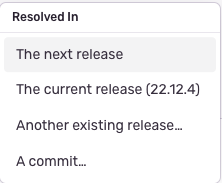
Options for Jira workflow:

In essence, I only have one option for the workflow even though I have multiple options for how to resolve.
### Solution Brainstorm
Ideally, I would like to be able to select a different Jira workflow for each different resolution. For example, if I choose to resolve to "The current release...", I would have an option in the Jira integration to create a separate workflow for this resolution vs any other type of resolution.
Possible setup would look something like this:
- Resolved In... The next release --> Jira ticket would be "Closed"
- Resolved In... The current release --> Jira ticket would be "Pending Current Release"
- Resolved In... Another existing release --> Jira ticket would be "Pending Next Release"
┆Issue is synchronized with this [Jira Improvement](https://getsentry.atlassian.net/browse/FEEDBACK-1698) by [Unito](https://www.unito.io)
Contributor guide
Assessment
This issue has not been assessed yet.