getgrav / getgrav/grav-plugin-admin
Problem with slug-conversion of titles / folder names
- Dominant language
- PHP
- Stars
- 377
- Forks
- 225
- Avg merge
- 11h 51m
- Merged PRs (30d)
- 4
Description
I want to create a new folder, give it a name (e.g. 'New Folder') and hit save.
It seems like grav or grav's admin plugin has a problem with the conversion of titles / folder names – these are no longer slugified like in past versions (in this case I expected "/new-folder" but I got "/new folder" with spaces instead).
Meanwhile the 'Folder Name' is converted to 'New folder' instead of 'New Folder'.
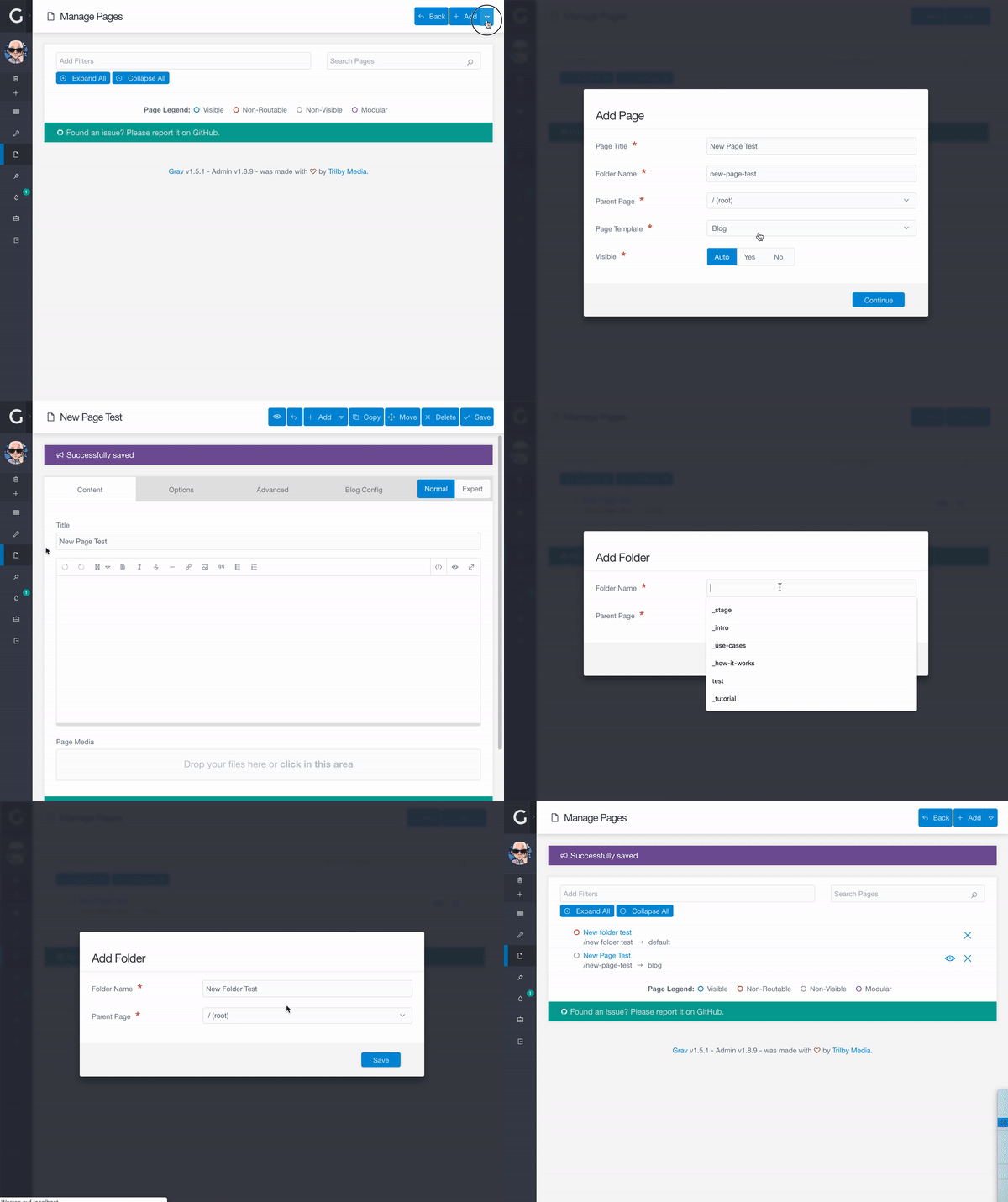
When I click on the folder's name in the page list, I get to its 'edit' view (grav/admin/pages/new%20folder) where the 'Title' is empty (instead of showing 'New Folder'). When I click on 'Advanced', I see the correct title under Settings / Folder Name.
In an earlier test, a new created folder and/or page suddenly 'disappearing' its title/name and link (similar to the case described here https://github.com/getgrav/grav-plugin-admin/issues/1327) when I switched from the 'edit page' view back to the page list view / overview.
My configuration:
* I tested it with a blank Grav installation (with the default theme)
* Grav v1.5.1
* Admin v1.8.9
* I had this issue locally as well as on my live site
UPDATE:
I also tested with an older configuration – with the same results:
* Grav v1.4.7
* Admin v1.8.3
I also recently found slightly different 'symptoms' which I think might be related to the issue described in this post: Here https://github.com/getgrav/grav-theme-antimatter/issues/139 and here https://discourse.getgrav.org/t/modular-title-and-content-cannot-be-saved-disappear-after-saving/7339
Contributor guide
Assessment
This issue has not been assessed yet.