get-convex / get-convex/convex-agent-plugins
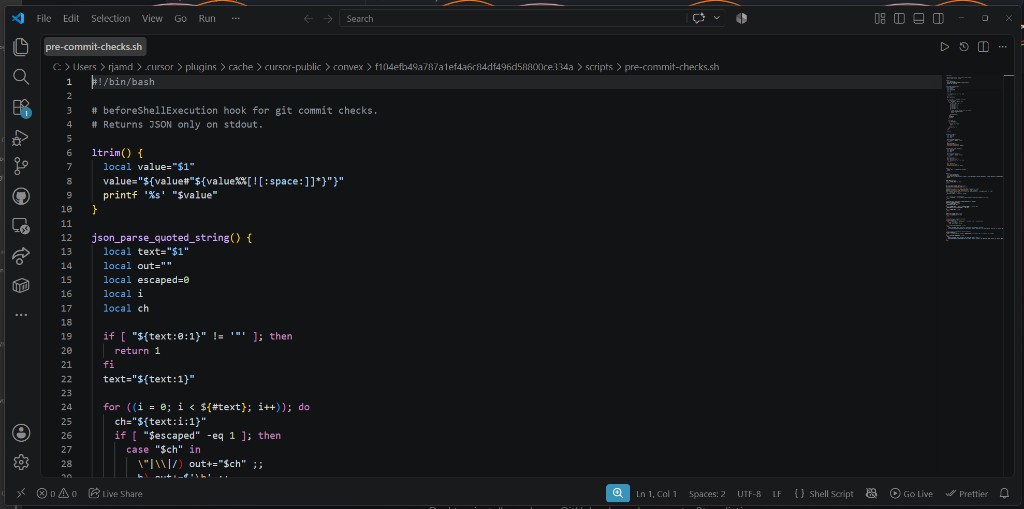
Windows: beforeShellExecution hook opens pre-commit-checks.sh in editor on git commit
- Dominant language
- Shell
- Stars
- 110
- Forks
- 13
- Avg merge
- 13m
- Merged PRs (30d)
- 3
Description
## Summary
On Windows, the Convex Cursor plugin's `beforeShellExecution` hook does not run silently. When `git commit` is executed (agent terminal or integrated terminal), Cursor **opens the plugin's `pre-commit-checks.sh` as a normal editor tab** and steals focus. The tab points at the plugin cache under `%USERPROFILE%\.cursor\plugins\cache\cursor-public\convex\\scripts\`, not at the user's project.
This is a disruptive UX failure distinct from "hook didn't run": the user is yanked out of their workflow into vendor hook source they never asked to see. Pre-commit Convex checks likely never execute on Windows.
## Environment
- **OS:** Windows 11 (Build 26200)
- **Editor:** Cursor (VS Code fork)
- **Plugin:** Convex Cursor marketplace plugin (`hooks.json` → `beforeShellExecution`)
- **Hook command:** `./scripts/pre-commit-checks.sh`
- **Project:** Any workspace containing a `convex/` directory (reproduced on [FoodTruckNerdz/ftn-site](https://github.com/FoodTruckNerdz/ftn-site))
## Steps to reproduce
1. Install the Convex Cursor plugin from the marketplace (includes `hooks.json` with a `beforeShellExecution` matcher on `git commit`).
2. Open a repo that has a `convex/` folder.
3. Stage changes and run `git commit` — from the **agent shell** or the integrated terminal.
4. Observe the editor.
## Expected behavior
- The hook runs headlessly, reads stdin JSON, prints allow/deny JSON to stdout, and exits.
- No editor tab opens; the user's focus stays on their work.
- Convex lint rules (`Date.now()` in queries, `.filter()` on `db.query()`) are enforced or skipped silently when not applicable.
## Actual behavior
- Cursor opens **`pre-commit-checks.sh`** as an editor tab.
- Breadcrumb path:
`C:\Users\\.cursor\plugins\cache\cursor-public\convex\\scripts\pre-commit-checks.sh`
- The `` folder changes when the plugin updates (e.g. `f104efb49a787a1ef4a6c84df496d58800ce334a`), so the tab path looks like a new file each time.
- The tab shows the bash hook source (`#!/bin/bash`, `# beforeShellExecution hook for git commit checks.`).
- This happens on **every** commit attempt that matches the hook — not only when the user explicitly opens the file.

## Impact
- **Workflow interruption:** git commit (often via agent) suddenly surfaces unrelated plugin internals.
- **Checks probably skipped:** Windows does not execute `.sh` the way macOS/Linux do; the hook likely never returns allow/deny JSON, so the intended guard may not run at all.
- **Confusing attribution:** looks like the agent or project opened a random script; the real source is the Convex plugin cache.
## Relationship to #8
[#8](https://github.com/get-convex/convex-agent-plugins/issues/8) reports that the hook "fails on Windows" and that Windows may prompt to open the `.sh` file. This report focuses on the **observed user-facing presentation**:
| #8 framing | This report |
| --- | --- |
| Hook fails cross-platform | **Editor tab steals focus** on every matching `git commit` |
| Execution / interpreter problem | **Visual impact** — user lands in vendor hook source under `.cursor\plugins\cache\` |
| Single failure mode | Recurring, hash-suffixed cache paths make it look like new mystery files |
Same probable root cause (bash-only hook invoked as `./scripts/pre-commit-checks.sh` on Windows), but the **primary bug from a user perspective** is unwanted editor navigation during normal commits, not just silent failure.
## Suggested fix
- Replace the bash-only hook with a **cross-platform runner** (Node script is fine — Convex projects already depend on Node), or invoke bash explicitly when available with a Windows-safe fallback.
- Until fixed, document that the Windows hook is disabled/broken and provide an opt-out in plugin settings so users are not surprised by editor tabs.
## Workaround
- Disable the Convex plugin's `beforeShellExecution` hook in **Cursor → Settings → Hooks**, or uninstall/disable the Convex plugin hook entry.
- Rely on the always-on Convex ESLint/rules in the plugin instead of the commit gate (loses automatic commit blocking).
Contributor guide
Research direction
Start by inspecting hooks.json and scripts/pre-commit-checks.sh, then reproduce the matching git commit on Windows from the agent or integrated terminal. Trace how the hook is invoked and verify that it reads stdin, returns allow/deny JSON, runs or skips the checks appropriately, and never opens the script as an editor tab.
Written by the indexing model from the issue text.
Assessment
- Tech stack
- shell
- Domain
- developer-experience, tooling
- Issue type
- Bug
- Difficulty
- 4/5
- Estimated time
- 3-5 days
- Activity status
- Active
- Clarity
- Mostly clear
- Newbie friendliness
- 55/100