Inconsistent test results after upgrading to 5.3.0 with docker
- Dominant language
- JavaScript
- Stars
- 7.2k
- Forks
- 621
- PR merge metrics
- No merged PRs in 30d
Description
Somewhat similar to #1298 ...
I'm getting random errors in my tests where the page is rendered in a really weird state.
e.g. when rendering a desktop view the menu is rendered correctly with an input field for the search, but the page content is rendered like it would on a smartphone.
My testcase:
1. change version in package.json
2. rm yarn.lock
3. yarn install
4. yarn run backstop reference --docker --config=x --filter=1page
5. yarn run backstop test --docker --config=x --filter=1page
6. (repeat last step 4 more times)
Results vary depending on backstopjs version:
5.0.7 => All tests succeed
5.1.0 => All tests succeed
5.2.1 => Error: Cannot find module 'puppeteer'
5.3.0 =>
| viewport | Run 1 | Run 2 | Run 3 | Run 4 | Run 5 |
| ---- | ---- | ---- | ---- | ---- | ----
| 400px | ✅ |✅ |✅ | ✅ | ✅ |
| 800px |❌ | ❌ | ❌ | ❌ | ✅ |
| 1024px |❌ | ❌ | ❌ | ❌ | ❌ |
| 1440px | ✅ | ❌ | ❌ | ✅ | ❌ |
i.e. only smartphone is working
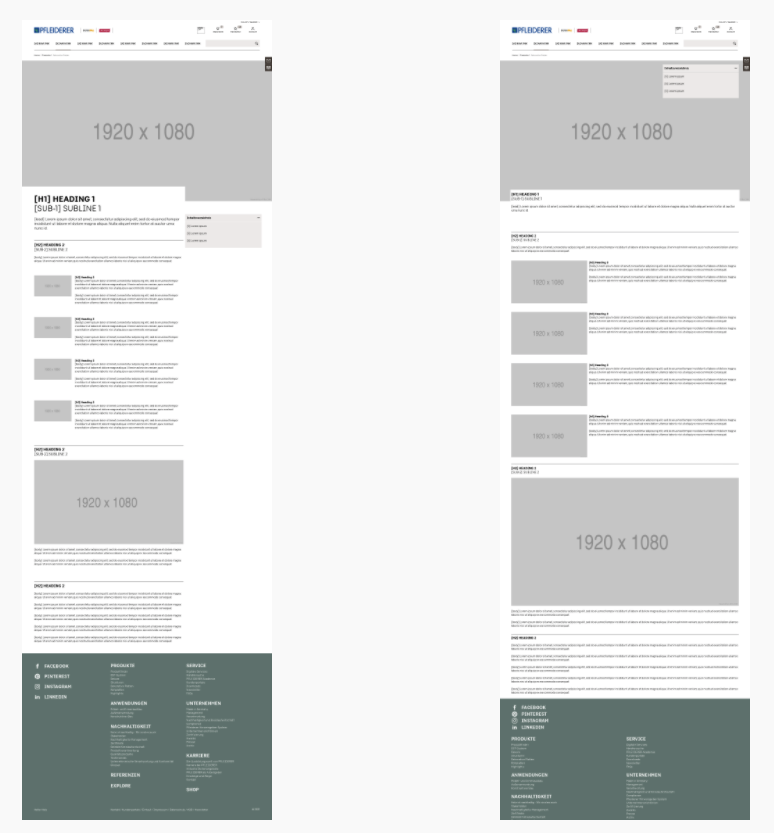
Here is an example of one image generated correctly and another for the same viewport wrong; notice that the right image is also cut off at the bottom; There is a line missing with the copyright notice etc.
Contributor guide
Research direction
Start with package.json and yarn.lock, then reproduce the five-run matrix using the listed BackstopJS versions and the `--docker --config=x --filter=1page` commands. Compare the viewport results and generated images across runs; done means the same viewport renders consistently after upgrading to 5.3.0.
Written by the indexing model from the issue text.
Assessment
- Tech stack
- docker, javascript
- Domain
- testing-qa
- Issue type
- Bug
- Difficulty
- 4/5
- Estimated time
- 3-5 days
- Activity status
- Stale
- Clarity
- Needs clarification
- Newbie friendliness
- 25/100