galaxyproject / galaxyproject/training-material
I want help with Making sense of a newly assembled genome tutorial
- Dominant language
- HTML
- Stars
- 367
- Forks
- 1.1k
- Avg merge
- 16h 27m
- Merged PRs (30d)
- 49
Description
Hello everyone
I faced a problem with the output of "Search in textfiles (grep)" tool in this tutorial exactly with the “Regular Expression”: ^>
the output is empty, i dont have experince with this Regular Expressions but when i deleted the Regular Expression the uotput of the tool showed three lines as follows:
CP020543.1
CP024090.1
LT906474.1
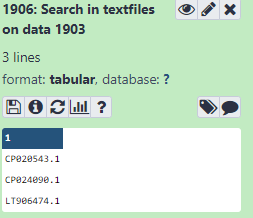
however in tutorial it should be come like this

>CP020543.1
>CP024090.1
>LT906474.1
i continued the tutorial but that made problems in next steps in particular with IGV browser
Thank you in advanced for your help
Contributor guide
Research direction
Start by reproducing the “Search in textfiles (grep)” step in the Making sense of a newly assembled genome tutorial, using the shown regular expression ^>. Review the existing issue discussion and tutorial instructions around that step. Done means the output includes the expected FASTA header lines and the following IGV browser steps work as documented.
Written by the indexing model from the issue text.
Assessment
- Domain
- documentation
- Issue type
- Bug
- Difficulty
- 3/5
- Estimated time
- 1-2 days
- Activity status
- Stale
- Clarity
- Needs clarification
- Newbie friendliness
- 25/100