fuzhengwei / fuzhengwei/blog.github.io
Spring cloud(六)《基于github webhook动态刷新服务配置》 - bugstack虫洞栈
- Dominant language
- HTML
- Stars
- 14
- Forks
- 7
- PR merge metrics
- No merged PRs in 30d
Description
https://bugstack.cn/2019/11/06/Spring-Cloud(%E5%85%AD)-%E5%9F%BA%E4%BA%8EGithub-Webhook%E5%8A%A8%E6%80%81%E5%88%B7%E6%96%B0%E6%9C%8D%E5%8A%A1%E9%85%8D%E7%BD%AE.html
前言介绍
在实际开发中经常会有一个叫做配置中心的服务,这个服务经过变更参数来动态刷新线上业务数据行为配置。比如;行为开关、活动数据、黑白名单、本地/预发/线上环境切换等等,这些配置信息往往需要在我们不重启系统的时候就可以被更新执行。那么我们一般会使用具备此类属性在分布式系统中适合的组件进行开发配置中心,像是zookeeper、redis发布订阅、或者http定时轮许拉取,他们都可以做成统一配置中心服务。而在Spring Cloud Config 中,默认采用 Git 来存储配置信息,所以使用 Spring Cloud Config 构建的配置服务器,天然就支持对微服务应用配置信息的版本管理,在加上Github的Webhook钩子服务,可以在我们push等行为操作的时候,自动执行我们的http行为,以达到自动刷新配置服务。
环境准备
- jdk 1.8、idea2018、Maven3
- Spring Boot 2.0.6.RELEASE
- Spring Cloud Finchley.SR2
- 需要有一个Git帐号,用来创建配置中心以及开启Webhooks服务,添加回调
案例说明
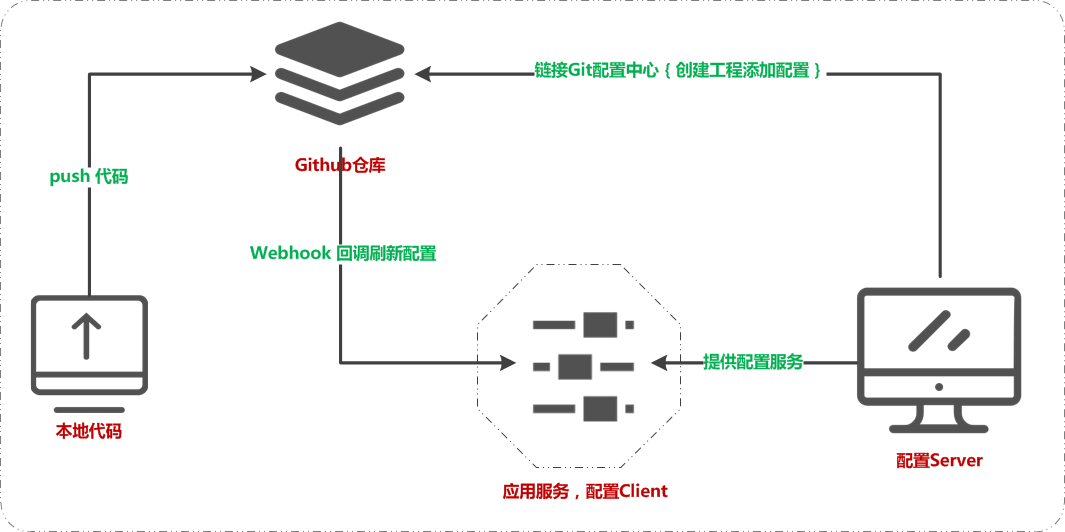
通过在个人Git创建配置服务工程,开启Webhooks服务添加回调钩子http://xxx:port/actuator/refresh在更新配置后自动刷新服务配置内容,如图;
代码示例
itstack-demo-springcloud-06

├── itstack-demo-springcloud-config-client

│   └── src

│       └── main

│           ├── java

│           │   └── org.itstack.demo

│           │        ├── web

│           │        │   └── ConfigClientController.java

│           │        └── ConfigClientApplication.java

│           └── resources

│               ├── application.yml

│               └── bootstrap.yml

└── itstack-demo-springcloud-config-server

    └── src

        └── main

            ├── java

            │   └── org.itstack.demo

            │        └── ConfigServerApplication.java

            └── resources

                └── application.yml
完整代码欢迎关注公众号:bugstack虫洞栈 回复“SpringCloud专题”进行下载
itstack-demo-springcloud-config-client | 配置获取客户端方,提供自动刷新Http
web/ConfigClientController.java & 添加注解@RefreshScope自动刷新配置
/**

 * 微信公众号:bugstack虫洞栈 | 沉淀、分享、成长,专注于原创专题案例

 * 论坛:http://bugstack.cn

 * Create by 付政委 on @2019

 */

@RestController

@RefreshScope

public class ConfigClientController {

    @Value("${info.profile:error}")

    private String profile;

    @GetMapping("/config")

    public Mono<String> config() {

        return Mono.justOrEmpty(profile);

    }

}
ConfigClientApplication.java & 普通配置即可
/**

 * 微信公众号:bugstack虫洞栈 | 沉淀、分享、成长,专注于原创专题案例

 * 论坛:http://bugstack.cn

 * Create by 付政委 on @2019

 */

@SpringBootApplication

public class ConfigClientApplication {

    public static void main(String[] args) {

        SpringApplication.run(ConfigClientApplication.class, args);

    }

}
application.yml & 需要配置endpoints,这样才可以暴漏刷新服务
spring:

  application:

    name: itstack-demo-springcloud-config-client

server:

  port: 9001

# /actuator/refresh 这个 Endpoint 暴露出来

management:

  endpoints:

    web:

      exposure:

        include: refresh
bootstrap.yml & 配置中心服务配置,http://localhost:7397
spring:

  cloud:

    config:

      uri: http://localhost:7397  # 配置中心的具体地址;itstack-demo-springcloud-config-server

      name: config-client         # 对应 {application} 部分,例如;config-client-dev = 只取最后一个符号'-'之前的

      profile: dev                # 对应 {profile} 部分

      label: master               # 对应 {label} 部分,即 Git 的分支。如果配置中心使用的是本地存储,则该参数无用

#配置文件会被转换成 Web,访问规则如下;

#/{application}/{profile}[/{label}]

#/{application}-{profile}.yml

#/{label}/{application}-{profile}.yml

#/{application}-{profile}.properties

#/{label}/{application}-{profile}.properties
itstack-demo-springcloud-config-server | 配置提供服务端方,链接Git配置工程地址
ConfigServerApplication.java & 添加注解@EnableConfigServer设置成配置服务中心
/**

 * 微信公众号:bugstack虫洞栈 | 沉淀、分享、成长,专注于原创专题案例

 * 论坛:http://bugstack.cn

 * Create by 付政委 on @2019

 */

@SpringBootApplication

@EnableConfigServer

public class ConfigServerApplication {

    public static void main(String[] args) {

        SpringApplication.run(ConfigServerApplication.class, args);

    }

}
application.yml &
server:

  port: 7397

spring:

  application:

    name: itstack-demo-springcloud-config

  cloud:

    config:

      server:

        git:

          uri: https://github.com/fuzhengwei/itstack-demo-config  # 换成自己的配置Git仓库的地址,如果没有可以新建工程地址,也可以克隆我的

          search-paths: config-repo                               # Git仓库地址下的底层配置文件名称,如果配置多个用逗号','分割。

# 如果配置中心需要访问权限,则开启配置

# spring.cloud.config.server.git.username:Github账户

# spring.cloud.config.server.git.password:Github密码
测试验证
- 准备好自己Github的配置仓库,也可以克隆我的Git;https://github.com/fuzhengwei/itstack-demo-config {有一组配置配置文件}
- 配置Webhooks,在https://github.com/换你自己的fuzhengwei/换你自己的itstack-demo-netty/settings/hooks/new
- 分别启动服务
- itstack-demo-springcloud-config-server 配置Server
- itstack-demo-springcloud-config-client 配置Client
- 访问配置服务,端口7397;http://localhost:7397/config-client/dev
- 访问结果
 {

     "name": "config-client",

     "profiles": [

         "dev"

     ],

     "label": null,

     "version": "ea0b1a1017595d542aa01b8b2bda68f9620dd81a",

     "state": null,

     "propertySources": [

         {

             "name": "https://github.com/zhaoyibo/spring-cloud-study/config-repo/config-client-dev.yml",

             "source": {

                 "info.profile": "dev bus"

             }

         }

     ]

}- 访问规则{配置文件会被转换成 Web 接口,规则如下}
- /{application}/{profile}[/{label}]
- /{application}-{profile}.yml
- /{label}/{application}-{profile}.yml
- /{application}-{profile}.properties
- /{label}/{application}-{profile}.properties
- 访问配置文件;http://localhost:8080/config-client-dev.yml {可以直接访问查看配置信息}
 info:

     profile: dev bus
- 访问使用配置的客户端,端口9001;http://localhost:9001/config {可以提交配置代码反复刷新测试}
dev bus
综上总结
- Spring Cloud Config 可以很方便的依赖于Github提供的回调钩子进行更新配置,同时也支持本地配置
- Webhooks 不止可以用于变更配置,还可以用于一起启动触发工程打包部署发布的行为
- 不要局限于知识点,往往每一个新知识所带来的架构设计更值得学习,这些都可以灵活的用于项目系统中
上一篇:Spring Cloud(五)《Turbine 监控信息聚合展示 Hystrix》
微信搜索「bugstack虫洞栈」公众号,关注后回复「SpringCloud专题」获取本文源码&更多原创专题案例!
Contributor guide
No contributing guide indexed for this repository
Assessment
This issue has not been assessed yet.