Using s3fs with MinIO: FileNotFoundError when running s3fs locally, but works with boto3 and also with s3fs in Docker-compose setup
Nobody has claimed this yet.
- Dominant language
- Python
- Stars
- 1k
- Forks
- 305
- Avg merge
- 22h 37m
- Merged PRs (30d)
- 4
Description
Friends, cross-posting from https://stackoverflow.com/questions/75913127/using-s3fs-with-minio-filenotfounderror-when-running-s3fs-locally-but-works-wi , hope this is acceptable:
I'm trying to access files in a MinIO bucket using s3fs. The code works with boto3 locally and also with s3fs when using a docker-compose setup. However, when I try to run s3fs locally, I get a FileNotFoundError.
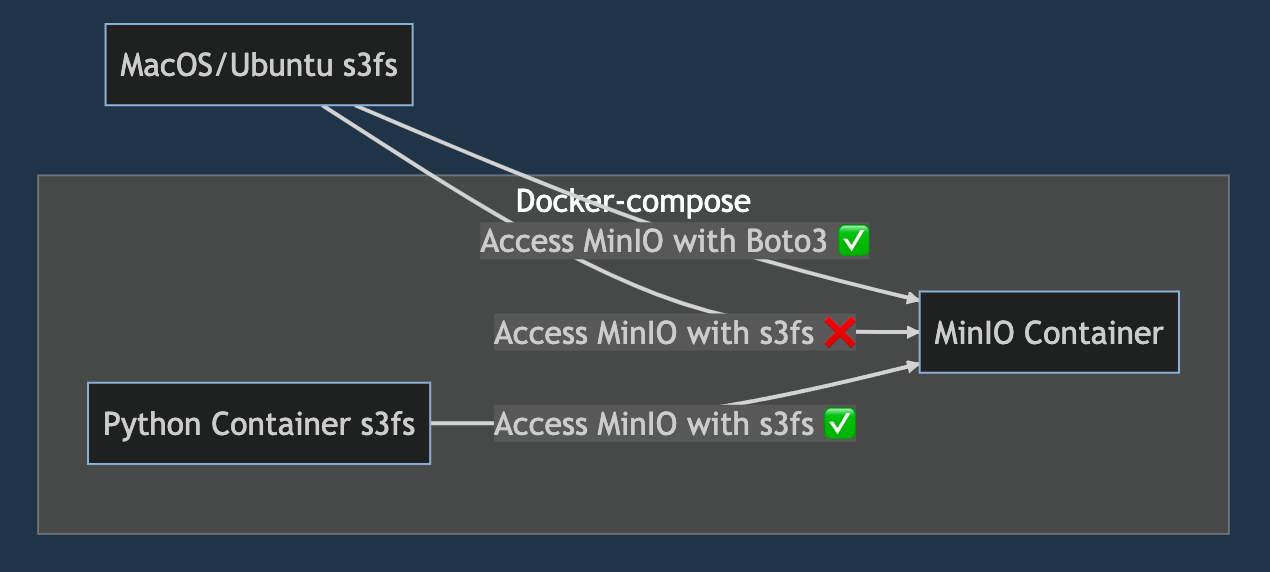
Here's the working code using boto3:
import boto3
from io import BytesIO
access_key = 'TEST_MINIO_USER'
secret_key = 'TEST_MINIO_PASSWORD'
endpoint_url = 'http://localhost:9000'
s3 = boto3.client('s3', endpoint_url=endpoint_url, aws_access_key_id=access_key, aws_secret_access_key=secret_key)
bucket_name = 'test-bucket'
file_key = '01_raw/companies.csv'
file_content = BytesIO()
s3.download_fileobj(bucket_name, file_key, file_content)
file_content.seek(0)
print(file_content.read().decode('utf-8'))
...
14296,,Netherlands,4.0,f
...
Here's the non-working code using s3fs:
import s3fs
fs = s3fs.S3FileSystem(
     key=access_key,
     secret=secret_key,
     client_kwargs={'endpoint_url': endpoint_url}
 )
file_path = f"{bucket_name}/{file_key}"
with fs.open(file_path, 'r') as file:
     file_content = file.read()
This throws the following error:
s3fs/core.py", line 1294, in _info
    raise FileNotFoundError(path)
FileNotFoundError: test-bucket/01_raw/companies.csv
Listing bucket items also doesn't work:
>>> for obj in s3.list_objects(Bucket=bucket_name)['Contents']:
...     print(obj['Key'])

01_raw/companies.csv

>>> for file in fs.ls(bucket_name):
...     print(file)
What's interesting here is that when both my s3fs process and minio run in a docker-compose setup, then it works fine.
At the moment, I want to only run minio in a container and s3fs on my MacOS (have also reproduced on Ubuntu). It works fine with boto3, but s3fs leaves me hanging, as illustrated above.
I've also compared s3fs versions inside and outside of my container:
% venv/bin/python -m pip freeze | grep boto3
boto3==1.26.104
% venv/bin/python -m pip freeze | grep s3fs
s3fs==2023.3.0
root@921ef19d6ce6:# pip freeze | grep s3fs
s3fs==2023.3.0
Any ideas for how to fix would be greatly appreciated. :)
Contributor guide
First steps
- Read the whole issue, then the project's contributing guide.
- Comment on the issue to say you are picking it up — it saves two people doing the same work.
- Fork the repository and make your change on a branch.
- Open a pull request that references the issue number.
Research direction
Start with s3fs/core.py at _info and reproduce the local MinIO setup using the shown S3FileSystem, fs.open, and fs.ls calls. Compare those results with the working boto3 listing, then define done as correctly finding and listing 01_raw/companies.csv in the local setup with a regression test for the reported FileNotFoundError.
Written by the indexing model from the issue text.
Assessment
- Tech stack
- python
- Domain
- cloud
- Issue type
- Bug
- Difficulty
- 4/5
- Estimated time
- 3-5 days
- Activity status
- Stale
- Clarity
- Needs clarification
- Newbie friendliness
- 30/100