formulahendry / formulahendry/vscode-code-runner
[Bug]
- Dominant language
- TypeScript
- Stars
- 2.4k
- Forks
- 351
- PR merge metrics
- No merged PRs in 30d
Description
- VS Code Version: 1.48.1
- OS Version: Windows 10 pro
- Code Runner Version: 0.11.0
**Description:**
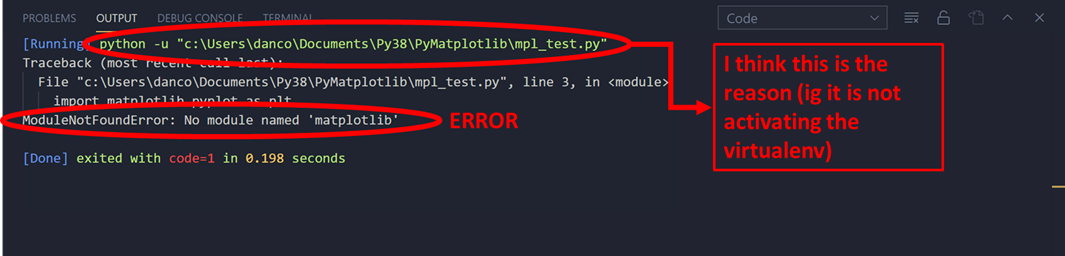
It seems that Code Runner does not recognize python virtual environments, I am trying to run a MatPlotLib script in Code Runner and it says that there is no matplotlib module installed. I know it is installed in the virtual environment because if I run the same script in the integrated terminal (with the virtualenv activated) it works perfectly. It just doesn't recognize the interpreter that vscode uses automatically. note: I have tried many packages, none of them works.
**To Reproduce**
1. Have python3 installed and in PATH variable
2. Create a virtualenv with pipenv (That is the one that I am using)
3. Install any package in that env
4. Create new file in vscode and select the interpreter that contains the PIPENV VENV
5. Write `import {packagename}` in the file
5. Run code with Code Runner using CTRL+ALT+N shortcut
**Actual behavior**
It tells that {packagename} is not installed although you have it installed in the venv (you can check it running it directly in the integrated terminal with f5)
**Expected behavior**
It should pop no problem.
**Screenshots**
Test file (it shows the correct interpreter that has been automatically selected by vscode)

running in Code Runner extension:
Contributor guide
No contributing guide indexed for this repository
Assessment
This issue has not been assessed yet.