formulahendry / formulahendry/vscode-code-runner
File/Folder Structure when running Python ?
- Dominant language
- TypeScript
- Stars
- 2.4k
- Forks
- 351
- PR merge metrics
- No merged PRs in 30d
Description
Hello.
A quick question on running Python code and how 'code runner' uses directories:
I have a following folder structure:
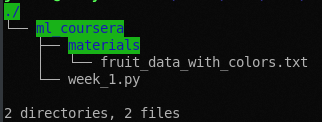
Then I reference the .txt file in week_1.py like this:
`fruits = pd.read_csv('materials/fruit_data_with_colors.txt', sep='\t')`
And it fails as the file is not found if I use 'code runner' from VS.
If I run this in terminal, it finds the file and executes correctly.
For VSCode/Code Runner I have to use strange structure like this to make it work:
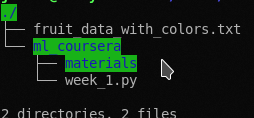
And then reference the file like this:
`fruits = pd.read_csv('fruit_data_with_colors.txt', sep='\t')`
It works, even though that .txt file is not local to .py file
How can I make it understand where I am running my code from and pick up local files/folders accordingly?
Contributor guide
No contributing guide indexed for this repository
Assessment
This issue has not been assessed yet.