forcedotcom / forcedotcom/devops-center-feedback
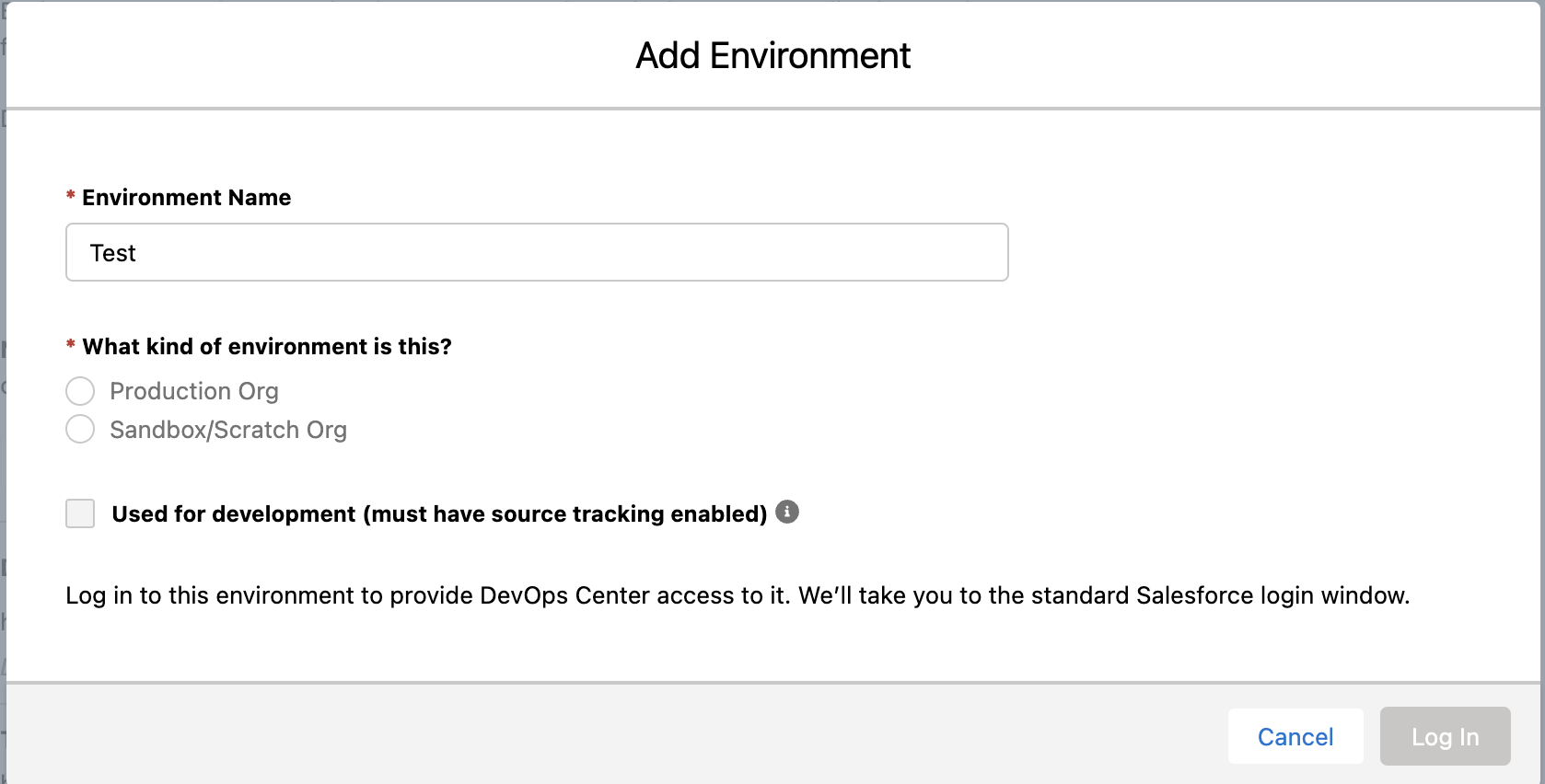
Under Add Environment, environment type labels are light grey, look disabled
- Dominant language
- No language data
- Stars
- 61
- Forks
- 2
- PR merge metrics
- No merged PRs in 30d
Description
**Describe the bug**
When filling out the Add Environments modal, I noticed that the text is greyer than you'd expect for the environment type selector (the help text at the bottom of the modal body is darker than it). Even though the radio buttons visibly auto-enable after setting an Environment Name, it's possible to miss this and think the buttons are still disabled.
**To Reproduce**
Steps to reproduce the behavior:
1. Go to Project > Settings > Add Environment.
2. In the modal, set an Environment Name.
3. Under "What kind of environment is this?", select one of the options.
**Expected behavior**
The text should not be darker, and honestly the radio buttons probably don't need to depend on the Environment Name (the validation for the Log In button should just depend on both Environment Name and Type being set properly).
**Screenshots**
**Additional context**
Obviously this is a bit of a nitpick, but I figured it's worth mentioning.
Contributor guide
Assessment
This issue has not been assessed yet.