fluttercommunity / fluttercommunity/chewie
m3u8 video not playing properly in iOS, aspect ratio coming 1, there is one loading indicator while video is playing
- Dominant language
- Dart
- Stars
- 2.1k
- Forks
- 1.1k
- Avg merge
- 6d 8h
- Merged PRs (30d)
- 6
Description
Hi, I am facing some issues playing m3u8 video in iOS using Chewie
1. Video Aspect Ratio coming wrong i.e 1 (Video size width & height coming 0)
2. There is always one loading indicator while video is playing, play pause option comes only if i drag seek bar
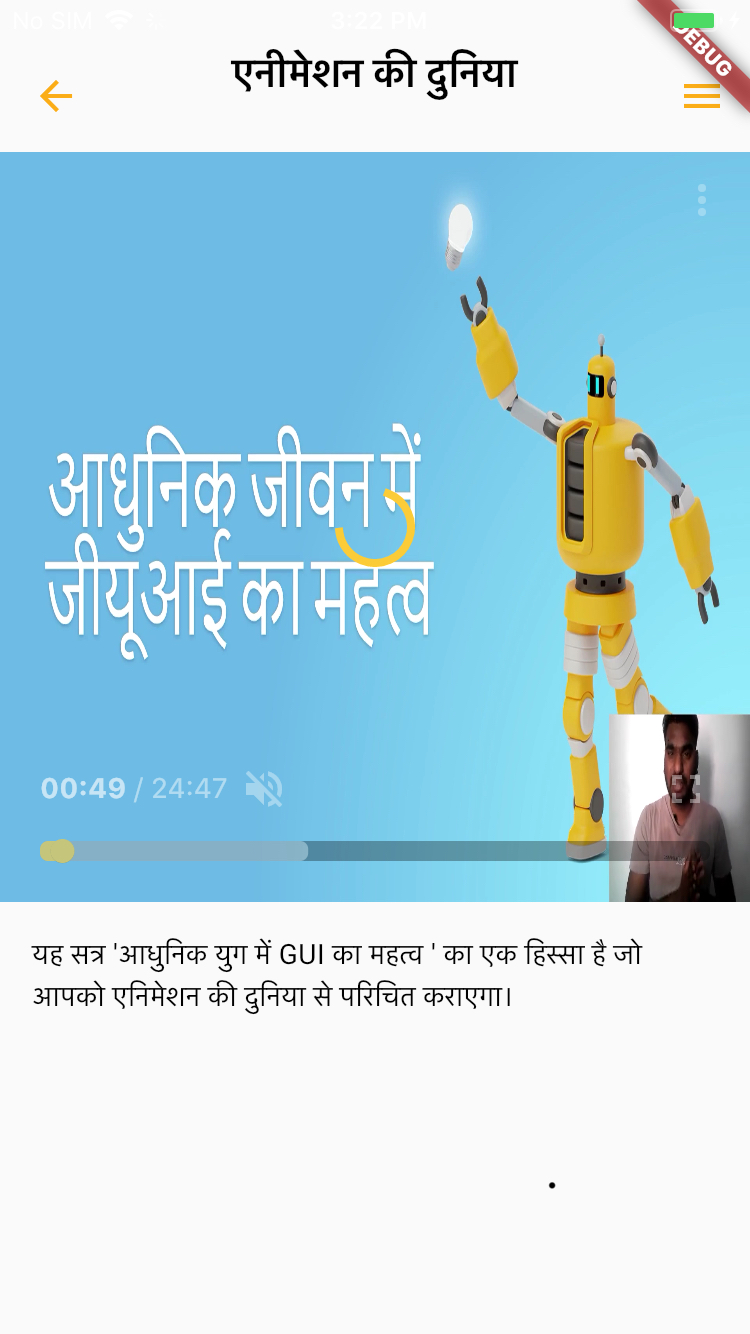
Device Info: iPhone6 12.5.5
chewie: ^1.3.3
video_player: ^2.2.17
[✓] Flutter (Channel stable, 2.5.0, on macOS 12.4 21F79 darwin-x64, locale en-IN)
• Flutter version 2.5.0 at /Volumes/Macintosh HD - Data/flutter
• Upstream repository https://github.com/flutter/flutter.git
• Framework revision 4cc385b4b8 (9 months ago), 2021-09-07 23:01:49 -0700
• Engine revision f0826da7ef
• Dart version 2.14.0
[!] Android toolchain - develop for Android devices (Android SDK version 30.0.3)
• Android SDK at /Users/flutter-dev/Library/Android/sdk
✗ cmdline-tools component is missing
Run `path/to/sdkmanager --install "cmdline-tools;latest"`
See https://developer.android.com/studio/command-line for more details.
✗ Android license status unknown.
Run `flutter doctor --android-licenses` to accept the SDK licenses.
See https://flutter.dev/docs/get-started/install/macos#android-setup for more details.
[!] Xcode - develop for iOS and macOS
• Xcode at /Applications/Xcode.app/Contents/Developer
• Xcode 13.4, Build version 13F17a
✗ CocoaPods not installed.
CocoaPods is used to retrieve the iOS and macOS platform side's plugin code that responds to your plugin usage on the Dart side.
Without CocoaPods, plugins will not work on iOS or macOS.
For more info, see https://flutter.dev/platform-plugins
To install see https://guides.cocoapods.org/using/getting-started.html#installation for instructions.
[✓] Chrome - develop for the web
• Chrome at /Applications/Google Chrome.app/Contents/MacOS/Google Chrome
[✓] Android Studio (version 4.1)
• Android Studio at /Applications/Android Studio.app/Contents
• Flutter plugin can be installed from:
🔨 https://plugins.jetbrains.com/plugin/9212-flutter
• Dart plugin can be installed from:
🔨 https://plugins.jetbrains.com/plugin/6351-dart
• Java version OpenJDK Runtime Environment (build 1.8.0_242-release-1644-b3-6915495)
Contributor guide
No contributing guide indexed for this repository
Assessment
This issue has not been assessed yet.