flutter / flutter/flutter-intellij
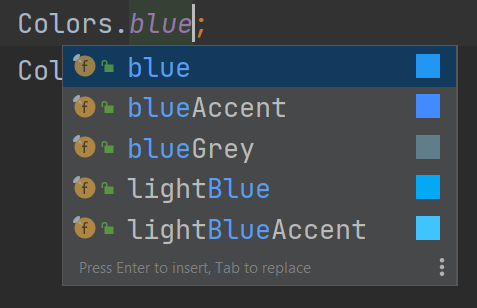
Actual colors of the colors shades should be visible on the code completion menu
- Dominant language
- Java
- Stars
- 2k
- Forks
- 356
- Avg merge
- 1d 11h
- Merged PRs (30d)
- 27
Description
## Steps to Reproduce
1. Code is `Colors.blue.shade`
2. Open the code completion
#### Expected:
To see all shades, along their _colors_, similar to
#### Actual:
The colors of individual shades is not shown.
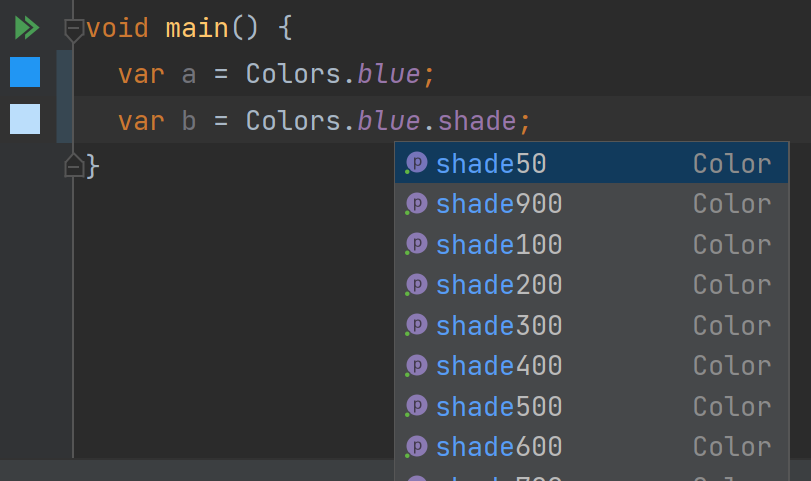
Interestingly, the color is shown in the gutter, but not in code completion.
## Version info
doctor -v
```
[√] Flutter (Channel master, 2.11.0-0.0.pre.869, on Microsoft Windows [Version 10.0.19042.1466], locale en-US)
• Flutter version 2.11.0-0.0.pre.869 at c:\use\flutter
• Upstream repository https://github.com/asashour/flutter.git
• Framework revision 1223e87f7b (3 hours ago), 2022-03-10 21:09:49 -0800
• Engine revision 6239bfb884
• Dart version 2.17.0 (build 2.17.0-182.0.dev)
• DevTools version 2.11.1
[!] Android toolchain - develop for Android devices (Android SDK version 32.0.0)
• Android SDK at C:\Users\ahmed_ashour\AppData\Local\Android\Sdk
X cmdline-tools component is missing
Run `path/to/sdkmanager --install "cmdline-tools;latest"`
See https://developer.android.com/studio/command-line for more details.
X Android license status unknown.
Run `flutter doctor --android-licenses` to accept the SDK licenses.
See https://flutter.dev/docs/get-started/install/windows#android-setup for more details.
[√] Chrome - develop for the web
• Chrome at C:\Program Files\Google\Chrome\Application\chrome.exe
[√] Visual Studio - develop for Windows (Visual Studio Community 2019 16.11.2)
• Visual Studio at C:\Program Files (x86)\Microsoft Visual Studio\2019\Community
• Visual Studio Community 2019 version 16.11.31624.102
• Windows 10 SDK version 10.0.19041.0
[√] Android Studio (version 2021.1)
• Android Studio at C:\Program Files\Android\Android Studio
• Flutter plugin can be installed from:
https://plugins.jetbrains.com/plugin/9212-flutter
• Dart plugin can be installed from:
https://plugins.jetbrains.com/plugin/6351-dart
• Java version OpenJDK Runtime Environment (build 11.0.11+9-b60-7590822)
[√] IntelliJ IDEA Community Edition (version 2021.3)
• IntelliJ at C:\Program Files\JetBrains\IntelliJ IDEA Community Edition 2021.2.1
• Flutter plugin version 65.2.4
• Dart plugin version 213.7227
[√] IntelliJ IDEA Ultimate Edition (version 2022.1)
• IntelliJ at C:\Program Files\JetBrains\IntelliJ IDEA 221.3427.89
• Flutter plugin can be installed from:
https://plugins.jetbrains.com/plugin/9212-flutter
• Dart plugin version 221.3427.93
[√] VS Code (version 1.64.2)
• VS Code at C:\Users\ahmed_ashour\AppData\Local\Programs\Microsoft VS Code
• Flutter extension version 3.34.0
[√] Connected device (4 available)
• Android SDK built for x86 (mobile) • emulator-5554 • android-x86 • Android 11 (API 30) (emulator)
• Windows (desktop) • windows • windows-x64 • Microsoft Windows [Version 10.0.19042.1466]
• Chrome (web) • chrome • web-javascript • Google Chrome 99.0.4844.51
• Edge (web) • edge • web-javascript • Microsoft Edge 99.0.1150.30
[√] HTTP Host Availability
• All required HTTP hosts are available
! Doctor found issues in 1 category.
```
Contributor guide
Assessment
This issue has not been assessed yet.