firebase / firebase/firebase-tools-ui
Documents do not show up in Emulator UI
- Dominant language
- TypeScript
- Stars
- 291
- Forks
- 74
- PR merge metrics
- No merged PRs in 30d
Description
**Describe the bug**
Firestore emulator only shows top level collections. No documents or subcollections. Documents added by client or firebase functions do not show up either. Documents are present since I can query them but I had to set `experimentalAutoDetectLongPolling` to `true` to be able to do that. Without setting that to true I got the below error:
```
[2022-09-04T20:22:11.598Z] @firebase/firestore: Firestore (9.9.4): Could not reach Cloud Firestore backend. Backend didn't respond within 10 seconds.
This typically indicates that your device does not have a healthy Internet connection at the moment. The client will operate in offline mode until it is able to successfully connect to the backend.
```
**To Reproduce**
Steps to reproduce the behavior:
- Will add soon
**Expected behavior**
Documents show up in emulator UI and experimentalAutoDetectLongPolling should be false
**Screenshots**
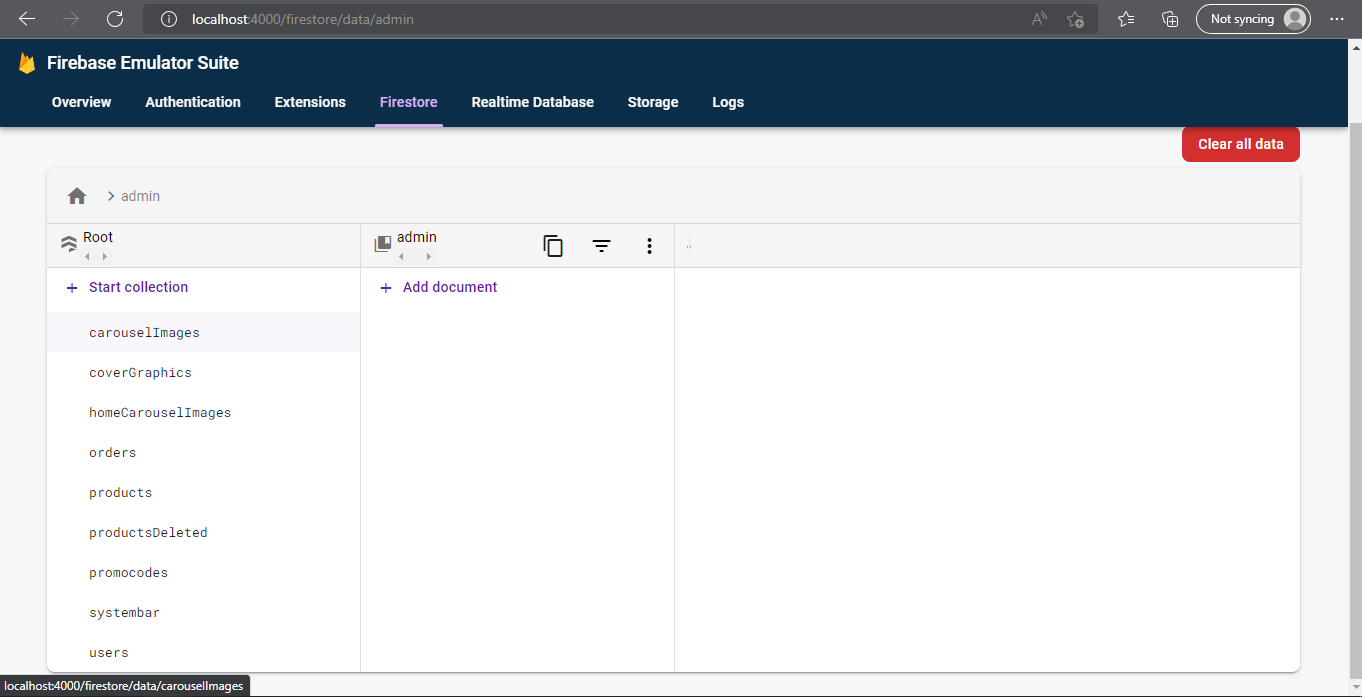
**Desktop (please complete the following information):**
- OS: Windows 10
- Browser: Chrome v105.0.5195.102 (Official Build) (64-bit) and Edge v104.0.1293.70 (Official build) (64-bit)
- Java: Java HotSpot(TM) 64-Bit Server VM (build 18.0.2.1+1-1, mixed mode, sharing)
- Node: v16.17.0 (tried downgrading to v16.14.0 to no avail)
- Firebase Tools: v11.8.0
**Additional context**
This is a Nuxt app and I believe this happened when I updated my firebase-tools, though installing an earlier version did not work
Contributor guide
Assessment
This issue has not been assessed yet.