firebase / firebase/firebase-tools-ui
Some characters change when cloning in the Realtime Database emulator UI
- Dominant language
- TypeScript
- Stars
- 291
- Forks
- 74
- PR merge metrics
- No merged PRs in 30d
Description
**Describe the bug**
When using the Realtime Database emulator, the "Clone" feature changes some characters in the new path
**To Reproduce**
Steps to reproduce the behavior:
1. Go to the Realtime Database tab on the Firebase Emulator Suite
2. Click on "Add child" on any database
3. Add a key containing ":" (e.g., 2022-05-23T18:08:08) and a map value
4. Select that child and click on the "Clone" button
5. You'll see that the new destination path contains "%3A" instead of ":" For example, "2022-05-23T18:08:08" becomes "2022-05-23T18%3A08%3A08_copy"
**Expected behavior**
I expect that the original characters remain unchanged. (e.g., "2022-05-23T18:08:08" -> "2022-05-23T18:08:08_copy")
**Screenshots**
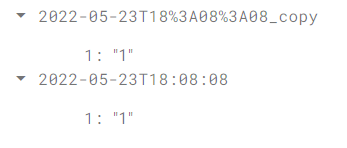
**Desktop (please complete the following information):**
- OS: macOS 12.3 / Windows 11
- Browser: Chrome
- Version: 100
Contributor guide
Research direction
Start in the Realtime Database tab of the Emulator Suite UI and reproduce the issue through Add child and Clone with a key containing a colon. Trace how the clone destination path is formed, then verify that reserved characters remain unchanged and the copied key ends with "_copy".
Written by the indexing model from the issue text.
Assessment
- Tech stack
- typescript
- Domain
- databases, frontend
- Issue type
- Bug
- Difficulty
- 3/5
- Estimated time
- 1-2 days
- Activity status
- Stale
- Clarity
- Clearly specified
- Newbie friendliness
- 48/100