files-community / files-community/Files
Feature: Display remote drive redirects on home page and sidebar
- Dominant language
- C#
- Stars
- 45.4k
- Forks
- 2.9k
- Avg merge
- 19h 7m
- Merged PRs (30d)
- 62
Description
### What the problem
When I'm using the Remote Desktop client or Hyper-V and set it to redirect a drive it will show up in the normal file explorer but not files.
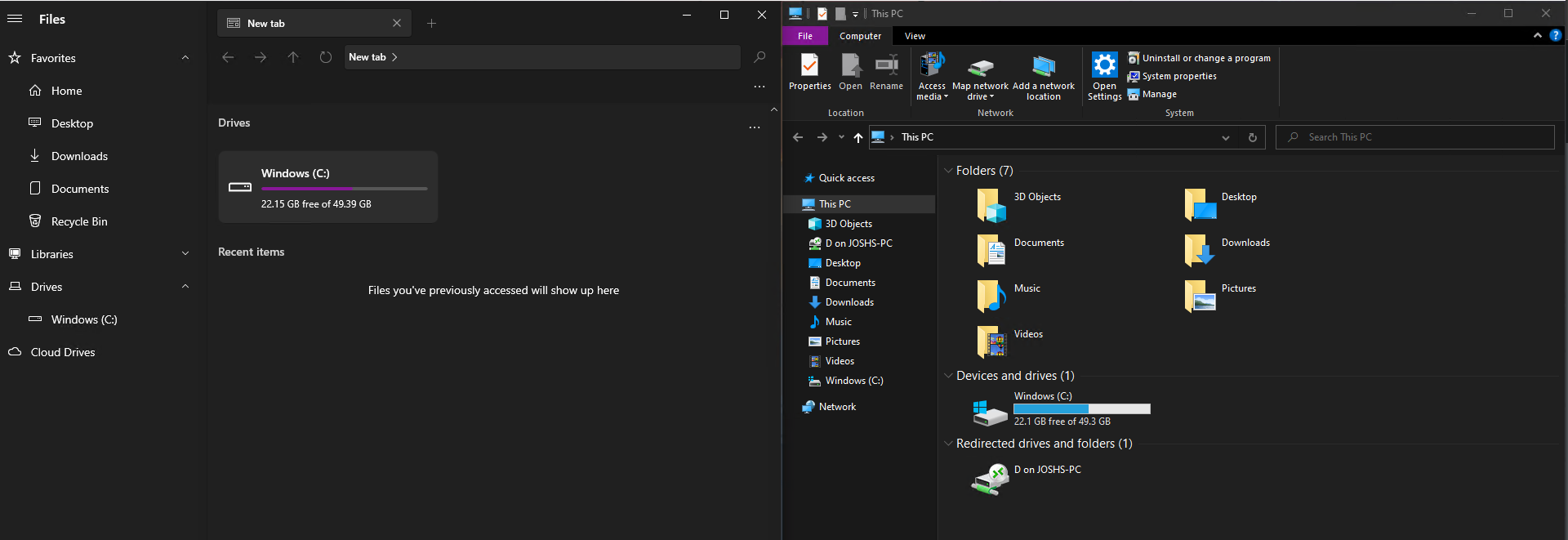
### Steps to reproduce
1. Connect to a computer with drive redirect enabled on the client
2. Open Files
3. See that there's no network drive reflecting drive redirect settings from client
### Requirements
- Auto mount the tsclient network drive on RD connect
- Remove the mounted when RD client disconnects/location isn't available anymore
### Files version
1.5.0.0
### Windows version
10.0.19043.899
### Relevant assets
[debug.txt](https://github.com/files-community/Files/files/6191739/debug.txt)
[debug_fulltrust.txt](https://github.com/files-community/Files/files/6191740/debug_fulltrust.txt)
Contributor guide
Assessment
This issue has not been assessed yet.