felixse / felixse/FluentTerminal
CTRL + ALT + 3 is mapped to something unknown, but prevent me typing '#' on UK Apple Keyboard on Bootcamp
- Dominant language
- C#
- Stars
- 9.6k
- Forks
- 448
- PR merge metrics
- No merged PRs in 30d
Description
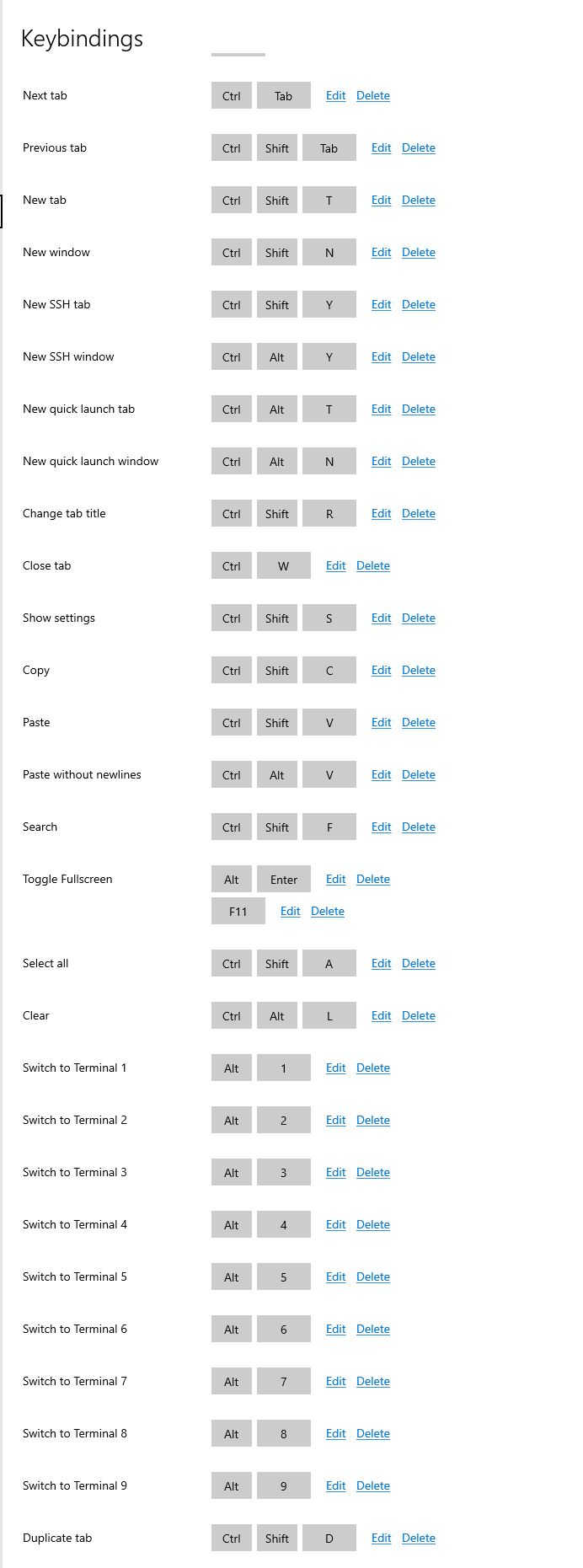
I am using windows 10 bootcamp, and use an old UK mechanical Apple Keyboard. The only way to type a HASH(POUND) symbol is to type CTRL-ALT-3. This works everywhere apart from FluentTerminal. Somehow, FT has a mapping that overrides CA-3 for HASH, but I can't see that clearly in the key-mapping settings in FT. When I hit CA-3, I just get a new WSL tab (which is odd since I haven't enable WSL yet, this is a clean install). I thought it was because of the Alt-3 binding, which is defined to switch to terminal 3, so I remapped that to something else, but that made no difference.
I really need this to work properly,
I have attached a picture of the keybindings as they appear in FT settings.
Contributor guide
No contributing guide indexed for this repository
Assessment
This issue has not been assessed yet.