felixse / felixse/FluentTerminal
Weird behavior when using "United States-International" keyboard settings
- Dominant language
- C#
- Stars
- 9.6k
- Forks
- 448
- PR merge metrics
- No merged PRs in 30d
Description
My Windows 10 is configured to use "United States-International" keyboard settings so that I can have access to diacriticals. Pretty much all the apps I known off respect the following behavior:
1. Hit double-quote key once -> nothing happens
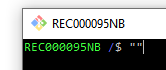
2. Hit double-quote key again -> two double-quote chars are inserted: `""`
Here is an example:
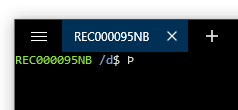
In FluentTerminal:
1. Hit double-quote key once -> nothing happens
2. Hit double-quote key again -> The following char gets inserted: `Þ`
The workaround I found in FluentTerminal is to type double-quote once, hit spacebar, then double-quote again and spacebar again.
The tilde (`~`) has similar problem: when I type `~/` it gives me `¿`.
Contributor guide
No contributing guide indexed for this repository
Assessment
This issue has not been assessed yet.