faressoft / faressoft/terminalizer
Cursor missing - Linux/KDE/Bash
- Dominant language
- JavaScript
- Stars
- 16.2k
- Forks
- 520
- PR merge metrics
- No merged PRs in 30d
Description
I'm running terminalizer 0.7.1 installed via npm 5.6.0 on node 8.11.1, running on Arch Linux inside KDE. I'm using bash in Konsole if that matters.
Everything seems to be working wonderfully, and I absolutely love this app, but cursors aren't displaying in the rendered version. I've tried messing with the cursor settings in my terminal emulator (Konsole) as well as trying to render with all three options for ``cursorStyle`` (block, underline, and bar). Nothing seems to be able to get the rendered image to include a cursor, which is particularly problematic because I'm recording something with tab-completion, so the cursor is an important visual cue.
I've attached a sample recording file and rendered image. Any help would be greatly appreciated.
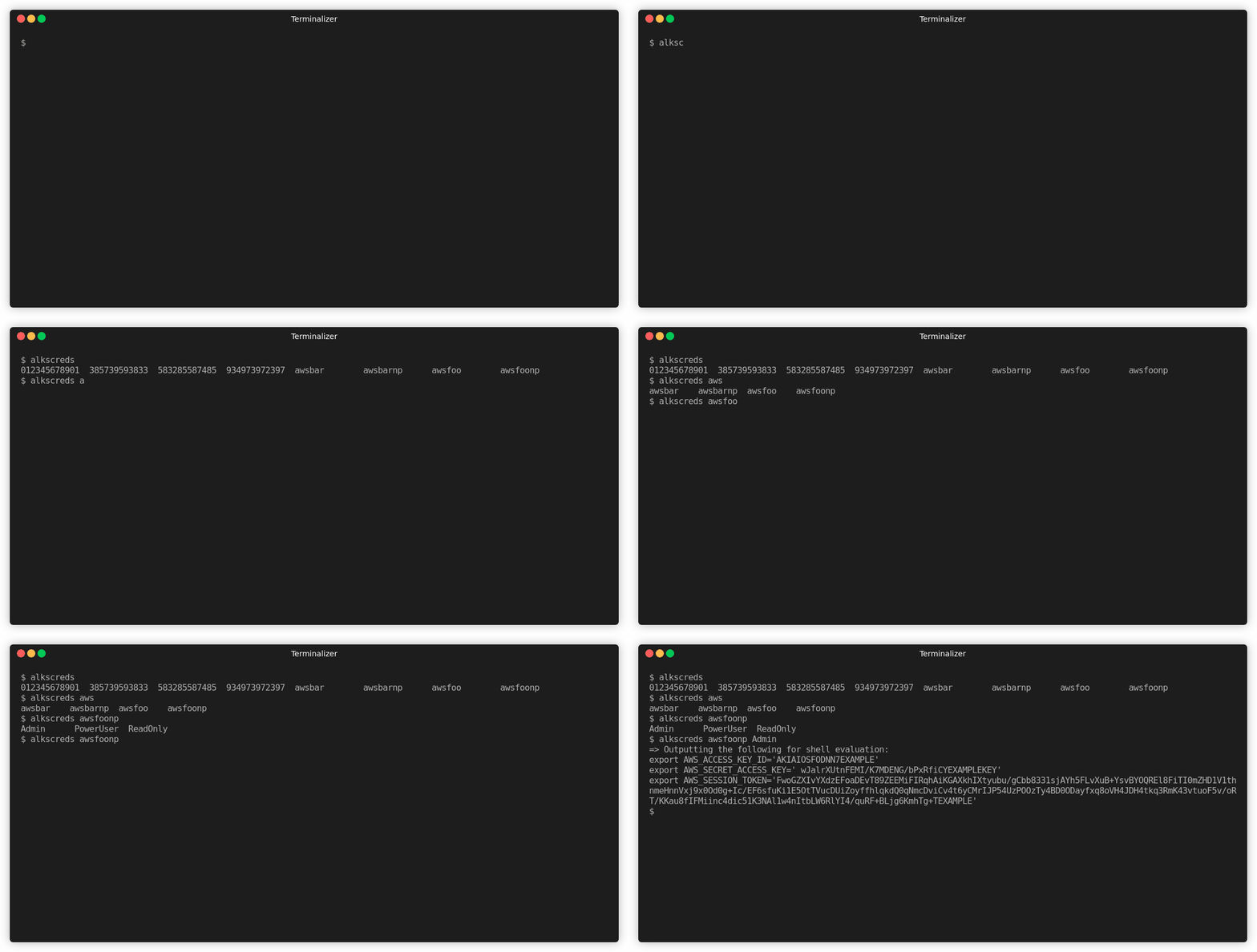
Sample recording:
```yml
# The configurations that used for the recording, feel free to edit them
config:
# Specify a command to be executed
# like `/bin/bash -l`, `ls`, or any other commands
# the default is bash for Linux
# or powershell.exe for Windows
command: bash -l
# Specify the current working directory path
# the default is the current working directory path
cwd: /home/jantman
# Export additional ENV variables
env:
recording: true
# Explicitly set the number of columns
# or use `auto` to take the current
# number of columns of your shell
cols: 120
# Explicitly set the number of rows
# or use `auto` to take the current
# number of rows of your shell
rows: 25
# Amount of times to repeat GIF
# If value is -1, play once
# If value is 0, loop indefinitely
# If value is a positive number, loop n times
repeat: 0
# Quality
# 1 - 100
quality: 100
# Delay between frames in ms
# If the value is `auto` use the actual recording delays
frameDelay: auto
# Maximum delay between frames in ms
# Ignored if the `frameDelay` isn't set to `auto`
# Set to `auto` to prevent limiting the max idle time
maxIdleTime: 2000
# The surrounding frame box
# The `type` can be null, window, floating, or solid`
# To hide the title use the value null
# Don't forget to add a backgroundColor style with a null as type
frameBox:
type: floating
title: Terminalizer
style:
border: 0px black solid
# boxShadow: none
# margin: 0px
# Add a watermark image to the rendered gif
# You need to specify an absolute path for
# the image on your machine or a URL, and you can also
# add your own CSS styles
watermark:
imagePath: null
style:
position: absolute
right: 15px
bottom: 15px
width: 100px
opacity: 0.9
# Cursor style can be one of
# `block`, `underline`, or `bar`
cursorStyle: bar
# Font family
# You can use any font that is installed on your machine
# in CSS-like syntax
fontFamily: "Monaco, Lucida Console, Ubuntu Mono, Monospace"
# The size of the font
fontSize: 16
# The height of lines
lineHeight: 1
# The spacing between letters
letterSpacing: 0
# Theme
theme:
background: "transparent"
foreground: "#afafaf"
cursor: "#c7c7c7"
black: "#232628"
red: "#fc4384"
green: "#b3e33b"
yellow: "#ffa727"
blue: "#75dff2"
magenta: "#ae89fe"
cyan: "#708387"
white: "#d5d5d0"
brightBlack: "#626566"
brightRed: "#ff7fac"
brightGreen: "#c8ed71"
brightYellow: "#ebdf86"
brightBlue: "#75dff2"
brightMagenta: "#ae89fe"
brightCyan: "#b1c6ca"
brightWhite: "#f9f9f4"
# Records, feel free to edit them
records:
- delay: 683
content: '$ '
- delay: 770
content: a
- delay: 56
content: l
- delay: 112
content: k
- delay: 72
content: s
- delay: 175
content: c
- delay: 249
content: r
- delay: 296
content: 'eds '
- delay: 617
content: "\a"
- delay: 452
content: "\r\n012345678901 385739593833 583285587485 934973972397 awsbar awsbarnp awsfoo awsfoonp \r\n$ alkscreds "
- delay: 907
content: a
- delay: 183
content: w
- delay: 176
content: s
- delay: 330
content: "\a"
- delay: 384
content: "\r\nawsbar awsbarnp awsfoo awsfoonp \r\n$ alkscreds aws"
- delay: 558
content: f
- delay: 432
content: "\aoo"
- delay: 689
content: "\a"
- delay: 271
content: 'n'
- delay: 425
content: 'p '
- delay: 953
content: "\a"
- delay: 487
content: "\r\nAdmin PowerUser ReadOnly \r\n$ alkscreds awsfoonp "
- delay: 919
content: A
- delay: 406
content: 'dmin '
- delay: 570
content: "\r\n"
- delay: 89
content: "=> Outputting the following for shell evaluation:\r\nexport AWS_ACCESS_KEY_ID='AKIAIOSFODNN7EXAMPLE'\r\nexport AWS_SECRET_ACCESS_KEY=' wJalrXUtnFEMI/K7MDENG/bPxRfiCYEXAMPLEKEY'\r\nexport AWS_SESSION_TOKEN='FwoGZXIvYXdzEFoaDEvT89ZEEMiFIRqhAiKGAXkhIXtyubu/gCbb8331sjAYh5FLvXuB+YsvBYOQREl8FiTI0mZHD1V1thnmeHnnVxj9x0Od0g+Ic/EF6sfuKi1E5OtTVucDUiZoyffhlqkdQ0qNmcDviCv4t6yCMrIJP54UzPOOzTy4BD0ODayfxq8oVH4JDH4tkq3RmK43vtuoF5v/oRT/KKau8fIFMiinc4dic51K3NAl1w4nItbLW6RlYI4/quRF+BLjg6KmhTg+TEXAMPLE'\r\n"
- delay: 10
content: '$ '
```
Contributor guide
No contributing guide indexed for this repository
Assessment
This issue has not been assessed yet.