facebookresearch / facebookresearch/fairo
Enrich the Memory2D component of droidlet dashboard
- Dominant language
- Jupyter Notebook
- Stars
- 929
- Forks
- 123
- PR merge metrics
- No merged PRs in 30d
Description
## Type of Issue
Select the type of issue:
- [ ] Bug report (to report a bug)
- [x] Feature request (to request an additional feature)
- [ ] Tracker (I am just using this as a tracker)
- [ ] Refactor request
- [ ] Documentation Ask
## Description
This feature would enhance the current existing `Memory2D` component in he droidlet dashboard that currently shows a snapshot of the agent's memory on a 2-d grid. The `Memory2D` react component is [here](https://github.com/facebookresearch/droidlet/blob/main/dldashboard/web/src/components/Memory2D.js) . [Here's](https://github.com/facebookresearch/droidlet/blob/main/dldashboard/web/src/StateManager.js#L287) how we set the state of this component through the `StateManager`.
Currently the dashboard communicates with the backend robot process through socket io events. The workflow is : backend sends a sensor payload objects every once in a while (from [here](https://github.com/facebookresearch/droidlet/blob/d96ec5b79014d44d01516fdff83ff0d32ce309ee/locobot/agent/perception/perception.py#L245)) and the StateManager in the frontend captures that event [here](https://github.com/facebookresearch/droidlet/blob/dbed63f1e6539694f77771e4dd4ce026389ac98c/dldashboard/web/src/StateManager.js#L126) and maps it to its own functions [here](https://github.com/facebookresearch/droidlet/blob/main/dldashboard/web/src/StateManager.js#L59) and [here](https://github.com/facebookresearch/droidlet/blob/main/dldashboard/web/src/StateManager.js#L273). Note that this method will then be called whenever backend sends over the payload through an event called `sensor_payload`.
This is how the current setup looks:
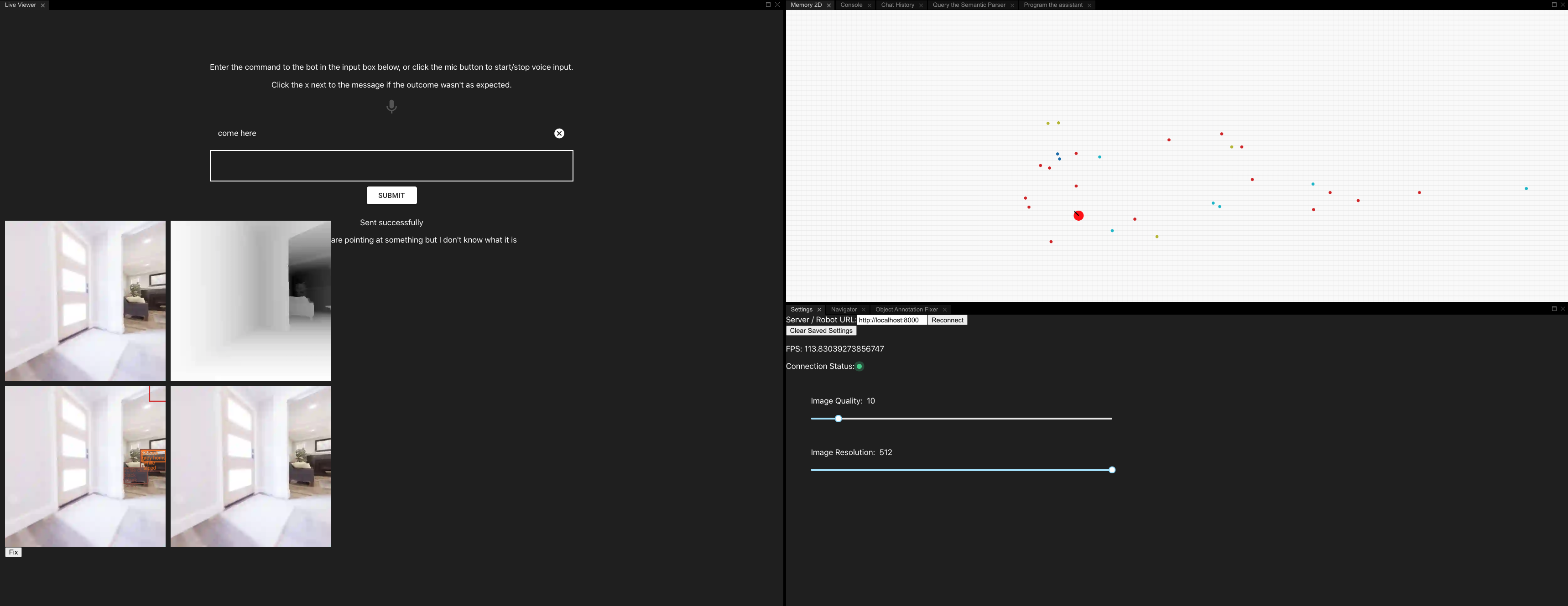
As a part of enhancing the Memory2D component further, to start with, we ask for a feature in the `Memory2D` React component so we can have the coordinate axes show up in the memory2D map along with the objects as moving dots.
Once we get there, we can then add an ability to zoom in and zoom out and have the coordinates (and the corresponding richness of object information) change.
To make these changes, you'll first have to setup `droidlet` as explained in the README [here](https://github.com/facebookresearch/droidlet) and [here](https://github.com/facebookresearch/droidlet/tree/main/locobot). Then:
1. Once you have successfully set things up, you can visualize the dashboard at `localhost:8000`
2. To make changes to the Memory2D React component, you will have to run it in dev mode as explained [here](https://github.com/facebookresearch/droidlet/tree/main/dldashboard/web). So run it using `yarn start` and then go to your `localhost:3000`. Your local changes made there should reflect on the dashboard on port `3000`. Once you are ready to check in your changes and have them reflect on `8000`, follow the instructions [here](https://github.com/facebookresearch/droidlet/tree/main/dldashboard/web#checking-in-your-changes) .
Contributor guide
Assessment
This issue has not been assessed yet.