[BUG] In production file corrupted, how to debug?!
- Dominant language
- JavaScript
- Stars
- 15.5k
- Forks
- 2k
- PR merge metrics
- No merged PRs in 30d
Description
[download (10).xlsx](https://github.com/exceljs/exceljs/files/6296697/download.10.xlsx)
Hi all!
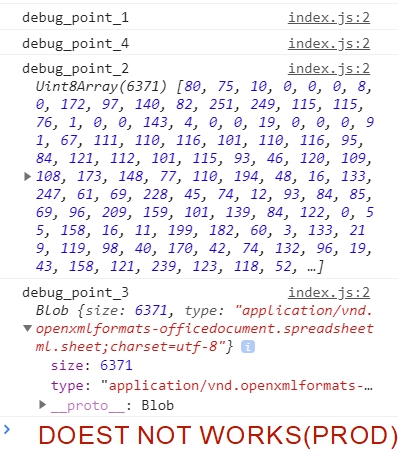
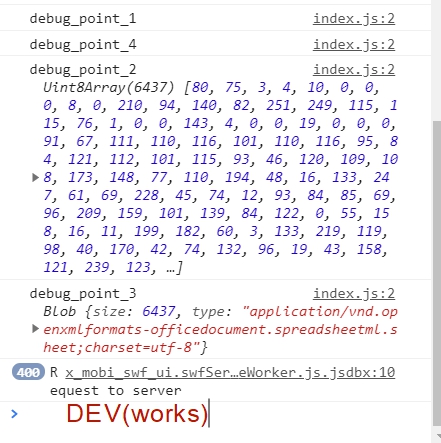
Trying to use this amazing lib on client side, in browser, and on localhost and in dev (after direct deployment) it works pretty well, but as soon it's deployed it to prod - file corrupted. I attached screenshots from dev (works) and prod (does not work),
all console logs from my code I'm able to see, but size of blob is different (**6437** vs **6371**)
I downloaded **1.10.0** exceljs.min.js file, and put it in my scripts folder to use directly this file (because found somewhere issues with new version, but also tried new one)
So in my code simple excel with 1 styled cell and 3 columns:
```
import * as ExcelJS from './scripts/exceljs.min.js';
import * as FileSaver from 'file-saver';
const EXCEL_TYPE = 'application/vnd.openxmlformats-officedocument.spreadsheetml.sheet;charset=UTF-8';
const wb = new ExcelJS.Workbook()
const ws = wb.addWorksheet('Sheet1')
ws.columns = [
{ header: 'Id', key: 'id', width: 10 },
{ header: 'Name', key: 'name', width: 32 },
{ header: 'D.O.B.', key: 'DOB', width: 10, outlineLevel: 1 }
];
ws.getCell('A1').fill = {
type: 'pattern',
pattern: 'darkVertical',
fgColor: { argb: 'FFFF0000' }
};
console.log('debug_point_1')
wb.xlsx.writeBuffer().then((data) => {
console.log('debug_point_2', data)
const blob = new Blob([data], { type: EXCEL_TYPE });
console.log('debug_point_3', blob)
// Given name
FileSaver.saveAs(blob, 'download.xlsx');
});
console.log('debug_point_4')
```
Also I want to note, that I tried different libs (msexcel-builder and SheetJS), both works on dev, but not work in test, there was successful deployment with SheetJS with specific **bookType: xls** (instead of default xlsx) and it worked fine (but in SheetJS I can't format styles, so had to look for something else), but non of excel libraries works in prod.
Any ideas guys how to debug it and detect the issue, or maybe to change bookType in ExcelJS lib to xls (for my opinion it will work fine then)
Contributor guide
No contributing guide indexed for this repository
Assessment
This issue has not been assessed yet.